
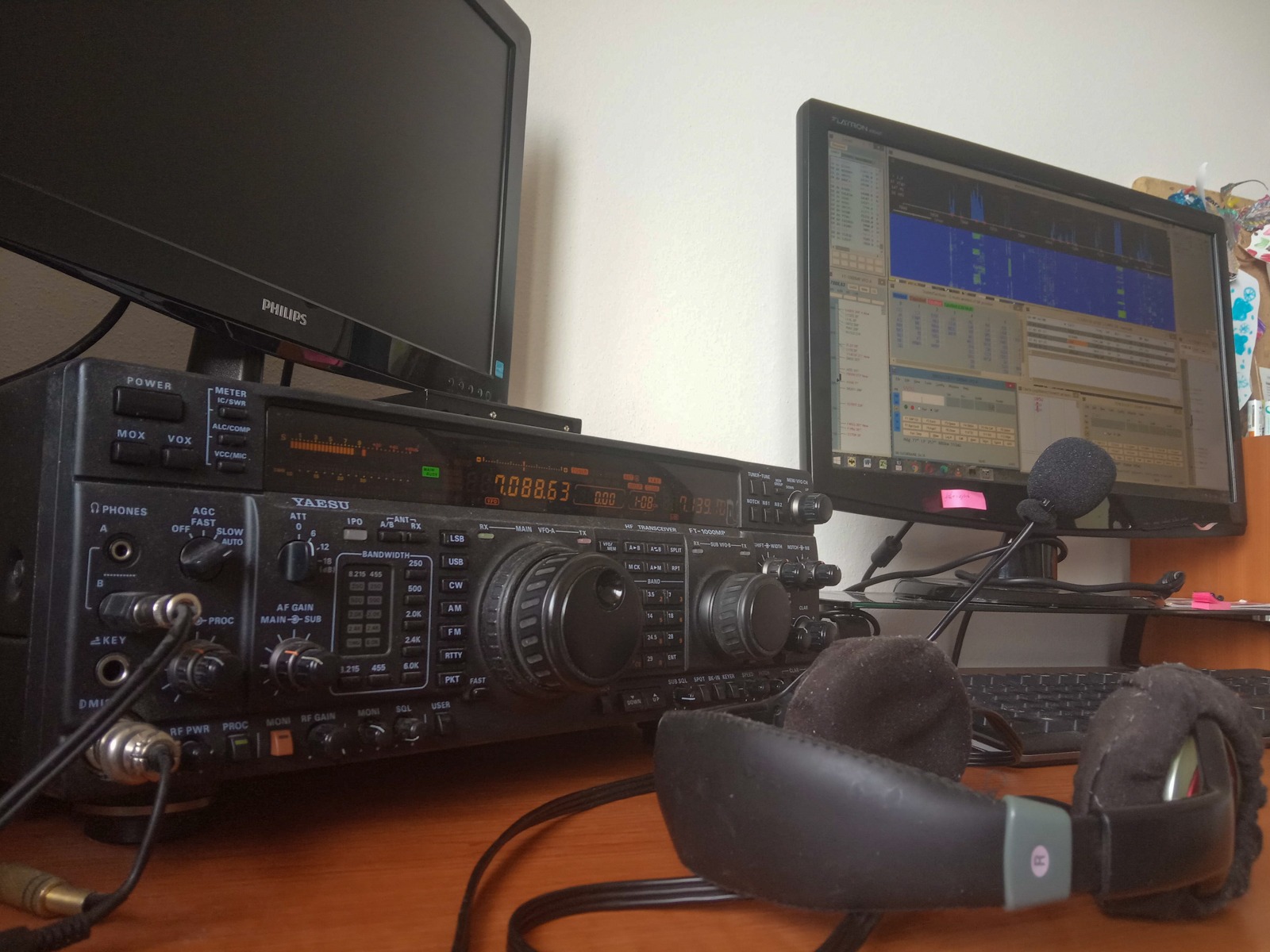
You will read in the article
What is QSOrder?
QSOrder (sometimes referred to as "QSO recorder by K3IT“) je nástroj určený pre rádioamatérov, najmä tých, ktorí sa venujú rádioamatérskym súťažiam (contesting), s cieľom automaticky nahrávať audio jednotlivých QSO. Projekt je open-source a spravovaný pod používateľom K3ITon GitHub (under the GPL-3.0 license).

QSOrder funguje ako externý doplnok pre logovací softvér — najčastejšie pre N1MM Logger+ — ktorý umožňuje, že v okamihu, keď sa uskutoční zápis QSO v logu, sa spustí záznam audio dát z prijímača (a prípadne aj z mikrofónu) a uloží sa ako samostatný súbor so špecifickým názvom obsahujúcim informácie o spojení (značka, frekvencia, čas, mód atď.).
K tomu sa QSOrder spolieha on UDP vysielanie („broadcast“) spojení zo strany logovacieho programu — keď N1MM (alebo iný kompatibilný softvér) vyšle informáciu o práve zaznamenanom QSO, QSOrder túto správu zachytí a podľa nej uloží obsah zvukovej buffer-pamäte.
An important aspect is that QSOrder maintains a circular buffer (FIFO) of audio data in memory, so when a QSO message arrives, it saves not only the audio during the connection itself, but also from the time surrounding (before and after), according to the set delay (delay) and buffer length.
How QSOrder works — technical details and usage
Below is a summary of how QSOrder is used in practice, what parameters it allows and what to watch out for:
Installation and basic setup
- Download
Windows executables (or native scripts), including a README file with instructions, are available on the project's GitHub page (k3it/qsorder).
Some older installations or distributions may also be available through SourceForge. - N1MM configuration (UDP broadcast)
V logovacom programe (N1MM Logger+) je potrebné povoliť, aby pri každom zápise QSO bola poslaná UDP správa (broadcast) s detailmi o spojení. V N1MM+ sa to spravidla nastavuje cez “Configure → Broadcast Data → Contact” (alebo cez zodpovedné nastavenie v .ini súbore)
In the *.ini file it might look like this:[ExternalBroadcast] DestinationIPs=127.0.0.1 DestinationPort=12060 IsBroadcastContact=TrueIf multiple stations (multi-station) or multiple ports are used, it is possible to set different ports and run multiple instances of QSOrder with different ports (e.g. –P 12061, etc.).
- Running QSOrder
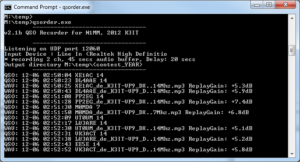
After the broadcast is set up, qsorder.exe (or an equivalent script) will start. The program lists on which UDP port it listens, which audio inputs were used and other parameters (e.g. buffer length, delay).
Communication must be enabled in the firewall if it is blocked. - Creating records
Keď je QSO zaznamenané v N1MM, UDP správa spustí uloženie audio bufferu do súboru. Uloženie je oneskorené podľa nastaveného parametra „delay“ — typicky 20 sekúnd — aby sa zachytil aj koncový úsek spojenia, ktorý by mohol byť zaznamenaný až po ukončení záznamu v logu.
The file is saved with a name that contains information such as call sign, own sign, competition name, mode, date and time, frequency, e.g.:DXCALL_de_OWNCALL_CONTEST_MODE_YYYYMMDD_HHMMSS_NNMHz.mp3Example:
W3LPL_de_V31VP_CQWWSSB_LSB_20171028_062004Z_3.5MHz.mp3V názve súboru sú zakomponované všetky podstatné informácie, ktoré umožnia identifikáciu QSO nielen podľa logu, ale aj podľa súborov vo vašom audio archíve.
-
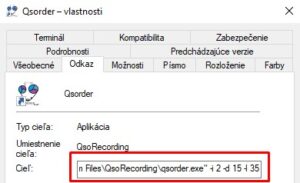
My parameters for running QSOrder Advanced parameters / switches
QSOrder supports various command line options that allow you to customize the behavior:-d DELAY(delay: how many seconds after the message is received, the buffer is written)-l BUFFER_LENGTH(buffer length in seconds)-P PORT(which UDP port to use)-k HOT_KEY(possibility of defining a keyboard shortcut that saves the buffer manually)-i DEVICE_INDEX(audio input index)- with STATION_NR(station number for multi-stations)--SO2R(so2r mode — stereo recording for two radios, the radio is muted when inactive)--continuous(continuous recording except for individual QSOs)--sample-rate(sampling rate for recording)
These options allow very flexible use and adaptation according to conditions. I use the setting "-i 2 -d 15 -l 35"
-

SO9I SO2R SO2R and multi-station
In case the operator uses SO2R (two radios at the same time), QSOrder allows recording separately left and right (left channel for radio 1, right channel for radio 2). If the radio is inactive, its channel can be muted using the switch--So2y.
In the discussions, users note that in multi-radio configurations it is advisable to run multiple instances of QSOrder, each with its own port and station number (–r parameter), to ensure that only relevant QSO audio for a given frequency or radio is recorded. - Manually start recording
In addition to automatic recording, the operator can start manual saving of the current buffer content using a defined keyboard shortcut (e.g.Ctrl+Alt+O, depending on the setting). This is useful if something interesting comes up on the air outside of a normal QSO that you want to record. - File management and organization
Output files are saved in folders according to competition and year (e.g.ContestName-YYYY). This organization helps to maintain clarity in the archive.
In addition, files also have an attribute in them ReplayGain, which indicates the perceived loudness and is embedded as metadata of the MP3 file. Tento údaj môže pomôcť pri prehrávaní, ak prehrávač podporuje ReplayGain.


QSOrder and indexing service – QSORDER Search
QSOrder itself is used for local recording of audio files, but there is also an add-on in the form of an indexing service called QSORDER Search (or "QSO Recorder Indexing Service" for short). This service does not store audio files directly — it acts as an index, referring to audio files that users have saved (eg on Dropbox) — and allows searching and playback of these shared QSOs if the audio is publicly available.
Main features of QSORDER Search
- On the website qsorder.hamradiomap.com it is possible to search for QSOs by call sign, time range and period (eg last 2 years, 1 year, 6 months, etc.).
- Service only indexes audio — does not store files themselves — audio must be recorded e.g. on Dropbox to a specific folder (Apps/QsoRecording).
- The user must authorize the access of this indexing service to his Dropbox folder. After authorization, the files start to be indexed, and the user gets a personal URL that he can insert into his profile or page (eg as an iframe on a QRZ page).
- Audio files must be named according to the naming convention (DXCALL_de_OWNCALL_CONTEST_MODE_… .mp3) — only correctly named files will be indexed and included in the search results.
- The indicated status shows that the database contains more than 507,770 recordings, with approx 68,613 unique DX call signs.
- The service is paid through hosting through HamRadioMap.com.
- Users can embed the QSO search result on their personal web pages (eg QRZ bio page) using iframe.
The goal of this indexing service is to make it easier for radio amateurs to access QSO recordings, allow them to "listen to your calls" and share them with the community, without the need to manage their own server to host audio files.

Advantages and benefits of QSOrder
Using QSOrder brings several significant advantages:
- Connection documentation
Each QSO is recorded as an audio file, making it possible to review after the competition whether the call was recorded correctly, identify errors (eg misheard call sign) or confirm problem calls. - Improving operator quality
After the competition, the operator can replay his connections and analyze where errors occurred in reception or transmission, which can improve future performance. - Sharing with the community
Thanks to the indexing service, radio amateurs can share (if they want) their recordings with others - be it colleagues, clubs or the public. - Automation with minimal intervention
If the system is set up correctly, the recording takes place automatically, the operator does not have to worry about manual start-up, which reduces the load during competitive activity. - Flexible setting
Thanks to a number of command parameters (delay, buffer, port, hotkey, so2r, etc.), the system can be adapted to various installation scenarios — single station, multiple stations, SO2R, various audio inputs. - Minimization of data load
Since the indexing service only references existing recordings (e.g. on Dropbox), there is no need for QSORDER Search to host huge volumes of audio data — this saves costs and infrastructure.
Challenges, limitations and practical notes
Like any system, QSOrder also has certain limits and things to watch out for:
-
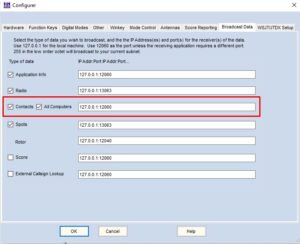
N1MM+ broadcast data setting Correct setting of UDP broadcast
If the N1MM is not properly configured to broadcast connections, the QSOrder will not be able to respond and will not pick up the QSO audio. Therefore, it is important that broadcast is turned on and the port is set correctly. - Buffer and delay synchronization
If the delay is too small, it may happen that some final section of the connection is not captured; on the other hand, if it is too large, the files may contain unnecessary silence or distracting content. Finding a good balance for a given competition is important. - Storage capacity
With heavy usage - lots of connections - a lot of audio files can quickly accumulate. Users must plan for storage (eg on hard drive, external storage, or in the cloud). Free Dropbox offers approximately 2 GB (~12,000 QSOs) as a default limit for audio recordings used with QSORDER Search. - Limitations in multi-stations / SO2R
Pri komplexných konfiguráciách (viac rádií, viac portov, rôzne vstupy zvuku) môže byť náročné správne nakonfigurovať QSOrder tak, aby zaznamenával len relevantné audio. In discussions, users mention the need to run multiple instances, specify station numbers (-r parameter) and ports.
Some problems appear when integrating with SDR software (eg Flex radio) where mixing audio channels is more difficult. - Dependency on external hosting for indexing
The user must use external hosting (e.g. Dropbox) and then authorize access to the indexing service. If the user loses access or changes the folder structure, indexing may be interrupted. - Formatting audio file names
If the files are not named according to the prescribed scheme, they will not be processed by the QSORDER Search indexing service — this is an important condition for sharing. - Dependence on a more powerful computer
With higher buffer lengths, higher sampling frequency or multi-channel recording, the CPU and I/O load can be higher — you have to make sure that the computer can handle the simultaneous use of N1MM + QSOrder + other tools.

Practical recommendations for users
- Before the competition, test the configuration thoroughly: check that N1MM broadcasts contacts, QSOrder captures UDP messages, audio input is correct and recording works.
- Experiment with the buffer value and delay to find the optimal setting for your configuration (eg buffer 45 s, delay 20 s is a common choice according to the documentation).
- Periodically archive or delete old audio files to avoid filling up your disk.
- If you plan to use an indexing service, strictly adhere to file nomenclature and properly authorize Dropbox access.
- When using SO2R or multiple stations, set the QSOrder so that each instance records only the channel it needs (use the –r, –P switches, etc.).
- Follow the project updates on GitHub as there may be bug fixes or new versions.
- To share recordings with the community - if you want - embed an iframe from your personal archive on a QRZ page or another website according to the instructions of the QSORDEX service.
Conclusion
QSOrder predstavuje veľmi užitočný pomocník pre rádioamatérov, ktorí sa venujú súťažiam (contestingu).
An example of a recording
JH4UYB
OM3SEM
It enables reliable and automatic recording of every connection in audio form, which brings many benefits — from documentation of connections to the possibility of performance analysis to sharing with the community. In combination with the indexing service QSORDER Search (which does not require hosting of audio files, but only indexing), the system becomes an attractive tool for radio amateurs to make QSO recordings available to the public.