
You can read in the article
Anyone who has not tried this thing will probably ask: "Why control the transceiver with a computer?"
However, the advantages of control are indisputable. In addition to entering the frequency from the numeric keypad and tuning to DX spots from the cluster, the programs offer a number of additional functions. These are different ways of scanning, dealing with memories, frequency databases, management of a practically unlimited number of memories, spectroscope, satellite tracking (elimination of the Doppler effect), transverter frequency display and much, much more...
So how to do it?
We will need two things: the interface between the computer and the transceiver and the software. Connection diagrams of such interfaces are available on the Internet, and you can also find them in the software documentation.
The IC-706 requires a CI-V interface. Among the many connections, I was interested in the OK2WY connection, which is very simple. All parts are soldered in a "sparrow's nest" style into a plastic box with dimensions of 30 x 45 x 18 millimeters. V SMD the design would probably also fit into the connector cover.
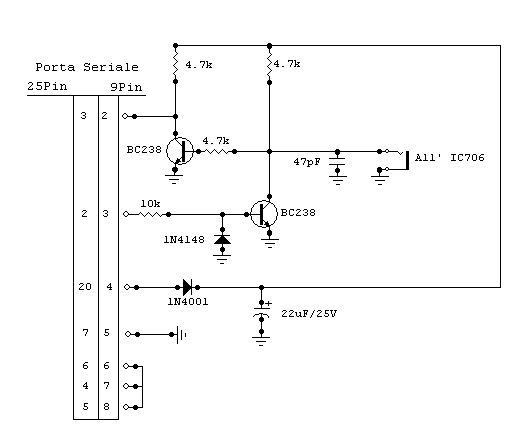

Even a beginner can create an interface in a few tens of minutes. If the components are flawless and you did not make a mistake in the connection, the interface will work the first time you turn it on. There is no need to worry about damage to the port, it has current protection (also against short circuit).
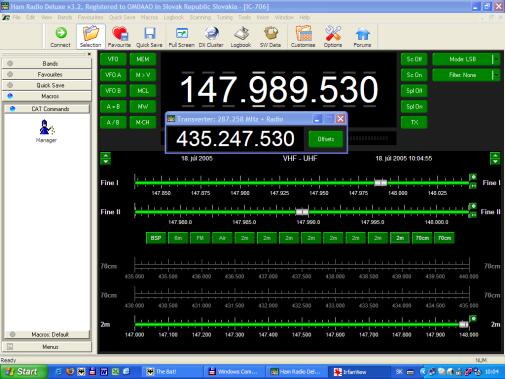
Ham Radio Deluxe
I use Ham Radio Deluxe as software, and I can only express satisfaction with it. After starting, it is necessary to enter where and which transceiver is connected. DTR (power supply) must also be activated for the specified interface. If you have a transceiver set for data transmission from the manufacturer, the software detects a speed of 1200 baud during autodetection. At this speed, tuning is jerky and responses to commands are unreasonably long.

By studying the manual, you will find out that both the address and the transmission speed can be changed in the initialization menu. The IC-706 is accessed by long pressing DISP and ON at the same time (it starts with the transceiver turned off). It is probably not necessary to change the address, but the transmission speed (item no. 22, CI-V BAUD) is. Set it to 19200.
If Ham Radio Deluxe now asks you to connect when it starts, set the port, transceiver type and baud rate to 19200 baud. Responses at this speed are already excellent, tuning is natural.
The description of what Ham Radio Deluxe offers alone would be enough for several articles. But try what I'm going to write for yourself. You can find the program on the website .: HERE .: