
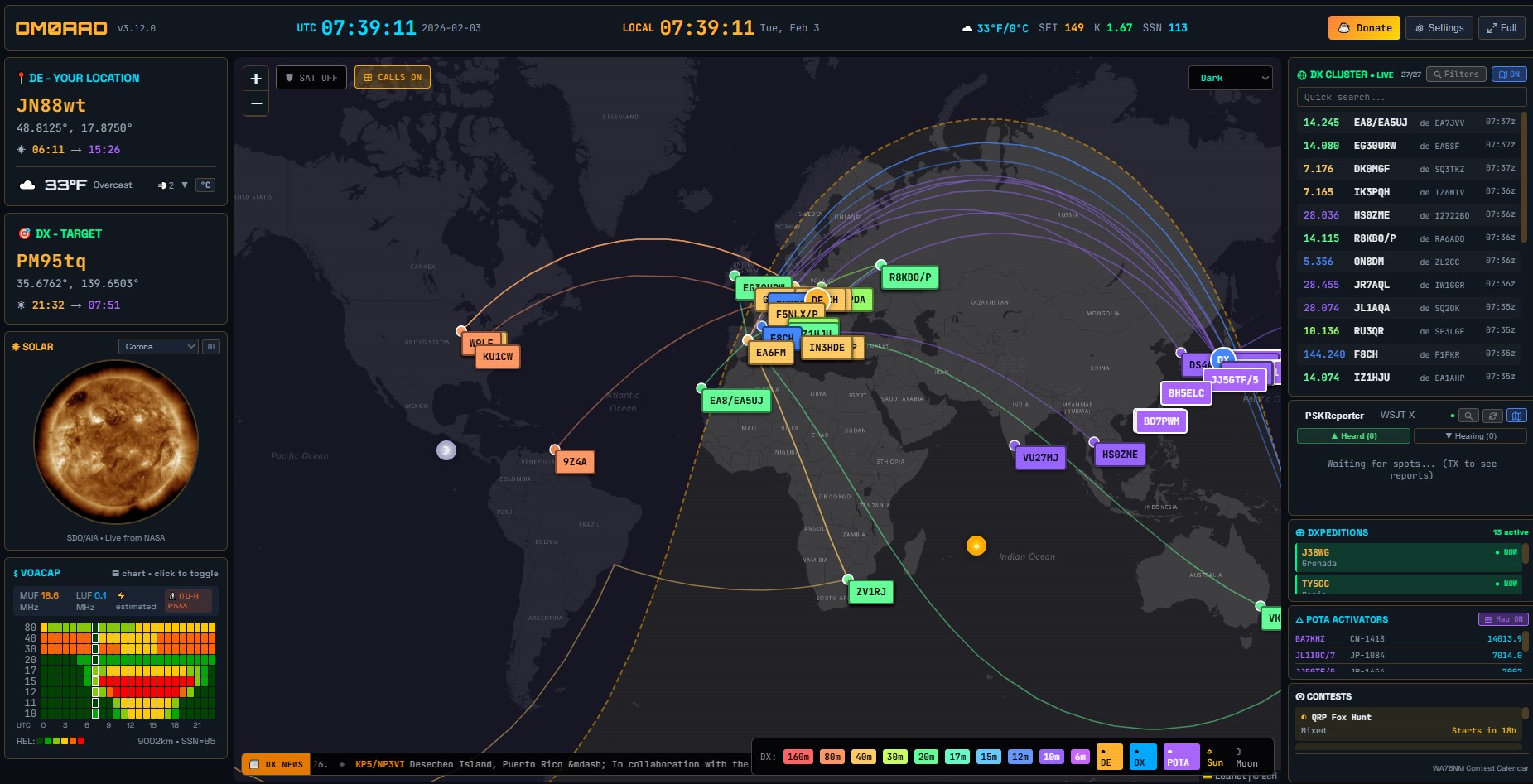
V srdci každého moderného rádioamatérskeho stanovišťa (tzv. „shacku“) sa v poslednom desaťročí udomácnil jeden špecifický kus softvéru – HamClock. This tool, originally developed by Elwood Downey (WB0OEW), has become an indispensable window into the world of short waves for many operators. As technologies have progressed and demands for flexibility have increased, however, the original architecture of HamClock has begun to hit its limits. Today, its successor is increasingly mentioned: OpenHamClock.
This article discusses in detail why this project is a necessary evolutionary step, what it brings to amateur radio operators in 2026, and why you should consider switching to this modern platform.
In the article, you will read
The end of an era: Why does HamClock need a successor?
The original HamClock was revolutionary. It was able to display everything essential on a small screen (often on a Raspberry Pi with a 7-inch touch display): current solar flux (SFI), number of sunspots (SN), A and K indices, DX cluster, mapu sivého pásma (Grey Line) a dokonca aj polohu satelitov.
However, as is often the case with monolithic projects, time has become its enemy. The original code was written in C with a focus on very specific hardware (ESP32, Raspberry Pi) and fixed screen resolutions. The moment amateur radio operators began requesting support for 4K monitors, integration with new APIs (like PSKReporter or POTA.app) a možnosť bežať v kontajneroch typu Docker, HamClock začal strácať dych.
OpenHamClock was created in response to these challenges. Its goal is not only to replicate old functions but to build them on otvorenej, modulárnej a rozšíriteľnej architektúre, ktorá prežije ďalšie desaťročie rádioamatérskeho vývoja.
What is OpenHamClock?
OpenHamClock is a modern, open-source reimplementation of the concept of amateur radio clocks. Unlike its predecessor, it is designed to be maximally independent of hardware. Whether you want to run it on an old laptop, the latest Raspberry Pi 5, or as a virtual machine on your server, OpenHamClock will adapt.
Key features and improvements
-
VOACAP predikcia v OpenHamClock na báze lokality DX Flexibilné rozlíšenie a UI: Unlike the fixed resolutions of the original software, OpenHamClock utilizes browser-based operation. Whether you have a small display in your backpack during SOTA aktivácii, alebo obrovský monitor nad vaším transceiverom, grafika zostáva ostrá a čitateľná.
-
Modulárny systém widgetov: This is probably the greatest asset of the project. Each piece of information (solar data, satellites, VOACAP forecast) is processed as a separate module. Users can choose what they want to see, and programmers can easily add new data sources without having to interfere with the core system.
-
Integrácia s digitálnymi módmi: V ére FT8 and JS8Call, it is important to see activity in real-time. OpenHamClock can aggregate data from PSKReportera a zobraziť vám mapu aktuálnej priechodnosti trás priamo z vášho stanovišťa.
-
Advanced satellite and ISS tracking: Sledovanie dráh bolo v OpenHamClocku prepracované. Využíva presnejšie knižnice pre výpočet elevácie a azimutu, čo ocenia najmä operátori pracujúci cez amatérske satelity alebo odrazy od Mesiaca (EME).

Technical depth: Under the hood
For the technically adept amateur radio operators, it is interesting to see how the project is structured. Developers opted for a modern approach that combines performance with ease of maintenance.
Event-driven architecture
While the old software often 'froze' while waiting for a response from the server (e.g., when downloading solar activity data), OpenHamClock utilizes asynchrónne spracovanie. To znamená, že hodiny a mapa bežia plynule na pozadí, zatiaľ čo sieťové moduly komunikujú s internetom na inej úrovni.
Support for third-party APIs
OpenHamClock is built to natively understand modern data formats like JSON and XML. This allows for easy integration with:
-
SpaceWeather.com for the most accurate data on geomagnetic storms.
-
Reverse beacon Network (RBN) for tracking your own call sign in the ether.
-
QRZ.com for automatically filling in information about DX stations.
Installation and configuration
Transitioning to OpenHamClock is not complicated. You can open it in a browser https://openhamclock.com. The second option is to install it on your own device. The project is hosted on GitHub, ensuring transparency and the ability to download the latest version at any time.
Quick installation procedure on Raspberry Pi:
-
Príprava systému: A clean installation of Raspberry Pi OS (64-bit) is recommended.
-
Klonovanie repozitára: `bash git clone https://github.com/accius/openhamclock.git
-
Inštalácia závislostí: The program uses libraries like SDL2 or Python (depending on the version), which ensure smooth graphics operation.
-
Konfigurácia: Through an intuitive configuration file, you enter your latitude and longitude (Maidenhead locator), API keys, and preferred colors.
Jednou z výhod je, že OpenHamClock podporuje aj vzdialené zobrazenie. You can have it running in the shack, but monitor its output through a web browser in the living room or on a tablet.
Why is it important for the community?
Amateur radio has always been about experimentation and openness. Closed systems or software that relies on a single developer pose a risk.
OpenHamClock this problem is addressed by the principle of 'by amateurs for amateurs'. Since the code is freely available under the GPL license, anyone can fix a bug or add a new feature. For example, if a new popular contest format or a new sensor network for measuring wave propagation appears, OpenHamClock will be the first to integrate them.
Practical use in amateur radio practice

Imagine a Saturday morning. You plan to participate in a contest or just 'hunt' DX stations. You turn on OpenHamClock and immediately see:
-
Slnečná aktivita: Is there a large group of spots? The 10m band will likely be open today.
-
DX Cluster: You see that a station from Kiribati has appeared on 20m.
-
Grey Line: The map shows you that in 15 minutes the line of the sphere will pass through your QTH
-
POTA/SOTA: Ak radi aktivujete parky, widget vám ukáže, kto je práve „on-air“, takže môžete rýchlo získať body do svojho logu.
You have all of this in front of you without having to click in the browser or switch windows on the computer.
Conclusion: Time for an upgrade
The original HamClock deserves an honorable place in the amateur radio hall of fame. It did a great job and inspired thousands of operators to build their own information terminal in the shack. However, with the arrival of OpenHamClock nastáva čas posunúť sa ďalej.
Nástupca prináša stabilitu, modularitu a predovšetkým slobodu. Už nie ste obmedzení hardvérom ani rozhodnutiami jedného človeka. OpenHamClock je platforma, ktorú si môžete prispôsobiť svojim potrebám, či už ste začiatočník s ručnou rádiostanicou, alebo skúsený „contester“ s anténnym polom.
If you're looking for a project for the upcoming weekend, visit the GitHub page of OpenHamClock and give your amateur radio station the modern visual system it deserves. The future of ham radio is digital, connected, and above all, open.
Je to pekné, farebné, modulárne, asynchrónne… beriem. Až kým som nepozrel na spracovanie zdrojových údajov pre SFI a SSN.
Aktuálna hodnota SFI sa zobrazuje asi tak mesiac stará, zo dňa 26.12.2025 a hodnota SSN je priemer hodnôt za celý predchádzajúci mesiac, čiže za január.
K index je jediný správny, načítava sa posledná známa hodnota.
Ostatné údaje som zatiaľ nepozeral 🙂 na to že je to v3, celkom blbý bug.
hola buenas mi caso es que al principio funcionaba todo de maravilla pero es que ahora entro vi web openhamclock y entro pero con un usuario americano y cuando pretendo cambiar a mi indicativo me dice que Detalles del error
por lo cual no se que pasa he probado en otro pc y nada y en rasberry y tampoco no se que pasa la verdad es que no se programar agradeceria una ayuda de todas las maneras gracias
entro con mi usuario y instataneamente se pone el indicativo de una colega americano y cuando voy a ambiarlo me sale esto Detalles del error
Hola Julio,
Es muy probable que el error que mencionas esté causado por el traductor automático de tu navegador (Google Translate). Cuando el traductor intenta cambiar el idioma de la página, altera el código interno (JavaScript) y el sistema de OpenHamClock se bloquea al intentar mostrar tu indicativo.
Para solucionarlo, intenta lo siguiente:
Desactiva el traductor: Haz clic en el icono de traducción en la barra de direcciones y selecciona „No traducir nunca este sitio“.
Usa una ventana de incógnito: Prueba a entrar desde una pestaña privada para ver si el error desaparece.
Limpia la caché: Borra los datos de navegación para que se elimine la sesión del colega americano que se quedó guardada.
¡Espero que esto te ayude a volver a la radio pronto!
73 cordiales.
muchas gracias por el reporte solucionado. ahora aver si doy con poner el cluster de aqui de (( ure )) que es el que tenemos aqui en españa aver si puedo gracias por el reporte 73 cordiales