

Many programs for Windows allow reception and broadcasting of sea through a sound card (MixW2, CW Get! and CW Type and others). But what about a retired 386 without a sound card?

You will read in the article
CW program from W0NFU
Do you remember that this was also possible on the ZX Specter or C-64? Larry W0NFU wrote a CW program thirteen years ago that does this. The only difference is that a simple interface similar to a Hamcomm comparator to a serial port (RS-232) is required. In addition to operation, the program can also be used to test your own keying... The description is designed as an inspiration for further attempts, not as a manual.
The CW program has minimum hardware requirements: IBM PC XT and newer with 128 kB RAM and a serial port with a communication speed of 9600 Bd. It takes up only 150 kB on disk. I tried the program on a 386/25 laptop, and it did not register any problems.
Connection via modem
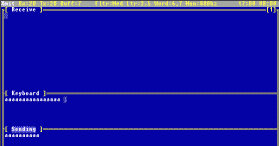
Vzhľadom na to, že sériový port dokáže rozlišovať iba logickú 0 a 1 nie je možné priame pripojenie na NF výstup prijímača. Interface musí zabezpečiť prevod signálu tak, aby bodke a čiarke zodpovedala logická 1, šumu a rušeniu logická nula. Toto dokáže Hammcom komparačný modem, ktorý je možné použiť s externým napájaním. CW totiž neumožňuje priviesť na nevyužité výstupy sériového portu +12 a -12V. V dokumentácii nie je žiadne zapojenie, momentálne jedno vyvíjam. Prvé testy som robil s kľúčom a 12V akumulátorom.
CW reception
CW can independently adapt to the speed of the received CW signal, as well as tolerate a certain inaccuracy of keying. The dot/dash ratio is adjusted by the user. Three software filters are available to suppress the influence of QRM and QRN. The whole principle is described in great detail in the manual.
CW broadcasting
Broadcasting is easy. The user can use macros with their own data and ten memories. The keying speed can be linked to the reception speed.
Program control
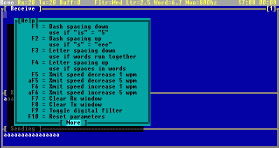
The control looks complicated at first glance, because the program is in English and uses a lot of keys and key combinations. But it is only a deceptive appearance, for the beginning it is possible to suffice with a single key, with which we switch from receiving to broadcasting and vice versa. This key is ESC. A short help can be called up at any time with the ALT+H combination. You can also translate it into Slovak or Czech, it is a cw.hlp file.
It is necessary to define your own data in the cw.msg file before starting. The most important item is the port, where it is necessary to write the address of the port on which the interface is connected (2F8 or 3F8 by default).
Evaluation
Impressions? CW impressed me not only in terms of functionality, but also as a former programmer. Today's programs can do the same and take up megabytes, requiring a lot of processing power. When he read my keying…. After all, it is cheaper to make an interface for a thousand-koruna laptop than to buy a faster laptop for a few thousand, so that a person can score a few points even without knowledge of the sea.
You can find the CW RS-232 program in the "Download" section CQ.sk