
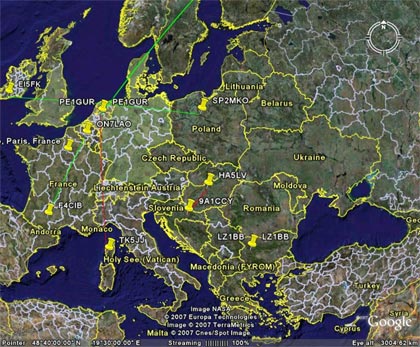
Google Earth is an application that allows an interactive view from above of the earth's surface. The user can zoom in, zoom out, rotate. The data is not stored on the computer, but is retrieved from the server. The resulting image on the computer monitor is a combination of satellite images, maps, terrain profile and 3D building model. The basic version is available for free download. Google Earth Plus and Google Earth Pro provide even more options and are characterized by a more accurate display of details.
Having DX cluster spots displayed on the map provides the advantage of faster orientation in propagation conditions. For example on VHF bands, a reflective point can be seen at Es. The Live software, for example, has a similar function MUF by G7RAU.
Google Earth requires a more powerful computer, the minimum is a processor with a clock frequency of 500 MHz, 128 MB of RAM, a 3D compatible graphics card and an Internet connection. You can download Google Earth from the site: https://www.google.com/intl/sk/earth/
After installing and starting the program, we only need to enter the data from where the information will be loaded for displaying spots from the DX cluster. We put them in the "Places" block, where we click on the text "My places". This will bring up the context menu, where we select the first item "Add" and from it "Network link".
In the window that opens, just enter the name (the name under which this definition will be displayed in Google Earth), the link (link, see below) and set the automatic refresh. We change it from "Once" to "Periodically" and set the time (1 minute or more). After entering the data, the spots will be displayed immediately. If not, you either made a mistake in the configuration, but you still need to refresh to update the data.