
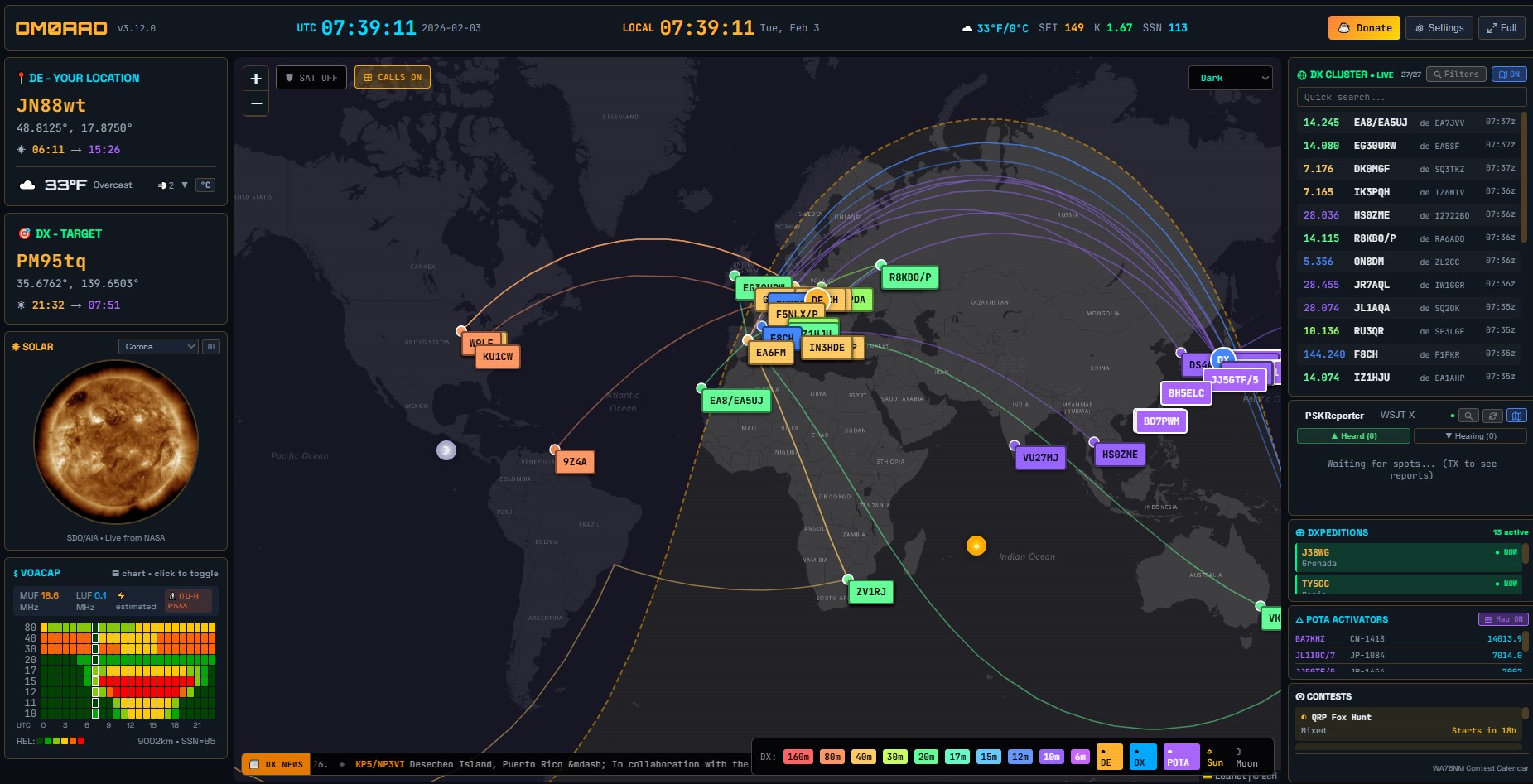
V srdci každého moderného rádioamatérskeho stanovišťa (tzv. „shacku“) sa v poslednom desaťročí udomácnil jeden špecifický kus softvéru – HamClock. Tento nástroj, pôvodne vyvinutý Elwoodom Downeym (WB0OEW), sa stal pre mnohých operátorov nepostrádateľným oknom do sveta krátkych vĺn. S postupom technológií a narastajúcimi nárokmi na flexibilitu však pôvodná architektúra HamClock-u začala narážať na svoje limity. Dnes sa čoraz častejšie skloňuje jeho nástupca: OpenHamClock.
Tento článok podrobne rozoberá, prečo je tento projekt nevyhnutným evolučným krokom, čo prináša rádioamatérom v roku 2026 a prečo by ste mali zvážiť prechod na túto modernú platformu.
V článku sa dočítate
Koniec jednej éry: Prečo HamClock potrebuje nástupcu?
Pôvodný HamClock bol revolučný. Dokázal na malej obrazovke (často na Raspberry Pi so 7-palcovým dotykovým displejom) zobraziť všetko podstatné: aktuálny slnečný tok (SFI), počet slnečných škvŕn (SN), A a K indexy, DX cluster, mapu sivého pásma (Grey Line) a dokonca aj polohu satelitov.
Avšak, ako to už pri monolitických projektoch býva, čas sa stal jeho nepriateľom. Pôvodný kód bol písaný v jazyku C s dôrazom na veľmi špecifický hardvér (ESP32, Raspberry Pi) a pevne definované rozlíšenia obrazovky. V momente, keď rádioamatéri začali žiadať podporu pre 4K monitory, integráciu s novými API (ako PSKReporter alebo POTA.app) a možnosť bežať v kontajneroch typu Docker, HamClock začal strácať dych.
OpenHamClock vznikol ako odpoveď na tieto výzvy. Jeho cieľom nie je len replikovať staré funkcie, ale postaviť ich na otvorenej, modulárnej a rozšíriteľnej architektúre, ktorá prežije ďalšie desaťročie rádioamatérskeho vývoja.
Čo je OpenHamClock?
OpenHamClock je moderná, open-source reimplementácia konceptu rádioamatérskych hodín. Na rozdiel od svojho predchodcu je navrhnutý tak, aby bol maximálne nezávislý od hardvéru. Či už ho chcete spustiť na starom notebooku, najnovšom Raspberry Pi 5, alebo ako virtuálny stroj na vašom serveri, OpenHamClock sa prispôsobí.
Kľúčové vlastnosti a vylepšenia
-
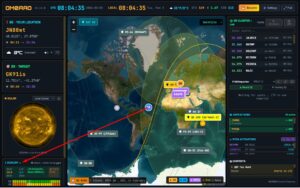
VOACAP predikcia v OpenHamClock na báze lokality DX Flexibilné rozlíšenie a UI: Na rozdiel od fixných rozlíšení pôvodného softvéru, OpenHamClock využíva spustenie v prehliadači. Či už máte malý displej v ruksaku pri SOTA aktivácii, alebo obrovský monitor nad vaším transceiverom, grafika zostáva ostrá a čitateľná.
-
Modulárny systém widgetov: Toto je pravdepodobne najväčšia devíza projektu. Každá informácia (slnečné dáta, satelity, VOACAP predpoveď) je spracovaná ako samostatný modul. Používatelia si môžu vybrať, čo chcú vidieť, a programátori môžu jednoducho pridávať nové zdroje dát bez toho, aby museli zasahovať do jadra systému.
-
Integrácia s digitálnymi módmi: V ére FT8 a JS8Call je dôležité vidieť aktivitu v reálnom čase. OpenHamClock dokáže agregovať dáta z PSKReportera a zobraziť vám mapu aktuálnej priechodnosti trás priamo z vášho stanovišťa.
-
Pokročilé sledovanie satelitov a ISS: Sledovanie dráh bolo v OpenHamClocku prepracované. Využíva presnejšie knižnice pre výpočet elevácie a azimutu, čo ocenia najmä operátori pracujúci cez amatérske satelity alebo odrazy od Mesiaca (EME).

Technická hĺbka: Pod kapotou
Pre technicky zdatnejších rádioamatérov je zaujímavý pohľad na to, ako je projekt štruktúrovaný. Vývojári sa rozhodli pre moderný prístup, ktorý kombinuje výkon s jednoduchosťou údržby.
Architektúra riadená udalosťami
Zatiaľ čo starý softvér často „zamrzol“ pri čakaní na odpoveď zo servera (napr. pri sťahovaní dát o slnečnej aktivite), OpenHamClock využíva asynchrónne spracovanie. To znamená, že hodiny a mapa bežia plynule na pozadí, zatiaľ čo sieťové moduly komunikujú s internetom na inej úrovni.
Podpora API tretích strán
OpenHamClock je postavený tak, aby natívne rozumel moderným formátom dát ako JSON a XML. To umožňuje jednoduchú integráciu s:
-
SpaceWeather.com pre najpresnejšie dáta o geomagnetických búrkach.
-
Reverse Beacon Network (RBN) pre sledovanie vašej vlastnej značky v éteri.
-
QRZ.com pre automatické dopĺňanie informácií o DX staniciach.
Inštalácia a konfigurácia
Prechod na OpenHamClock nie je zložitý. Môžete si ho otvoriť v prehliadači https://openhamclock.com. Druhou možnosťou je inštalácia na vlastné zariadenie. Projekt je hostovaný na GitHube, čo zaručuje transparentnosť a možnosť kedykoľvek stiahnuť najnovšiu verziu.
Rýchly postup inštalácie na Raspberry Pi:
-
Príprava systému: Odporúča sa čistá inštalácia Raspberry Pi OS (64-bit).
-
Klonovanie repozitára: „`bash git clone https://github.com/accius/openhamclock.git
-
Inštalácia závislostí: Program využíva knižnice ako SDL2 alebo Python (podľa verzie), ktoré zabezpečujú plynulý chod grafiky.
-
Konfigurácia: Cez intuitívny konfiguračný súbor zadáte svoju zemepisnú šírku a dĺžku (Maidenhead locator), API kľúče a preferované farby.
Jednou z výhod je, že OpenHamClock podporuje aj vzdialené zobrazenie. Môžete ho mať spustený v shacku, ale jeho výstup sledovať cez webový prehliadač v obývačke alebo na tablete.
Prečo je dôležitý pre komunitu?
Rádioamatérstvo bolo vždy o experimentovaní a otvorenosti. Uzavreté systémy alebo softvér, ktorý závisí od jediného vývojára, predstavujú riziko.
OpenHamClock tento problém rieši princípom „od rádioamatérov pre rádioamatérov“. Keďže kód je voľne dostupný pod licenciou GPL, ktokoľvek môže opraviť chybu alebo pridať novú funkciu. Ak sa napríklad objaví nový populárny súťažný formát alebo nová sieť senzorov pre meranie šírenia vĺn, OpenHamClock bude prvý, kto ich integruje.
Praktické využitie v rádioamatérskej praxi

Predstavte si sobotné ráno. Plánujete sa zapojiť do pretekov alebo len tak „loviť“ DX stanice. Zapnete OpenHamClock a okamžite vidíte:
-
Slnečná aktivita: Je tam veľká skupina škvŕn? Pásmo 10m bude dnes pravdepodobne otvorené.
-
DX Cluster: Vidíte, že na 20m sa objavila stanica z Kiribati.
-
Grey Line: Mapa vám ukazuje, že o 15 minút bude línia sféry prechádzať cez Vaše QTH
-
POTA/SOTA: Ak radi aktivujete parky, widget vám ukáže, kto je práve „on-air“, takže môžete rýchlo získať body do svojho logu.
To všetko máte na očiach bez toho, aby ste museli klikať v prehliadači alebo prepínať okná v počítači.
Záver: Čas na upgrade
Pôvodný HamClock si zaslúži čestné miesto v rádioamatérskej sieni slávy. Odviedol skvelú prácu a inšpiroval tisíce operátorov k tomu, aby si do shacku postavili vlastný informačný terminál. Avšak s príchodom OpenHamClock nastáva čas posunúť sa ďalej.
Nástupca prináša stabilitu, modularitu a predovšetkým slobodu. Už nie ste obmedzení hardvérom ani rozhodnutiami jedného človeka. OpenHamClock je platforma, ktorú si môžete prispôsobiť svojim potrebám, či už ste začiatočník s ručnou rádiostanicou, alebo skúsený „contester“ s anténnym polom.
Ak hľadáte projekt na nadchádzajúci víkend, navštívte GitHub stránku OpenHamClock a dajte svojmu rádioamatérskemu stanovišťu moderný vizuálny systém, ktorý si zaslúži. Budúcnosť ham-rádia je digitálna, prepojená a predovšetkým otvorená.
Je to pekné, farebné, modulárne, asynchrónne… beriem. Až kým som nepozrel na spracovanie zdrojových údajov pre SFI a SSN.
Aktuálna hodnota SFI sa zobrazuje asi tak mesiac stará, zo dňa 26.12.2025 a hodnota SSN je priemer hodnôt za celý predchádzajúci mesiac, čiže za január.
K index je jediný správny, načítava sa posledná známa hodnota.
Ostatné údaje som zatiaľ nepozeral 🙂 na to že je to v3, celkom blbý bug.
hola buenas mi caso es que al principio funcionaba todo de maravilla pero es que ahora entro vi web openhamclock y entro pero con un usuario americano y cuando pretendo cambiar a mi indicativo me dice que Detalles del error
NotFoundError: No se pudo ejecutar 'insertBefore' en 'Node': El nodo antes del cual se insertará el nuevo nodo no es un hijo de este nodo.

    en En (https://openhamclock.com/assets/index-DPzxSY8w.js:924:50342)
    en XP (https://openhamclock.com/assets/index-DPzxSY8w.js:9:56472)
    en div
    en div
    en div
    en div
    en Tm (https://openhamclock.com/assets/index-DPzxSY8w.js:924:43230)
    en div
    en e0 (https://openhamclock.com/assets/index-DPzxSY8w.js:1268:101)
    en Wp (https://openhamclock.com/assets/index-DPzxSY8w.js:17:10840)
    en Oe (https://openhamclock.com/assets/vendor-BFhbf4de.js:32:30806)
por lo cual no se que pasa he probado en otro pc y nada y en rasberry y tampoco no se que pasa la verdad es que no se programar agradeceria una ayuda de todas las maneras gracias
entro con mi usuario y instataneamente se pone el indicativo de una colega americano y cuando voy a ambiarlo me sale esto Detalles del error
NotFoundError: No se pudo ejecutar 'insertBefore' en 'Node': El nodo antes del cual se insertará el nuevo nodo no es un hijo de este nodo. en En (https://openhamclock.com/assets/index-DPzxSY8w.js:924:50342) en XP (https://openhamclock.com/assets/index-DPzxSY8w.js:9:56472) en div en div en div en div en Tm (https://openhamclock.com/assets/index-DPzxSY8w.js:924:43230) en div en e0 (https://openhamclock.com/assets/index-DPzxSY8w.js:1268:101) en Wp (https://openhamclock.com/assets/index-DPzxSY8w.js:17:10840) en Oe (https://openhamclock.com/assets/vendor-BFhbf4de.js:32:30806)Hola Julio,
Es muy probable que el error que mencionas esté causado por el traductor automático de tu navegador (Google Translate). Cuando el traductor intenta cambiar el idioma de la página, altera el código interno (JavaScript) y el sistema de OpenHamClock se bloquea al intentar mostrar tu indicativo.
Para solucionarlo, intenta lo siguiente:
Desactiva el traductor: Haz clic en el icono de traducción en la barra de direcciones y selecciona „No traducir nunca este sitio“.
Usa una ventana de incógnito: Prueba a entrar desde una pestaña privada para ver si el error desaparece.
Limpia la caché: Borra los datos de navegación para que se elimine la sesión del colega americano que se quedó guardada.
¡Espero que esto te ayude a volver a la radio pronto!
73 cordiales.
muchas gracias por el reporte solucionado. ahora aver si doy con poner el cluster de aqui de (( ure )) que es el que tenemos aqui en españa aver si puedo gracias por el reporte 73 cordiales