
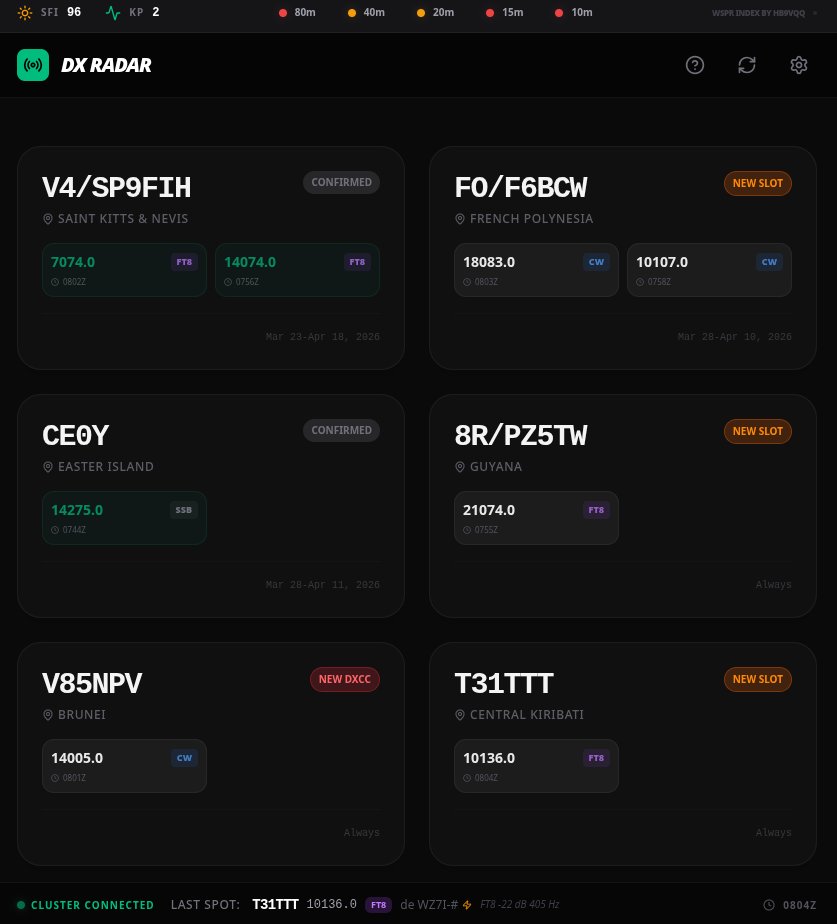
Ondra OK1CDJ has already created several applications for radio amateurs. We just mentioned recently WSPR Antenna Lab and before Ham radio Phone Trainer, and there is already another application: DX Radar.
Current operation on shortwave bands requires the operator to be quickly oriented in current events. The DX Radar Project, available at https://dxradar.ok1cdj.com, presents a modern solution in the form of a complex control panel for radio amateurs. This tool allows effective tracking of active DX expeditions and specific call signs in real time.
You will read in the article
Data integration and personalized tracking
The basis of the system is the connection of live data from the DX cluster and the network RBN with user data from the Club Log system. The main benefit of this integration is the application's ability to dynamically display the status of your connections at each active station. The system automatically distinguishes which modes and bands you have already confirmed, which ones are just completed, and where you still need a connection to the collection.
In addition to automatically generated expedition lists, DX Radar also allows manual addition of specific call signs. In the settings, it is enough to enter a comma-separated list of watched stations, which allows the operator to create a customized monitor for specific radio amateur goals.
Analysis of spots with the support of artificial intelligence
An exceptional element of the platform is the use of Gemini artificial intelligence. AI analysis runs in the background and processes incoming spots to identify important traffic parameters before the operator clicks on them. The system attempts to intelligently recognize information about split traffic, signal strength or specific operator behavior at the destination station.
Expedition management and visual signaling

DX Radar not only offers a view of current events, but also serves as a planning calendar. The section marked with a globe icon shows a list of expeditions planned for the next 14 days. These items are clearly marked with a blue Upcoming label in the report.
An important aspect is monitoring the urgency of the connection. If the validity of the expedition is nearing the end and the last two days of operation remain, an orange icon will appear on the record. During the last day, this icon will start flashing, alerting the user to the last chance to establish a connection.

The connection status is visualized by standardized color coding. Green color indicates a confirmed connection, amber indicates an established connection that has not yet been confirmed, and gray color defines missing slots in DXCC matrix.
Security and privacy protection
In terms of security, DX Radar is designed with an emphasis on protecting user data. All settings, configuration parameters and API keys are stored exclusively locally in the user's browser. The server part of the application does not store or process this sensitive data.
When configuring the connection with the Club Log service, it is essential to pay attention to the security recommendations. Users should not enter their master account password. Instead, it is necessary to generate a specific application password exclusively for this platform in the Club Log settings.
Interaction and user interface

The user interface is optimized for quick access to information. Clicking on a specific slot combination of band and mode will immediately display the latest spots for that choice. Clicking on the station call sign will in turn open the complete DXCC matrix in relation to your log. For manual updating of the list of expeditions, the Refresh button is available in the header of the page.
The project is open to feedback from the radio amateur community. Any technical errors or suggestions for improving functions can be reported by users via the GitHub platform or directly by e-mail to the project author.