
Club Log is an essential part of everyday work with the station for most active DX operators. QSO, sledovanie DXCC postupu, porovnávanie s ostatnými – to všetko Club Log poskytuje roky. Novšou funkciou, ktorá si získava čoraz väčšiu pozornosť, je DX Dash: verejne zdieľateľný, vizuálne prehľadný dashboard zobrazujúci aktivitu vašej stanice v reálnom čase.
In the article you will read
What is DX Dash?
DX Dash je zdieľateľný verejný prehľad aktivity vašej stanice v Club Log, navrhnutý tak, aby vám – alebo návštevníkovi vašej QRZ stránky – okamžite poskytol vizuálne atraktívny obraz o tom, čo sa na vašej stanici deje. Funguje ako domovská obrazovka pre mnohých operátorov pred tým, než sa ponoria do konkrétneho nástroja Club Log.
What data does DX Dash display?
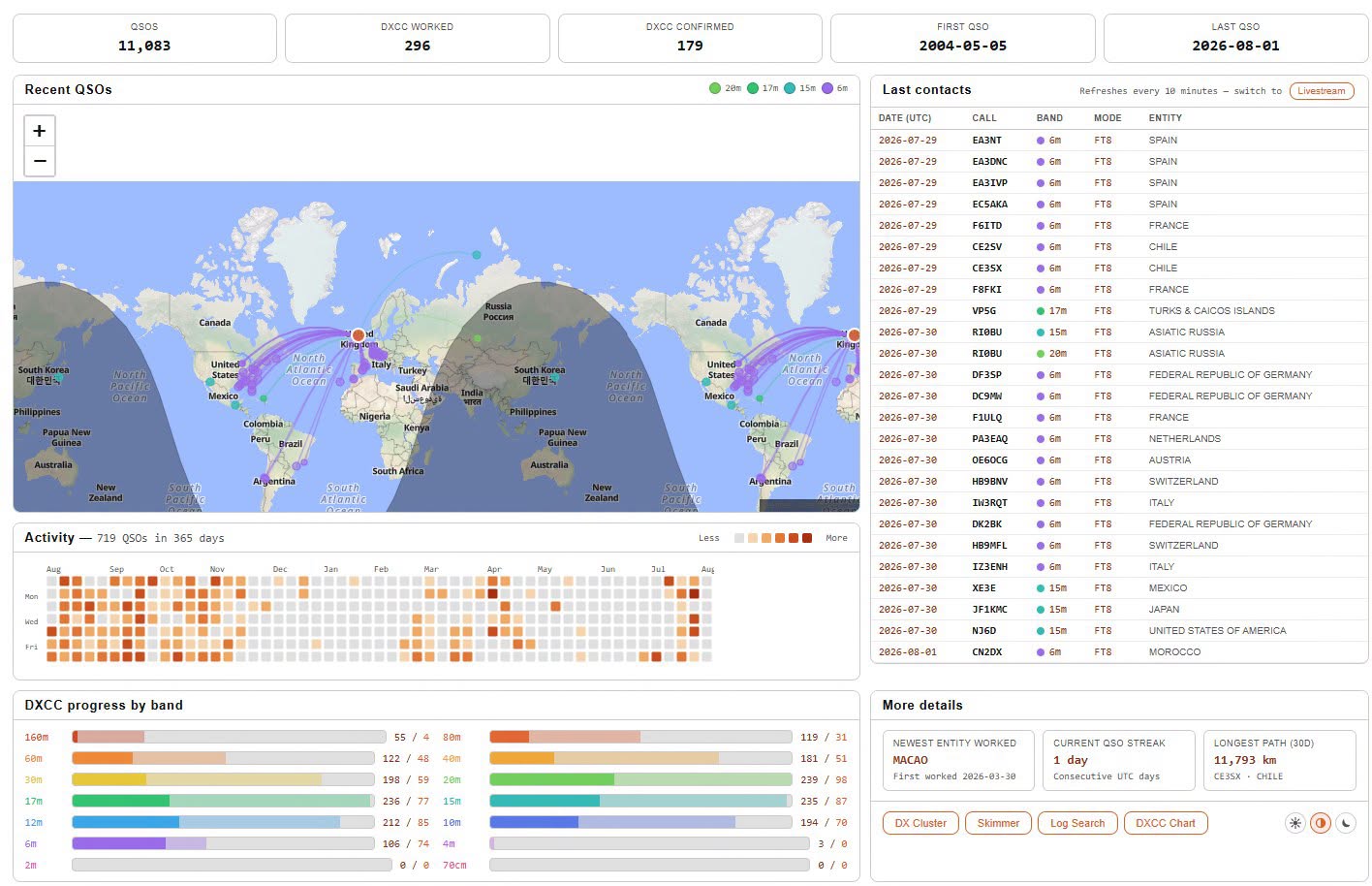
The dashboard displays clear summary statistics: total number of QSOs, number of DXCC entities worked and confirmed, date of first and last recorded QSO. The world map shows the last contacts – specifically the last 50 QSOs displayed as a signal trace from your location, with colored pins corresponding to the band colors used in the application. Where locators are available, the location is shown more precisely.
Below the map is a table of recent contacts with date, callsign, band, mode and DXCC entity, which is automatically updated every 10 minutes. The activity heatmap shows on which days you were active during the past year. The DXCC progress by band section shows the number of entities worked and confirmed separately for each band. In the Highlights section you will find the last new DXCC entity worked and the current series of days in a row that you were on the band (on-air streak). The DX Dash also shows the current propagation values - SFI, A-index a K-index – takže návštevník vidí propagačné podmienky na prvý pohľad. K dispozícii sú aj rýchle odkazy na DX cluster, skimmer, Log Search a váš DXCC Chart.
If your call is set as an active dispatch or you have Livestream enabled, the appropriate buttons will appear automatically in the DX Dash header.
Clublog – video for beginners
Where to find DX Dash and how to turn it on
Your DX Dash address is always in the form https://clublog.org/dx-dash/SIGN. For example, for the callsign OM0AAO it is https://clublog.org/dx-dash/om0rx. The site is public and accessible without logging in – making it a suitable link for a QRZ.com biography or social media profile.
DX Dash funguje na rovnakom nastavení ako widget „Last 10 QSOs“. Pre aktiváciu sa prihláste do Club Log, otvorte Settings, nájdite položku „Activate the last 10 QSOs and stats tool on your account?“ and zvoľte Yes, allow this tool. Po uložení nastavení je váš dashboard okamžite aktívny. Vypnutím tohto nastavenia sa dashboard pre návštevníkov ihneď znepristupní – iba dáta, ktoré ste sa rozhodli zdieľať, sú viditeľné.
DX Dash nie je navrhnutý na vkladanie do iframe na externých stránkach. Club Log dokumentácia odporúča odkazovať priamo na URL dashboardu namiesto pokusu o embed.
Try DX Dash
Ak máte účet v Club Log and odovzdávate denník pravidelne, DX Dash je funkcia, ktorá nevyžaduje žiadne dodatočné nastavenia nad rámec jedného prepínača v Settings. Výsledkom je verejná stránka, ktorá zaujme každého, kto váš volací znak vyhľadá – od potenciálnych DX protistanic až po členov klubu sledujúcich vašu aktivitu. Adresa vášho dashboardu: https://clublog.org/dx-dash/ZNACKA