
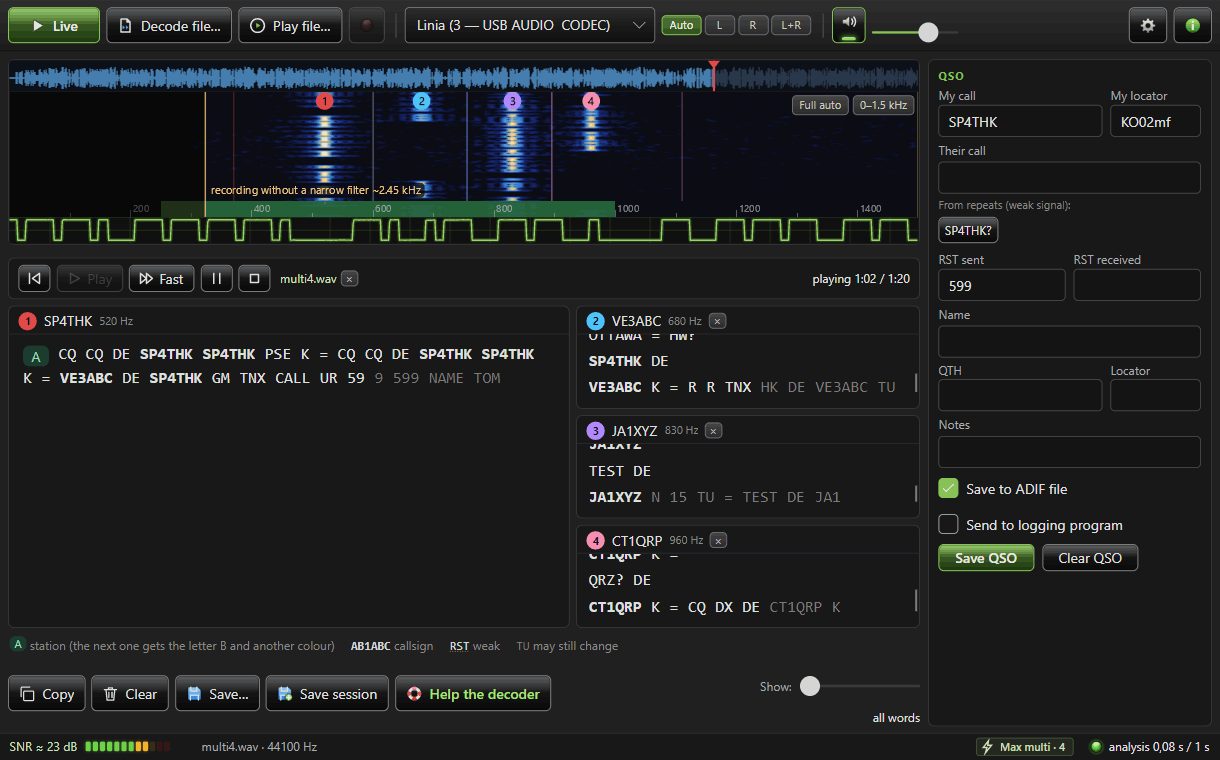
Kto niekedy skúšal CW dekodér, vie, že pri QSB, jamming or manually transmitted telegraphy, the text easily turns into an unreadable jumble of letters. Polish radio amateur SP4THK na to ide inak. Jeho bezplatný program CW Decoder číta morzeovku z rádia aj z nahrávok pomocou neural network trained on real connections.
You will read in the article
Neural network instead of fixed rules
The author writes on the project page that he collects training recordings from his radio and KiwiSDR receivers. At the same time, he is developing a realistic band sound generator that also learns from real recordings. The program offers two networks: Max for more powerful hardware and Eco for weaker computers. He chooses the appropriate one himself. Watch out for that on startup - on my PC from decades ago, the initial startup took about a minute.
CW Decoder is still in beta stage. The current version 0.9.0-beta.14 is from November 3, 2026, and the author openly warns that the program may be wrong and will continue to change.
Windows, macOS and Linux
The program is available for all three main platforms:
- Windows - installers for x64 and ARM64, no need for .NET,
- macOS - ZIP for Apple Silicon. The application is not signed, so the first time you start it, you open it via the right button and the Open option,
- Linux - tar.gz archives for x64 and ARM64.
The interface is translated into 31 languages. That is very pleasant. You can receive the signal live from the radio's sound card or decode it from a WAV or MP3 file. Just drag the recording into the program window. Radios with two MAIN and SUB receivers usually send each to a different audio channel: left for MAIN, right for SUB. Use the L or R switch in the upper bar to select which receiver should be decoded.
Waterfall and up to four stations at once
Click on a signal in the waterfall to limit the spectrum to just that. In multi mode, the program can read up to four stations at once, depending on the computer's performance. Each has its own channel, a numbered ring in the waterfall and a separate text window.
- left click to select your station (circle 1),
- pravým kliknutím protistanicu (krúžok 2),
- with the Ctrl key, on Mac ⌘, you add more stations (circles 3 and 4).
Prečo samostatné kanály? Autor uvádza zaujímavé čísla. If two similarly strong stations are on the same channel, the program will pick up only 23 to 37% of the words, even at 250 Hz spacing. V samostatných kanáloch je to 88 až 90 %.
The program reads the frequency and mode from the radio via Hamlib and OmniRig.
How to set up the radio
Decoding quality is very dependent on the radio settings. The author recommends:
- use CW mode, not SSB,
- for one station filter 250 to 500 Hz. To read more stations, you can extend the filter to about 2.4 kHz,
- CW pitch set to 500 to 700 Hz,
- AGC medium or slow. Fast AGC on a strong station will shake up the noise and break the rhythm of the dots and dashes,
- for very strong signals, use the Attenuator or reduce the RF GAIN and turn on the Preamplifier only for weak signals,
- set the input level of the sound card so that even the strongest station does not reach the maximum.
The last point is important. According to the author, the decoder copes better with a quiet signal than with a clipped one.
Receive only, never transmit
CW Decoder is a purely receiving tool. The author explicitly states that he never broadcasts the program. It will only change the radio frequency when you click the Tune button, and then only if you have enabled this feature in the settings.
Summary
SP4THK's CW Decoder is an interesting attempt to bring neural networks trained on real connections to telegraphy decoding. It is free, runs on three platforms and can handle up to four stations at once. Like any beta, it has its flies. However, if you are interested in how modern artificial intelligence will deal with Morse code from the band, download it and try it. The author also accepts voluntary contributions via "Buy me a coffee".