
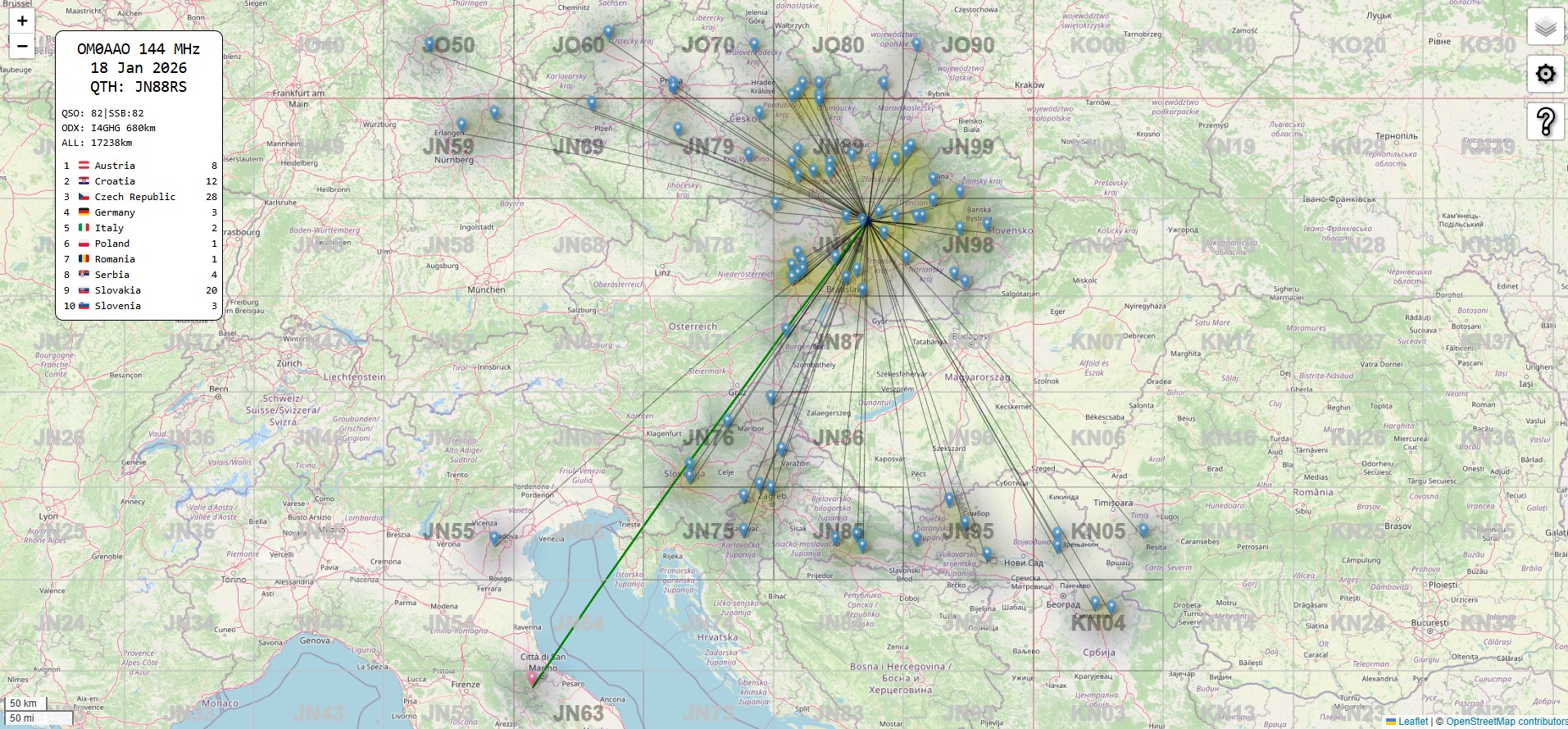
Vizualizácia rádioamatérskych spojení (QSO) is for many operators, especially after contests on VHF/UHF bands, an integral part of evaluation. Seeing your successes on the map helps not only in analyzing propagation but is also a great way to showcase results in the community. One of such tools was LogAnalyser by Maria DL4MFM, which replaced Marc DO2UDX službou ADIF to the map by CQGMA.
Damyan LZ5ZO created a clever, fast, and interactive tool called EDI Log Map, ktorý nájdete na adrese lz5zo.org/ham/edilogmap.html. Let's take a look at what this generator can do and why it should not be missing from your bookmarks.
In the article, you will read
Main Advantage: Privacy and Speed
Unlike many other online tools, EDI Log Map by LZ5ZO does not send your data to any server. The entire process takes place directly in your web browser. You select a file .edi from your computer and the script processes it locally. It is lightning fast and your logs stay with you.
How does it work?
Usage is maximally intuitive:
-
Nahratie logu: On the homepage, select the EDI file from your disk. A condition for correct display is that the records contain a valid QRA locator.
-
Nastavenia (Options): Kliknutím na ikonu ozubeného kolieska (Cog) you will open the settings panel. You can freely move this panel around the screen by dragging its top part.
Customize the map to your liking
In the settings, you will find a variety of features that allow you to fine-tune the map for a perfect screenshot:
-
QRA Grid: Turn on or off the locator square grid.
-
Circles (Kružnice): Display distance circles from your location. You can set the interval (step of 50 km), line thickness, and their color. Using the 'Direction' feature, you can rotate the distance labels around your QTH, aby neprekrývali dôležité spojenia.
-
Appearance of connections: Ak máte v logu stovky spojení, mapa môže byť neprehľadná. Pomocou posuvníkov
opacity(transparency) andweight(line thickness) you can soften the QSO lines. -
Markery a Heat map: You can choose whether to display markers (pins) or the actual call signs of the stations (
pin/call). For a visually effective representation of connection density, there is also a Heat map (tepelná mapa).

Interactivity and statistics EDI Log Map LZ5ZO
The map is not just a static image. In the upper right corner (or wherever you move it) you will find a window Stat (Štatistiky):
-
Zoom na DXCC: Click on a specific country in the statistics list and the map will automatically zoom in on connections from that area.
-
Reset zobrazenia: Kliknutím na hlavičku okna (napr. časť QSO/ODX) you will return the map to the original overall view.
-
Detaily spojenia: By clicking directly on the connection line on the map, the call sign, distance, and Azimut (bearing).
How to share the result?
Keď ste s vizuálnou stránkou spokojní, Damyan zabudoval priamo do nástroja funkciu pre export. Stačí kliknúť pravým tlačidlom myši kdekoľvek na mapu a vybrať „Take a screenshot“. Then you will choose the area you want to capture, and you can either copy the image to the clipboard or download it to your computer.
Conclusion
The generator from LZ5ZO is an excellent helper for anyone using the EDI format (standard for VHF contests in IARU Región 1). Je zadarmo, rešpektuje súkromie a ponúka profesionálne vyzerajúce mapy, ktoré oživia každý rádioamatérsky blog alebo profil na sociálnych sieťach.
73, a dopočutia v ďalšom conteste!