
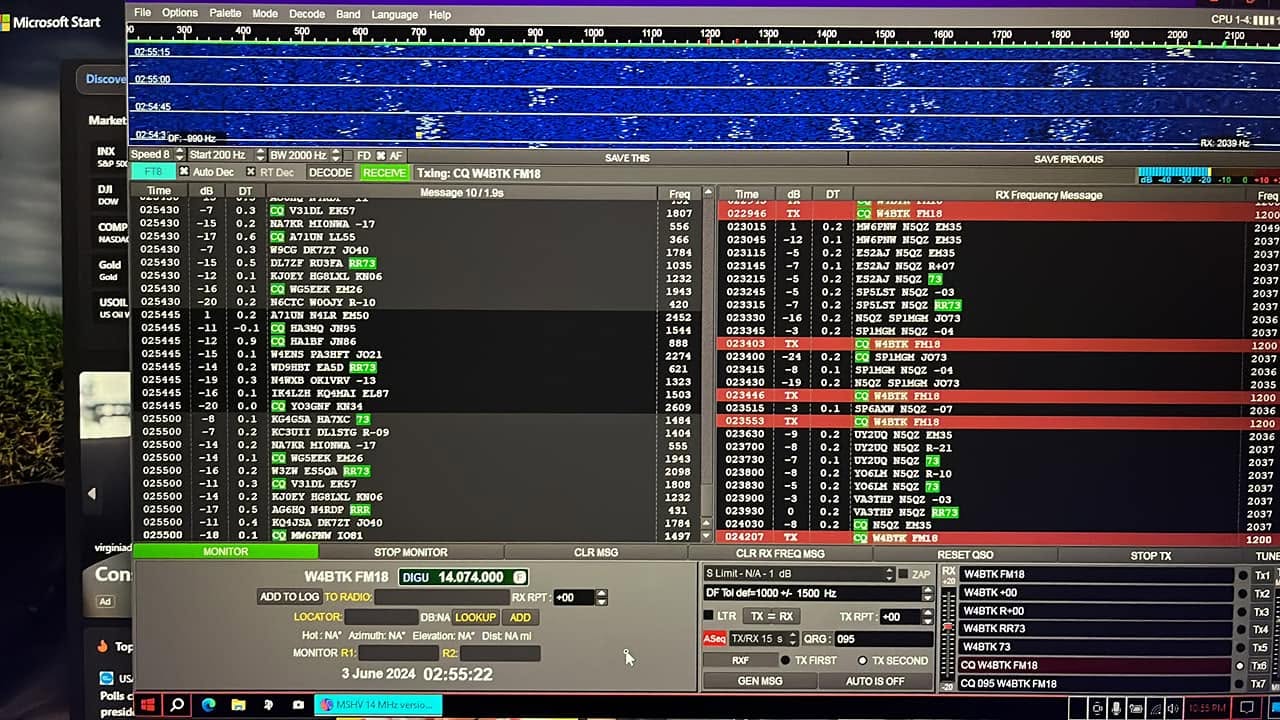
Rádioamatérsky svet digitálnych módov je bohatý na softvérové riešenia, no väčšina z nich smeruje k HF prevádzke cez FT8 a FT4. Pre operátorov, ktorí sa venujú meteor scatter na 2 m a 6 m, EME, tropospheric scatter or ionospheric scatter, was for many years the primary WSJT choice of Joe Taylor K1JT. It was from this source base that the MSHV project grew - software that takes the WSJT decoders and generators, reimplements them in C++, and offers its own interface with several key extensions.
In the article you will read
Automatic connections with MSHV – Multi Answering Auto Seq Protocol
Jednou z najvýraznejších vlastností MSHV, ktorá ho odlišuje od WSJT-X, is the Multi Answering Auto Seq Protocol (MAM) for FT8 mode. This protocol was designed specifically for DX expeditions and very active stations that need to answer multiple stations at the same time. In practice, this means that the station sets the number of TX slots (1 to 5 simultaneous signals) and the queue of waiting stations (Queue Limit 1–100). The application itself manages who it is currently answering (Now tab), who it is holding in the queue (Queued tab) and automatically saves completed QSO do denníka s poznámkou MA QSO v stĺpci komentár.
For normal stations that are not DX expeditions, it is recommended to set only one TX Slot. Using multiple TX slots without the necessary power reserve and linear amplifier characteristics would lead to intermodulation and interference with other stations. The protocol can be quickly switched to the normal working protocol at any time by pressing Ctrl+` (backtick, the key below Escape on a US keyboard layout).
What MSHV is and what it does

MSHV je bezplatná open-source aplikácia pre rádioamatérske digitálne módy zameraná predovšetkým na VHF prevádzku – meteor scatter, EME, troposférický a ionosférický rozptyl. Skratka MSHV odkazuje na autora: Christo LZ2HV, rádioamatér z Bulharska, ktorý projekt vyvíja od roku 2015. Program preberá algoritmy dekódovania a generovania signálov z WSJT od K1JT (s plným uvedením autorských práv), avšak celú logiku rozhrania, riadenia transceivera, logovanie a rozšírené funkcie implementuje vlastným spôsobom v jazyku C++ s grafickým rozhraním Qt.
A key feature of MSHV is that all settings and configurations take effect immediately without the need to restart the application – including changing audio settings, switching modes or changing CAT transceiver control parameters. This is a practical advantage over some other software packages where changing ports or audio devices requires a restart.
Supported MSHV modes
| Fashion | Primary destination | Character transmission speed |
|---|---|---|
| MSK144 | Meteor scatter | 250 characters/s (standard message); with Sh option frame 20 ms |
| JTMS | Meteor scatter | 197 characters/second |
| FSK441 | Meteor scatter | 147 characters/second |
| FSK315 | Meteor scatter | 105 characters/second |
| ISCAT | Meteor scatter and ionosférický rozptyl na 6 m | 16.15 or 32.3 characters/s |
| JT6M | Meteor scatter and ionosférický rozptyl na 6 m | 14.4 characters/second |
| FT8 | Fast tropospheric QSOs, HF DX | – |
| FT4 | HF contesting | – |
| FT2 | HF operation (experimental mode, IU8LMC) | – |
| JT65 | EME, VHF/UHF tropospheric scattering | – |
| Q65 | EME, ionospheric scattering, tropospheric scattering, rain scattering, TEP | – |
| PI4 | Lighthouse purposes (MGM) | – |
Video: MSHV in practice
Who is behind the development of MSHV?
The primary author and developer of MSHV is Christo LZ2HV from Bulgaria. Jurek SP9HWY and Dick G0LFF participated in testing and development. Bo OZ2M consulted on the graphical interface design. Binary packages for various platforms are compiled by other volunteers: Richard G8JVM prepares binaries for Debian Linux including ARM (Ubuntu, Raspbian), Walter DL8FCL provides binaries for Fedora and openSUSE, Manoj VU2CPL compiles versions for macOS.
The interface is translated into various languages by volunteers from all over the world: Chinese (Simplified and Traditional) VR2UPU, Spanish and Catalan EA3KE, Portuguese CU3AK, Romanian YO3JW, Danish 5P1KZX, Polish SP5QWB, French ON6DP, Brazilian Portuguese PP7CJ, Norwegian LA3QMA, Italian IW4ARD. The Russian translation was originally provided by R5WM (SK) and RU4NG. Neither Slovak nor Czech are currently listed in the translation list.
The MSHV discussion group is available on Groups.io at groups.io/g/mshv. It is the primary communication channel between the developer and users - bug reports, configuration questions, and feature suggestions are addressed there. The source code is publicly available on GitHub (github.com/LZ2HV/MSHV) and SourceForge (sourceforge.net/projects/mshv/).
System requirements and installation

MSHV places modest demands on hardware. For smooth operation, a processor with a frequency of 1 GHz and 512 MB of free RAM is sufficient. The minimum monitor resolution is 1024×768 pixels, for laptops 1366×768. The software requires a transceiver with an antenna for the VHF/UKV/SHF bands, a computer interface for T/R switching or VOX, a full-duplex sound card and an audio connection between the transceiver and the computer (audio cable or USB). Synchronization of the system clock with UTC with an accuracy of ±1 s is essential.
Supported operating systems: Windows XP, 7, 8, 10, 11 in 32-bit and 64-bit versions. For Linux, Qt 5.6.3, Alsa and PulseAudio libraries are required. Binary packages for Debian and ARM (Raspberry Pi) are prepared by G8JVM, for Fedora and openSUSE DL8FCL, for macOS VU2CPL.
Installation on Windows does not require any installer in the classic sense - an installation EXE file is available for both 32-bit and 64-bit versions. It is recommended to place the application on a different drive than the operating system: if Windows is on C:\, extract MSHV to, for example, D:\MSHV_XXX. It is launched directly from the .exe file or via a shortcut on the desktop - do not copy the .exe file directly to the desktop. All required libraries are statically compiled directly into a binary file, nothing needs to be installed externally.
Basic MSHV settings
After the first start, you need to set up four basic areas in the Options menu. In Sound Settings, you configure the input and output audio devices and select the left or right audio channel for the input. It is important to set the recording level so that the noise from the transceiver shows 0 dB on the signal strength indicator - this is a condition for correct decoding. The Display Refresh Speed function is used to slow down the display refresh rate on slower processors.

In Interface Control, COM ports for CAT control and PTT are set. Two communication ports are available: one for both CAT and PTT, the other for PTT only. PTT can be activated via RTS, DTR or CAT command. The Start Ptt Test button allows verification of switching functionality. The optional Tx Watchdog protects the transmitter from continuous transmission in the event of a loop.
V sekcii Macros sa nastaví vlastný volací znak (My Call), lokátor Maidenhead (Grid Locator) and textové makrá pre TX správy. Platné makrá sú: %M pre vlastný volací znak, %T pre volací znak korespondenta, %R pre RST, %G4 pre 4-znakový lokátor, %G6 pre 6-znakový lokátor, %QRG pre náhodné frekvenčné ofset and %N pre sériové číslo. Tlačidlá Region 1/2/3 nastavia predvolené makrá podľa geografického regiónu IARU.
In Radio and Network Configuration, station information is configured and reporting to PSK Reporter is activated. Double-click on a row in the table to enter personal information for a given radio connection.
Description of MSHV functions
The main window of MSHV contains two displays for displaying the received signal. Display 1 is filled during a 30-second period, then the data is automatically moved to display 2 and display 1 starts receiving new data. Each display shows a three-layer image: a time linear graph at the top, a waterfall in the middle and a signal strength indicator at the bottom. Decoding a specific ping is done by clicking with the mouse in the middle of the signal - the left button selects the basic decoding area, the right button doubles it.
The Display List shows all decoded records with time, dB signal value, DF Doppler offset and message text. Double-clicking on a row will automatically transfer the correspondent's call sign to the TO RADIO field and generate the corresponding TX reports. Clicking on the dB or Rpt column will add a TX report.
Seven TX messages (TX1–TX7) are available for immediate transmission via buttons or F1–F7 keys. Messages can be written manually or generated automatically using the GEN MSG button from macros. The RX Level Correction and TX Level Correction sliders allow fine-tuning of the sound card input and output levels within a range of ±12 dB without having to change system settings.
The ZAP function filters narrowband constant amplitude signals (birdies) before decoding. It is activated by checking the box or by pressing Ctrl+Z and requires 10 seconds of receive period to start working properly.
For JT65 mode, MSHV offers several decoding levels: Single Signal for synchronization of a single signal, Max 4/8/16/32 Decoded Signals for multiple simultaneous correspondents and Enable Averaging for very weak signals requiring at least 3 periods. For MSK144 mode, three decoding levels are available depending on the processor power: Fast MSK144, Normal MSK144 and Deep MSK144. For equalization of the received signal in MSK144, static coefficients, dynamic coefficients from the receiver or a combination of them can be selected.
Integrovaný jednoduchý denník umožňuje pridávanie, úpravu, mazanie, vyhľadávanie a triedenie QSO. Export prebieha vo formáte ADIF (výber alebo všetky QSO) do adresára ExportLog. Import spojení zo starej verzie MSHV je možný cez menu Add Log. Astronomické dáta pre Mesiac sú dostupné priamo z menu Options – Astronomical Data, čo oceníme pri plánovaní EME prevádzky.
User insights
The MSHV discussion group on Groups.io regularly posts experiences from various operators. Users particularly appreciate that MSHV supports all important VHF modes simultaneously in one application – from MSK144 to JT65 to Q65 and FT8 – without the need to switch between different programs. The instant application of all settings without rebooting has also been praised, which speeds up the tuning of the connection and audio path.
Recurring questions include the correct setting of the recording level (0 dB receiver noise), which is a condition for correct decoding of all modes. For new users, it is recommended to first set the level in the system mixer and only then fine-tune the display with the Tune Displays slider to a dark blue color with small green dots.
"Multi Answering Auto Seq Protocol has been tested by: Mike LZ2NW, Andy LZ2HM, Miro LZ2KV and Plamen LZ2PR. If you are not a DX expedition, it is recommended to use only one TX Slot."
— MSHV, LZ2HV documentation
Links to download MSHV
| Platform | Link |
|---|---|
| Windows 32 and 64 bit (installer, version 2.76.6) | sourceforge.net/projects/mshv/files/MSHV_2766_Installer_32_and_64bit.exe/download |
| Debian Linux 32 bit, 64 bit and ARM (Ubuntu, Raspbian) - G8JVM | drive.google.com/drive/folders/1wWQbV5l1_93UdX9iM9gy6mmOIklyLAaX |
| Fedora and openSUSE 32 and 64 bit - DL8FCL | download.opensuse.org/repositories/home:/dl8fcl:/mshv/ |
| macOS binaries – VU2CPL | github.com/vu2cpl/mshv-macos-port/releases |
| Complete source code | sourceforge.net/projects/mshv/files/MSHV_2765_Full_Source_Code.zip/download |
| GitHub repository | github.com/LZ2HV/ MSHV |
| Sample files | lz2hv.org/sites/default/files/mshv/All_Dir_Samples.zip |
| ON example files | lz2hv.org/sites/default/files/mshv/ZAP_Samples.zip |
| MSHV discussion group | groups.io/g/mshv |
| Project homepage | lz2hv.org/mshv |
Try MSHV at the nearest meteor shower Perseids
MSHV je dospelý projekt s viac ako desaťročnou históriou aktívneho vývoja, ktorý pokrýva celé spektrum VKV digitálnych módov od MSK144 pre meteor scatter cez JT65 a Q65 pre EME až po FT8 a FT4. Pre operátora, ktorý sa chce venovať VKV šíreniu inak ako troposférou, je MSHV logickou prvou voľbou. Stiahnite si inštalátor pre Windows z SourceForge alebo príslušné binárky pre svoju linuxovú distribúciu, nastavte zvukovú cestu, synchronizujte hodiny s UTC a pridajte sa do diskusnej skupiny groups.io/g/mshv – komunita rýchlo odpovie na akúkoľvek otázku ku konfigurácii.