
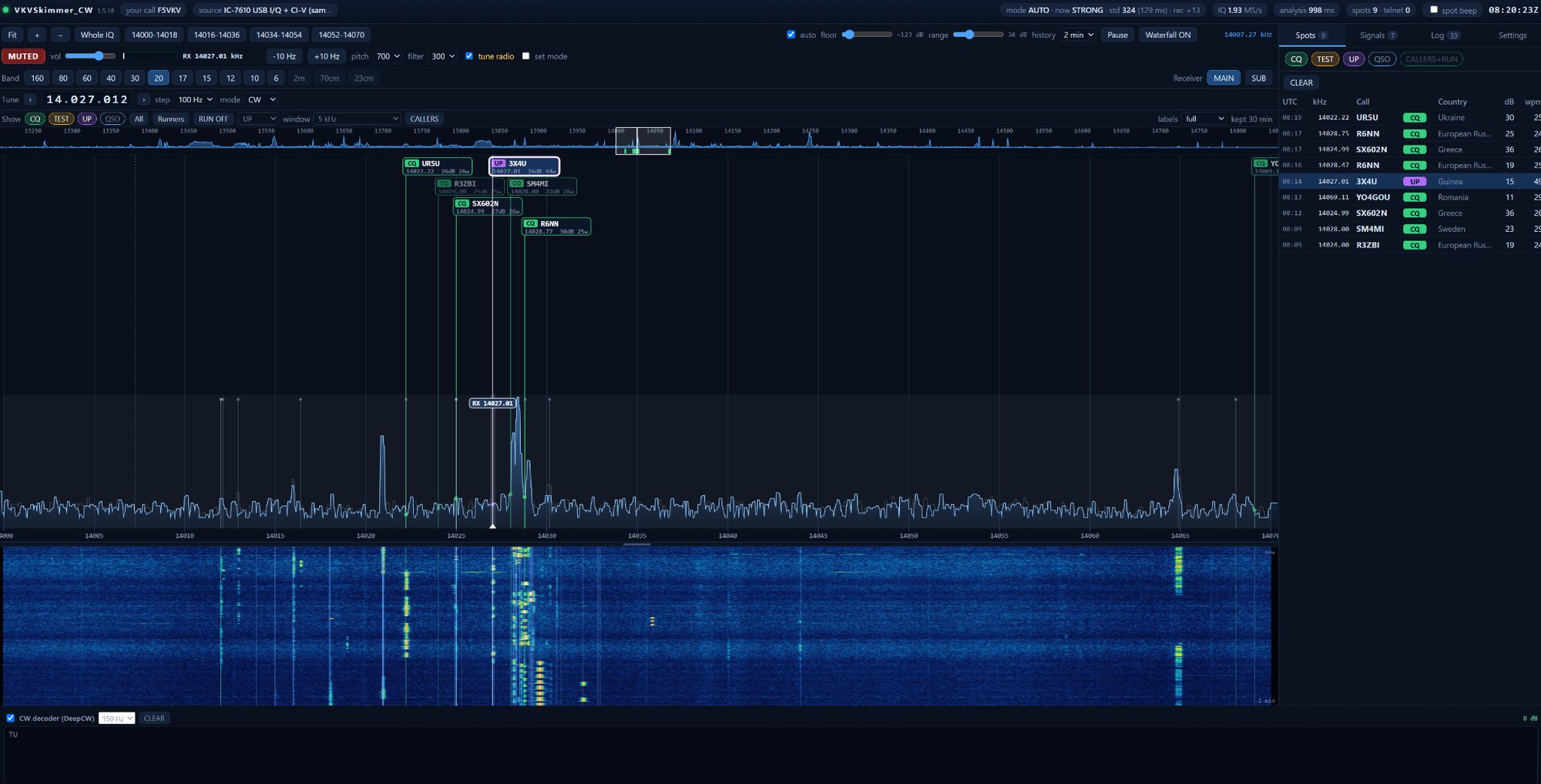
skimmer is a program that listens to the band for you and automatically decodes all stations that call CQ. You can see the result as spots in the log or cluster. If you are used to the CW Skimmer from VE3NEA, but the chain of controllers, HDSDR and virtual audio cables bothers you, the new VKVSkimmer project is worth paying attention to.
The author is Fabio Roccatagliata, F5VKV, and the program is free. Public releases have no license file or time limit. This article is based on the version 1.5.19 user manual and the project website.
You will read in the article
Two programs, one interface
VKVSkimmer is distributed as two separate 64-bit Windows applications: VKVSkimmer_CW.exe and VKVSkimmer_RTTY.exe. Each has its own decoder, configuration file (skimmer.ini and rtty.ini) and ports. You can run one or both.
It is controlled in a browser (Edge, Chrome or Firefox). Once started it will open at 127.0.0.1:8073 for CW and :8074 for RTTY. You will see a spectrum with marked spots, a waterfall, a list of signals and a decoder that reads the station you are listening to in real time.
Where does it get the signal from?

The biggest attraction is direct I/Q from the Icom IC-7610 and IC-7760 stations via USB 3, without a 32-bit ExtIO driver, HDSDR or virtual cables. According to the author, this is the only skimmer that does this. The same connection brings CI-V tuning and protection against spotting during its own transmission. IC-7610 requires firmware 1.20 or later.
But you can also get by with cheaper hardware. RTL-SDR (via rtl_tcp), SDRplay RSP, I/Q or sound card audio and IF output from Icom are supported. However, a CW and RTTY pair cannot share the same Icom direct I/Q device at the same time.
How it decodes and what is the "golden rule"
CW dekóduje neural network from the family DeepCW, the Viterbi decoder helps her as a second opinion. Longer reading alone does not win, the correction must have agreement between decoders and sufficient certainty. There is an AUTO profile for the CPU, LIGHT for older computers and MAXIMUM for powerful ones.

Each spot goes through several checks: brand structure, prefix from cty_wt.dat, Super check Partial (MASTER.SCP) and station role. If the tag, prefix or role is uncertain, it will not be published. Therefore, it can happen that the station is visible in the spectrum, but the spot is missing. The author takes it as an intention: better no spot than a bad one.
RUN mode and on-demand operation
When you call CQ yourself, you turn on RUN. The spectrum will only show the stations that are calling you, a few seconds after the call. The fast secondary engine only analyzes the window around your frequency, so the caller is displayed sooner. You see the spot that it reads only once as a preliminary (dashed with italics) and after being confirmed by the main engine, it changes to normal.
Clicking on the caller tunes the SUB receiver so the broadcast frequency on MAIN does not move. A double click writes the connection to the ADIF file (VKVSkimmer_CW.adi or VKVSkimmer_RTTY.adi). SUB tuning and the radio watch window require direct I/Q from Icom.
Connecting with the world

Skimmer je zároveň vlastný telnetový DX cluster. Spoty sa posielajú v štandardnom formáte na port 7300 (CW) alebo 7301 (RTTY). N1MM+ you connect to the Telnet window, where the spots appear in the band maps and on the Spectrum Display. It works similarly DXLog and other logging programs.
You can also send spectrum directly to N1MM+ via UDP (port 13064), without I/Q sharing. For work with Reverse beacon Network there is a dedicated port compatible with Skimmer Server and RBN Aggregator. You need to set rbn_port and your locator.

RBN Reference works in the opposite direction. Skimmer reads spots from RBN and uses them to confirm, retain or reject its own candidates. However, it will never create or repair a brand. If the RBN is not available, the skimmer continues to work.
First run and typical problems

Extract the whole package into one folder, for example C:\VKVSkimmer, and write the callsign in the INI file or in the GUI in Settings. Without a valid tag, the skimmer decodes and displays, but does not publish anything, and the red warning SET YOUR callsign lights up in the top bar. Portable tags must have a real prefix (F/F5VKV) or suffix (F5VKV/P).
If you see data loss, switch the profile to LIGHT, connect the laptop to the network and turn off the waterfall in the browser. MASTER.SCP and cty_wt.dat files are updated automatically. The list of contests (contests.txt), on the other hand, is replaced manually. When reporting an error, run the program through a file with the _with_logs.bat extension and attach the ZIP log.
You can download it at vkvskimmer.com/download. The project is free, the author thanks for the voluntary support through Ko-fi.
Frequently asked questions
Is VKVSkimmer really free?
Yes, public releases do not have a license file or expiration. You can support the author with a voluntary contribution via Ko-fi.
What hardware do I need?
A computer with 64-bit Windows and a modern browser. The signal source can be Icom IC-7610 or IC-7760 via USB 3, RTL-SDR, SDRplay RSP or a sound card.
Why doesn't the skimmer publish any spots?
Most often, the call sign is missing, then the red warning SET YOUR CALLSIGN lights up. Also check spot_mode (default cq) and logger connection to port 7300 or 7301.
Can RBN change the tag the skimmer has decoded?
No, RBN can only confirm, hold or reject the spot. It does not create or replace any brand.
Can I run CW and RTTY at the same time?
Yes, as two separate programs with their own ports. However, they must not share the same Icom direct I/Q device at the same time.