

WIFI, wi-fi, microwave oven, wireless internet are synonyms for the transmission of data (internet) through the ether at relatively high frequencies. The advantage is mainly mobility in combination with high transmission speed (the speed of Internet access is usually limited by the provider).
The networks of the most widely used standards 802.11b and 802.11g work at a frequency of 2.45 GHz. This is not very far from the amateur radio band of 13 cm, so all the laws apply as for this microwave band.
The biggest problem with WIFI is signal propagation in space. If we are not satisfied with a range of several meters (tens of meters), it is necessary to consider a more powerful antenna. Commercially, directional antennas are mainly used on the client side yagi a paraboly. Ich cena je však pomerne vysoká.

I compared three antennas - the original one supplied with the AP, homemade DL7KM (eight) and a 10-element loop quad, which has proven itself excellently. The best DX I have done on this antenna is AP at a distance of 4.5 km.
The construction of the antenna is simple (simpler than it looks), it requires common mechanical tools and a larger soldering iron (more than 100W).
You will read in the article
WIFI antenna according to G6KSN
The inspiration for this antenna is the material on http://www.paramowifix.net/antenas/loop_uda_yagi/. It is a G6KSN design converted to a frequency as needed. The version described here is quite long.
Thanks to the LoopYagi Design program from G6KSN, we can calculate the antenna for any frequency with any boom length. In my case, it's the 10-element version. The number of elements was determined by the length of the copper support tube - boom. The entire antenna is no longer than thirty centimeters.

Dimensions calculated by the program

On the boom-e, we mark the positions of the individual elements with a file. We prefer to make the grooves longer so that they are clearly visible during soldering.
We will use Cu conductor with a diameter of 1.5 mm for the elements. We make the ring as follows: we cut the exact length of the wire for the element (e.g. 135 mm) from the wire and bend it on a pipe of a suitable diameter. After being released from the pliers, the wire springs back, so it is more appropriate to use a tube with a smaller diameter than the element. This is how we prepare all the elements, including the radiator.
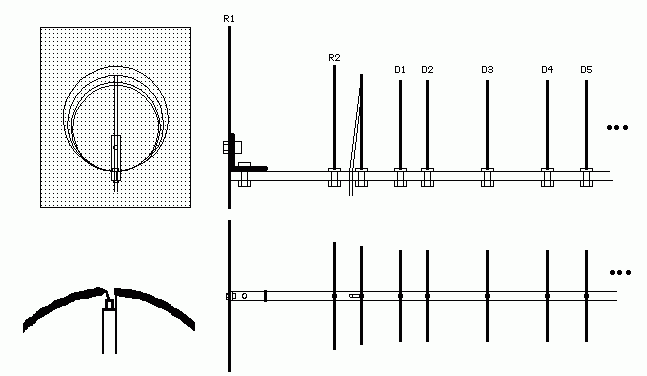
After that, all you have to do is solder the elements onto the boom with a large soldering iron. After soldering all the elements, we cut the radiator exactly opposite the boom (we can also cut out 1 mm). We mount the N-connector. We will make a jumper from a thin coaxial cable (RG-58 can also be used if it is not better). We shorten all outlets to a minimum. We fly the cable.
The mechanical construction is obvious from the photos
|
|
|
|
|
|


You can download the Loop Yagi CALC program .: HERE :.. The antenna was tested with excellent results only on WIFI, not yet on AMA. With WIFI, the effect of polarization (vertical, horizontal, "and something in between") and directionality is noticeable. Tuning to the best signal requires a little patience.
For outdoor use, do not forget to fix it well against moisture.