
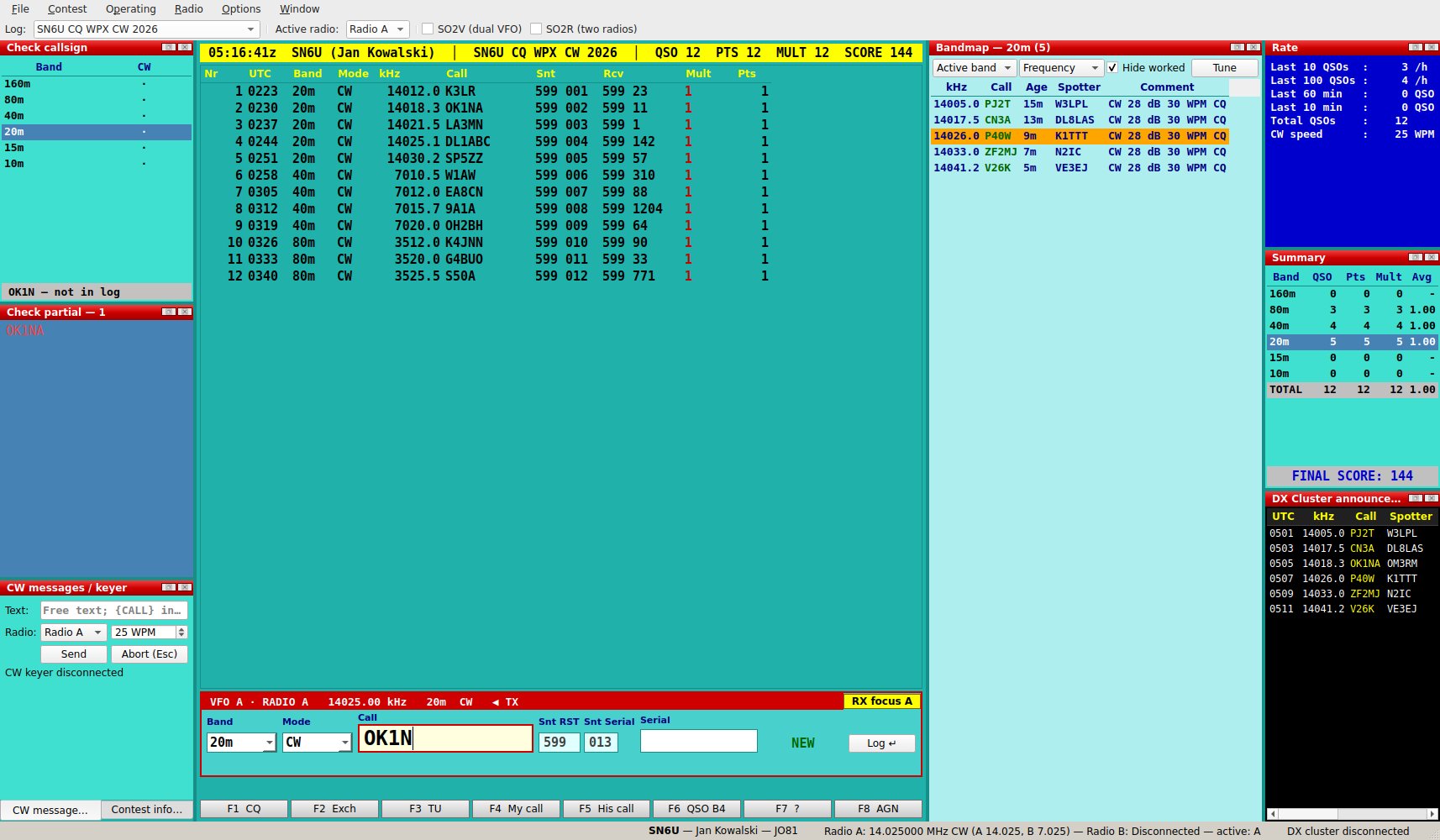
There are plenty of competitive journals for Windows to choose from. Those who sit at the radio with Linux have a much more difficult choice. contest Logger by Marcin SP6MI is one of the projects that fills this gap, and it does so in a good way: with its interface and keyboard shortcuts, it is similar to what competitors are used to from DXLog or N1MM+.
It is a cross-platform program for Linux and Windows, written in C++20 on top of the Qt 6 library and distributed under the GPL-3.0 license.
You will read in the article
Installation and initial start-up
The program is compiled from the source code. You need CMake 3.21 or later, a compiler with C++20 support, Qt 6.2 and later including the Core, Widgets, Sql, Network, and SerialPort modules, the QSQLITE driver, and the yaml-cpp 0.7 library. Hamlib is optional, but without it you don't have a backend for CAT and CW.

The assembly itself is for three commands: cmake -S . -B build, cmake –build build and ctest to run tests. At the first start, the program creates a data folder, on Linux ~/.local/share/ContestLogger/, where you can find the INI configuration file and copies of the built-in race definitions.
Each log is a separate SQLite file that you save wherever you want. It carries connections, race definition, station data, CW macros as well as copies of used SCP, call history and CTY lists, so you don't need the original help files on another computer.
A window that the contestant knows
The main window has a log name bar at the top, active radio selection, Run and S&P toggles, and SO2V and SO2R checkboxes. Below it is a yellow status bar with UTC time, the number of connections, points, multipliers and scores, in the middle is the log itself, and at the bottom is a connection input panel with a bar of F1 to F8 keys.
Docking windows can be arranged around it at will: Check callsign with band times mode grid, Check partial with color resolution, Needed QSO / Mult, bandmap, Contest info, Rate with a graph of connections for five-minute segments, Summary with the resulting score and a raw list of announcements from the DX cluster. Duplicates and errors in the exchange are not reported by the modal window, but by the message line below the panel.
Entering and correcting connections

The workflow is standard. You write a mark in the Call field, use the space bar to go through the fields of the received exchange and enter the connection with the Enter key. Ctrl+W clears the panel. The program takes the band and mode from CAT, while not rewriting the manual selection every second, and generates the serial number itself.
Double-click on the log line to open the repair window, where you can change the mark, UTC time, band, mode, frequency and both exchanges. With the right button, you can mark the connection as invalid: it will remain in the logbook, but it will not count towards points, multipliers or export. You can undo the last change with the shortcut Ctrl+Alt+Z.
Radio, CW and race definitions
CAT goes through Hamlib or through the Mock test backend. The CW keyer can work with Hamlib, cwdaemon or mock, and messages on the F1 to F8 keys support macros such as {CALL}, {MYCALL}, {SENT} or {SERIAL}. You can also turn on ESM and Auto CQ, while when CAT is connected, the mode will automatically switch from Run to S&P after retuning by more than 3 kHz.
The race rules are in YAML files and there are 23 of them in the package, from CQ WW and CQ WPX to ARRL DX and Sweepstakes, WAE, SP DX, EU HFC and IARU HFC to WAG and general logging. However, the author explicitly refers to them as starting profiles, not as certified implementations of the race regulations, so the scoring must be verified before the race. You can write your own definition yourself: the scheme recognizes RST, serial, integer, text, grid, callsign and enum field types and multipliers according to exchange, WPX prefix or CTY data.
Advances and export
The database runs in WAL mode and is checked at startup. In addition to manual backups via Back up database... you can enable automatic backups, by default daily with 30 files saved per log. Restoration is done when the program is closed with the -restore-backup switch. You can also revert to the previous version of the race definition or the Master.SCP and wl_cty.dat downloaded file.
Export goes to Cabrilla 3.0 and ADIF, import handles both formats. Also included is sending QTC for WAE and broadcasting in N1MM protocol via UDP.
What is still missing
Príručka je v tomto smere príjemne úprimná a obmedzenia vymenúva sama. Windows balík zo CI sa zostavuje bez Hamlib, takže tam máte len backend Mock. Chýba ovládanie PTT, hlasový kľúčovač a správy pre RTTY a FT8, the program does not decode RTTY and does not communicate with MMTTY. With the SO2R, there is no audio switching, PTT or antennas, so none OTRSP. CAT itself is only tested on Hamlib Dummy and rigctld so far.
Network log synchronization between stations exists, but is not approved for use in racing by the author. It runs over TCP without encryption and without authentication, so it belongs at most to a trusted network and certainly not to a public IP address.
So if you're looking for a competitive Linux log and don't mind compiling, it's worth a look project repository and especially user guide.
Frequently asked questions
Is there a ready-made installation package?
The program is compiled from source code using CMake. The procedure for both Linux and Windows, including the package of the Hamlib library, is in the BUILD_AND_RELEASE.md document.
Does CAT and CW also work on Windows?
The Windows package from the autobuild is without the Hamlib library, so only the Mock test backend is available. If you want real CAT on Windows, you have to compile the program with your own Hamlib.
Which races does the program include?
There are 23 definitions in the pack including CQ WW, CQ WPX, ARRL DX, ARRL Sweepstakes, WAE, SP DX, EU HFC, IARU HFC and WAG. These are starting profiles, so check the scoring before the race.
Can the diary be shared between multiple stations?
Synchronization over TCP is implemented, but the author does not mark it as race-approved. Communication is not encrypted or authenticated, so it only belongs to a trusted network.
Does the program support RTTY or FT8?
Nope. Although the race definitions allow RTTY, the program does not decode or transmit it and does not communicate with MMTTY. Messages for FT8 and voice keyer are also missing.