
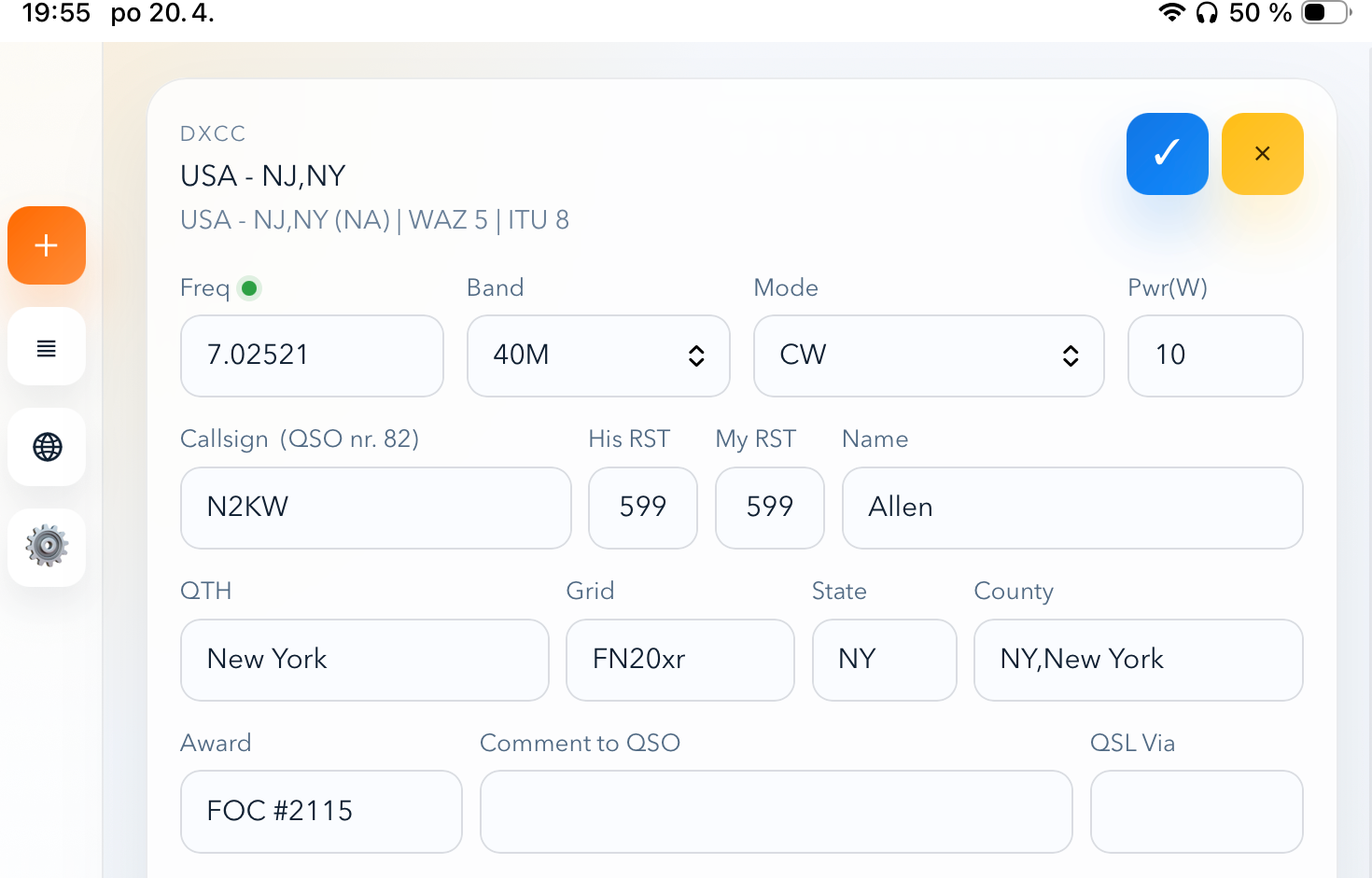
Rádioamatérsky svet sa neustále vyvíja a s ním aj nástroje, ktoré operátori používajú na evidenciu svojich spojení. Medzi najpopulárnejšie open-source logovacie programy pre operačný systém Linux patrí nepochybne CQRLOG.
Jeho autor, Petr OK2CQR, nedávno zverejnil správu, ktorá poteší najmä priaznivcov vysielania z terénu a používateľov moderných mobilných zariadení – projekt CQRLOG for web. It is a web interface for the logbook that brings mobility without the need for complex data migration or changes to the control philosophy that CQRLOG users are accustomed to.
In the article you will read
Philosophy of the CQRLOG for web project and motivation for its creation
The main idea of CQRLOG for web is to provide operators with a convenient and fast browser interface that connects directly to their existing CQRLOG database on the desktop. Petr OK2CQR built this project primarily for portable operation needs. Operators who are engaged in activities such as WWFF, GMA alebo SOTA, často riešia dilemu, aké zariadenie použiť na zápis spojení priamo v teréne. Klasický notebook môže byť v poľných podmienkach nepraktický kvôli váhe, výdrži batérie alebo čitateľnosti displeja na slnku. Tablety a smartfóny sú v tomto smere ideálne, no doteraz chýbalo riešenie, ktoré by bolo plne integrované s hlavným domácim logom bez nutnosti následného exportu a importu ADIF súborov.

Autor pri vývoji vychádzal z vlastnej skúsenosti. Predstavou bola jednoduchá zostava pozostávajúca z batohu, transceivra Elecraft KX2, batérie, telegrafného kľúča a antény typu Endfed. V takejto konfigurácii je tablet najlepším spoločníkom pre logovanie. Hoci sa prvý koncept webového rozhrania objavil už pred niekoľkými rokmi, vtedajšia verzia trpela viacerými chybami a nebola pripravená na širšie nasadenie. Súčasná verzia je kompletným prepísaním celého kódu od základov a predstavuje stabilné riešenie, ktoré autor s dôverou sprístupňuje komunite.
Architecture and connection with the desktop version
Je dôležité zdôrazniť, že CQRLOG for web nie je samostatný, izolovaný logovací program. Je navrhnutý ako sprievodné rozhranie pre operátorov, ktorí už aktívne využívajú desktopovú verziu CQRLOGu. Systém pracuje priamo s databázou MariaDB, ktorú používa desktopová aplikácia. To znamená, že všetky spojenia zapísané cez tablet v teréne sa okamžite a bez ďalších krokov nachádzajú v hlavnej databáze.
Although the web interface offers full-featured logging and editing capabilities, some advanced functions remain the privilege of the desktop application. These include mainly uploading data to services such as LoTW alebo eQSL, hromadnú editáciu záznamov a generovanie podrobných štatistík. CQRLOG for web sa sústredí na to, čo je v teréne najdôležitejšie: rýchly a presný zápis QSO.
Používateľské rozhranie a ergonómia logovania
Pri návrhu rozhrania sa kládol veľký dôraz na to, aby sa používatelia cítili ako doma. Rozloženie polí v hlavnom formulári kopíruje logiku desktopovej verzie. operátor má k dispozícii polia pre volaciu značku, frekvenciu, pásmo, mód, reporty RST, meno, QTH, lokátor, výkon, dátum a čas, poznámky, stav QSL, IOTA, WAZ, ITU, state, district and award information.
Ergonómia ovládania je optimalizovaná pre rádioamatérsku prácu. Podporovaná je navigácia pomocou šípok na klávesnici, čo urýchľuje pohyb medzi vstupnými poliami. Automatická kapitalizácia mena a QTH šetrí čas a zabezpečuje vizuálnu konzistenciu logu. Zaujímavou funkciou je správanie medzerníka, ktorý umožňuje rýchly skok z poľa volacej značky priamo na pole reportu RST. Pre rýchle vymazanie formulára pri neúspešnom spojení slúži dvojité stlačenie klávesy Escape.
Systém obsahuje automatické hodiny v reálnom čase, ktoré sa aktualizujú každú sekundu a zaznamenávajú čas začiatku aj konca spojenia. Pre situácie, kedy je potrebné do logu zapísať staršie spojenia, je k dispozícii offline režim, ktorý umožňuje manuálne zadávanie dátumu a času. Vývojár myslel aj na predvolené hodnoty reportov, ktoré sa dynamicky menia podľa zvoleného módu, napríklad 599 pre telegrafiu a 59 pre SSB or digitálne módy.
Intelligent features and data search

CQRLOG for web is not just an empty form. It is connected to external data sources that make the operator's work easier. When entering a callsign, real-time data search is performed about DXCC prostredníctvom HamQTH. The system immediately displays the country, continent, and WAZ and ITU zones.
Ak sa v databáze už nachádzajú predchádzajúce spojenia s danou značkou, rozhranie automaticky predvyplní polia ako meno, QTH, lokátor, štát or okres. Táto funkcia je neoceniteľná pri contestoch or pri pravidelných spojeniach s tými istými operátormi. Pod hlavným formulárom sa tiež zobrazuje tabuľka histórie predchádzajúcich spojení s aktuálne volanou stanicou.
For members of various amateur radio clubs, club membership display is available. The system can display up to five different club designations, with configuration taken directly from the desktop version of CQRLOG settings. The interface also includes a list of contacts with pagination and editing capabilities. If the callsign is changed in edit mode, the system performs a new DXCC data search to ensure data integrity.
Integrácia s DX Clusterom a solárne údaje

Efektívna rádioamatérska prevádzka sa nezaobíde bez informácií o aktuálnom dianí na pásmach. Webové rozhranie obsahuje integrovaný DX Cluster, ktorý čerpá dáta zo servera HamQTH. Zoznam spotov sa automaticky obnovuje každých dvadsať sekúnd, takže operátor má neustály prehľad o tom, kde sa objavila zaujímavá stanica.
In addition to the spots themselves, current solar data is also integrated into the interface. The A and K indices, SFI (Solar Flux Index), SSN (Sunspot Number), and information about the state of the geomagnetic field are displayed. This data is crucial for estimating radio wave propagation conditions on short waves and helps the operator decide which band to focus on at a given moment.
Connection with radio station via Pico radio gateway
Jednou z najzaujímavejších technologických vlastností projektu je možnosť synchronizácie s rádiostanicou. Webové rozhranie dokáže v reálnom čase čítať frekvenciu a mód z transceivrov Elecraft KX2 a KX3. Táto funkcionalita je realizovaná through ďalšieho autorovho projektu Pico radio gateway.
Hardware connection of the transceiver with a tablet or computer running a browser allows automatic switching of band and mode in the log according to how the operator tunes the radio. The gateway output format is intentionally simple, which opens the door for the community to develop their own interfaces for radios that are not yet directly supported. The log interface includes an indicator of online or offline status of the radio connection, and the user can configure the frequency polling interval.
Design and technical implementation

In terms of design, CQRLOG for web is a modern application with a responsive appearance. The reference device for optimization was the iPad Mini in portrait mode, which is the ideal size for field operations. However, the application works correctly on a wide range of devices from desktops to mobile phones. Users have the option to switch between dark and light mode, with the system also supporting automatic detection according to operating system settings.
An interesting feature for Czech and Slovak users is keyboard transliteration. If the operator accidentally types Slovak or Czech characters with diacritics in the upper number row, the system automatically converts them to digits. The application also remembers the last used band, mode, frequency and power across individual sessions, which speeds up resuming work.
From a technical standpoint, the backend is built on the PHP/Symfony framework, while the frontend uses the React library. Communication takes place via REST API. The entire application is distributed as a single Docker container, which significantly simplifies the installation and deployment process in a production environment.
System installation and configuration

Deploying CQRLOG for web requires basic knowledge of working with the terminal and the Docker tool. The basic prerequisite is a functional MariaDB database with an existing CQRLOG schema. The installation process begins by cloning the repository from GitHub. Subsequently, it is necessary to create a configuration file from the attached example and fill in important data, such as database credentials, application URL address and login credentials for the web interface.
The actual launch of the application is performed using the make prod command. If the system runs behind a reverse proxy server, such as Apache or Nginx, it is possible to publish the application under your own domain name. Detailed instructions including solutions to potential problems are available in the README.md file in the official project repository.
Final evaluation and code availability
Petr OK2CQR created a tool that fills a gap in CQRLOG. Although the project was developed primarily for the author's personal needs, its quality and level of integration make it an attractive choice for the broad community of Linux and open-source software users. CQRLOG for web brings freedom of movement without losing control over data.
Zdrojové kódy pre webové rozhranie aj pre Pico radio gateway sú voľne dostupné na platforme GitHub pod účtom ok2cqr. Autor víta spätnú väzbu od používateľov a verí, že tento projekt uľahčí mnohým operátorom ich cesty za spojeniami z prírody. Ak hľadáte moderné, rýchle a spoľahlivé riešenie pre logovanie v teréne, ktoré bez problémov komunikuje s vaším domácim archívom spojení, CQRLOG for web is a solution that should not escape your attention.