
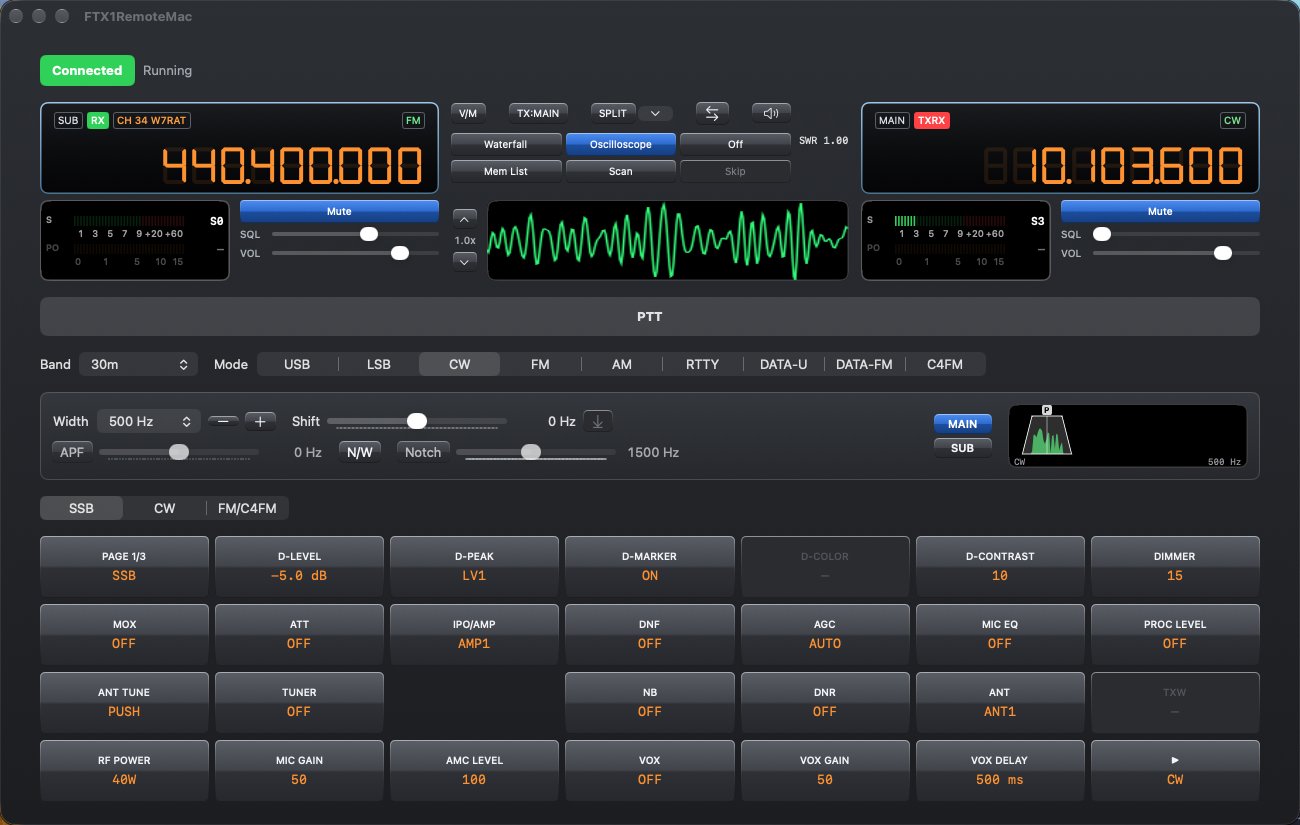
The Yaesu FTX-1 is a modern radio, but if it's connected via USB at home and you're sitting in another room or on the go, its display won't help you much. Carl Obermeier, on GitHub captobie, therefore wrote his own applications. They are called FTX-1 Remote and control the radio from Mac, Windows, iPad and iPhone. The project is free under the MIT license.
You will read in the article
Four apps, one radio
Mac is the main workplace. One thick window shows both VFO, S-meter and SWR, waterfall or oscilloscope, filters, memories and numbered MENU radio. Via the Tools menu, you can open windows for FT8, FT4, CW, RTTY/PSK, WebSDR a APRS. Mac zároveň slúži ako hub pre mobilné zariadenia cez WebSocket.

The Windows application is written separately in C# and WinUI 3, but it copies the functions of the Mac. She is missing the APRS map. Even Windows can serve as a hub for iPad and iPhone after turning it on in the settings.
The iPad connects either to a hub on Mac or Windows, or directly to the Raspberry Pi. Has both VFOs, filters, MENU, PTT hold, CW decoder, APRS and MyKiwiSDR window. For those who do not have a radio, there is a demo mode. The iPhone is a simple controller with frequency, SWR, PTT and modes of operation, no MENU and no decoders.
Everything goes through rigctld
None of the applications open the serial port directly. The only source of truth about the radio is rigctld from Hamlib on port 4532. FTX-1 (model 1051) support was brought by Hamlib 4.7 and applications can bring their own version 4.7.2. The advantage is that the radio can also use WSJT-X at the same time.
However, most FTX-1 menu items have no equivalent in Hamlib. Applications therefore control them with direct CAT commands via passthrough rigctld. In this way, you can access the numbered MENU and hundreds of advanced settings items that would otherwise only be available from the radio panel.
At home via USB, remotely via Raspberry Pi
In local mode, the radio is connected via USB to a Mac or Windows PC, and the rigctld application runs itself. If another rigctld for FTX-1 is already running, it will take over and not terminate it. Rigctld for other radio will reject.
In remote mode, the radio is on the Raspberry Pi. The author uses a Pi 2B with Raspberry Pi OS 13 "Trixie". The Pi is running rigctld with -m parameter 1051 and post_write_delay=10 option, service for stream received audio (port 8532), service for broadcast audio (port 8533) and optionally service for CW key (port 8534). The ALSA configuration allows you to share the radio's sound card with Direwolf as well.
You connect to the Pi externally via Tailscale. This is important because neither rigctld nor audio ports have a password or encryption. The author expressly warns that the Pi should never be exposed directly to the Internet. Hub on Mac and Windows only accepts connections from the computer itself, from Tailscale and from private networks.
Broadcast control and security
Applications control main and sub receiver, frequency, mode of operation, filter width, IF SHIFT, notch, CONTOUR and APF, memories and scanning. Waterfall and oscilloscope are calculated from audio, not from CAT. The sound from the main and secondary receivers goes as two separate channels with their own volume and squelch.
Everything the radio can lock goes through the safety fuse. You must first enable the transmission with the Enable Transmit switch and the application checks whether the frequency is in the amateur radio band.
Digital modes of operation

CW is decoded by the CWKit library in Neural or Classic mode from the main or secondary receiver, from WebSDR or from an audio file. You can transmit via the radio's keyer memory or with a key or trap via Arduino. On the Pi, a 300ms buffer compensates for network latency.
FT8 and FT4 are only decoded for now, with optional sending to PSK Reporter. RTTY and BPSK31/63 have their own window with both reception and transmission, and on Mac also a PSK browser that decodes multiple signals at once.

APRS is decoded directly in the application from the audio, since CAT does not send received packets. There is a list of stations, news and on Mac a map. Since version 0.13, the application can also send location beacons, with the Beacon Now button or at an interval, and messages with automatic confirmations and repetition.

What brought 0.13
Verzia 0.13 pridala dekódovanie FT4, okno RTTY/PSK s PSK browserom, APRS majáky a správy, natívne okno MyKiwiSDR pre vlastný KiwiSDR a tlačidlo TUNE for external automatic tuners. The squelch timeout was reduced to 1.5 seconds, the recording of connections to MacLoggerDX, Wavelog, HRD Logbook and Log4OM and French and Italian translation.
Limitations and errors in the CAT manual
The project is intended for one user and has no accounts or login. The audio service on the Pi serves only one client at a time. The Windows version has CW, WebSDR and filters tested mainly against simulation, not on band, and the polarity of RTTY tones on band is not yet confirmed.
The practical experiences of the author are worth reading. A weak power supply on the Pi 2B was causing the radio's USB converter to disconnect and it helped with long CW keying ferrite on the cable.
A valuable by-product is a list of radio-verified errors in Yaesu's CAT manual. Memory channels go from 1 to 999, not 99, VOX delay is set in 100ms increments, DCS codes need three digits, and maximum power per KV is 100W. If you're writing your own software for the FTX-1, this file will save you a lot of searching.
Applications and instructions can be found in FTX-1 Remote repositories, Raspberry Pi setup v instructions for the Pi.
Frequently asked questions
Is FTX-1 Remote free?
Yes, the project is open source under the MIT license. Mac and Windows apps are on GitHub, iPad and iPhone via TestFlight, App Store or custom translation in Xcode.
Do I need a Raspberry Pi?
Nope. You can have the radio via USB directly on a Mac or Windows PC. The Pi is useful when you want to have the radio available remotely without a Mac or PC running.
Is it safe to expose the Pi to the Internet?
Nope. Neither rigctld nor audio ports have a password or encryption, so the author recommends connecting only through Tailscale or a trusted local network.
Can I stream FT8 through the app?
Not yet, FT8 and FT4 are just decoded in the app. Since the radio is controlled by rigctld, you can use WSJT-X at the same time.
What can the iPhone app do?
It is a simple controller for frequency, SWR, PTT and type of operation. It has no radio MENU or digital decoders.