
You will read in the article
Powerful WebSDR server with decoders, CAT control and support for multiple receivers
WebSDR už dávno nemusí znamenať iba prijímač, na ktorom si návštevník vyberie frekvenciu, nastaví moduláciu a počúva. Projekt PhantomSDR-Plus takes this concept further. It is an open-source server for software-defined radios that combines signal reception, advanced audio processing, digital mode decoding and remote control in a web browser environment.
The project is derived from the original PhantomSDR and is being developed by radio amateurs SV1BTL, 9A7AOF, F1NSK and SV2AMK. The current version 6.0.0 brings a lot of functions not only for listeners, but also for station operators. An interesting part of the ecosystem is the standalone PhantomSDR+ desktop application, which can connect the web receiver to its own transceiver via CAT.
Server architecture and performance
PhantomSDR-Plus is designed as a multi-user WebSDR server. Its architecture allows serving hundreds of simultaneous listeners, while the actual number depends on the performance of the computer used SDR receiver, sample rate and available acceleration.
Sampling rates up to 70 MSPS for real sampling or 35 MSPS for complex I/Q data are supported. Challenging FFT calculations can be offloaded to an OpenCL or CUDA-enabled graphics processor. Thus, the server does not have to deal with all the spectrum processing load with only CPU computing cores.
The method of working with several listeners is also interesting. The server processes the wide received band and provides individual users with their own tuning, demodulation, filter and audio. Each listener can thus choose a different frequency without affecting the others. Audio transmission uses optimized FLAC and Opus codecs with an emphasis on low latency.
Interface, debugging and visualization
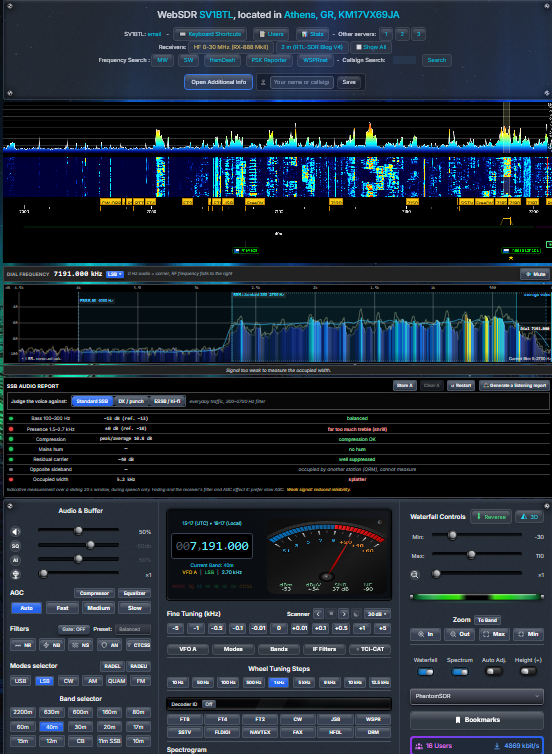
The user interface is among the most striking parts of the PhantomSDR-Plus. The basis is a spectrum and a waterfall with an overlay of the frequency plan. Individual bands can be distinguished by color, and the user has several color maps, contrast, brightness and zoom settings.

Tuning is not limited to one control. The frequency can be selected by clicking directly on the signal in the waterfall, entering a numerical value, using the keyboard, mouse wheel or step buttons. Adjustable tuning steps, band buttons and a channel scanner are also available. It can traverse the selected range and stop at a signal that exceeds the set level above the noise background. The Skip empty function can skip the empty parts of the band according to the spectrum data.
In addition to the classic two-dimensional spectrum, the software also offers a 3D display of the spectrum. The signal is displayed in it as a spatial profile, in which frequency forms one axis, time another, and the height corresponds to the signal level. This feature is based on the PhantomSDR-ORSAT solution from F1NSK.
Frequency bookmarks, custom tags, station overview and other information tools are practical. There is also a page with an overview of propagation conditions, which shows the rating of individual bands according to distance. Mobile devices can use a full custom interface or a lightweight site /mobile. It does not contain a waterfall and transmits approximately half the data compared to the full display.
The following video presents a complete tutorial of the web interface in version 5.5.0. It shows the individual functions of the receiver and can serve as a practical guide before your own installation or using a public station.
Demodulation, audio and I/Q
The PhantomSDR-Plus offers common analog AM, synchronized AM (SAM), C-QUAM stereo, FM, wideband WFM, USB, LSB and CW modes. There is also a raw I/Q output, which allows the received data to be passed on to another program or recorded for later analysis.
In I/Q mode, a width of 12, 24 or 48 kHz may be available. Specific options depend on the settings of the receiver operator. Up to six separate I/Q demodulators can be run in the browser at the same time. Each works with its own signal within the received I/Q section without having to change the tuning of the main receiver. The recording can be saved in WAV, so we can then open it, for example, in SDR++ or other compatible software.
The audio section contains several tools to improve listening. There is NR noise reduction, NB impulse noise suppression, NS background noise suppression, and AN automatic notch filter. Local AI noise suppression RNNoise, which runs directly in the browser, can also be used in voice modes. It is complemented by AGC, squelch, CTCSS, compressor and equalizer.
Samostatnou funkciou je Receive Diversity. A listener can pair their receiver with a second remote receiver – another PhantomSDR-Plus, KiwiSDR, UberSDR or WebSDR. The software compares the quality of the received signal and plays audio from the receiver that has a better signal at that moment. It is not a phase addition of two signals or a coherent addition; the system selects the more suitable of the two receiving locations. WebSDR also requires a small relay on the server.
Digital decoders and automatic mode recognition
One of the biggest advantages of the project is the number of decoding functions. PhantomSDR-Plus can process a wide range of signals directly in the web browser environment. With most decoders, we do not need a separate program or a virtual audio cable. Decoders work in the background, and according to the documentation, their processing does not block audio playback.
They are especially interesting for radio amateurs FT8, FT4, experimentálny FT2, JS8, CW, QRSS a WSPR. K dispozícii je aj HF FAX/WEFAX, SSTV a NAVTEX. V spoločnom okne Fldigi sú spracované režimy RTTY, PSK31/63/125, QPSK, Olivia, Contestia, MFSK16/32/64, FST4W, MSK144, DominoEX, THOR, THROB, Hellschreiber, MT63, Packet a APRS. APRS does not lack a live map of received stations.

A separate SERVICES group includes HFDL aeronautical data reception with aircraft chart, marine FSK/SITOR, meteorological and marine RTTY, DSC, time signals and HF Selcall. DRM digital radio broadcasting and FreeDV RADE V1/V2 voice digital mode are processed on the server side. RADE V2 is a beta implementation.
Decoder ID is a useful tool. Instead of trying multiple decoders, it can analyze received signal properties such as bandwidth, pitch, symbol rate, and timing. It will then offer a likely digital mode and the corresponding decoder. The recognition is only a recommendation - the program will not start the decoder without user intervention.
Another function is the server autorun spot reporter. It can automatically decode FT8, FT4, JS8 and WSPR and send received spots to PSK Reporter or WSPRnet. The operator sets the bands, modes and time intervals in which the service should work. The function is optional and requires setting in the administrator panel before activation.
Desktop PhantomSDR+ 6.0.0 and CAT transceiver control
Desktop PhantomSDR+ is a separate part of the project. This is a client application, not a SDR server replacement. It allows you to manage the list of favorite receivers and open them in separate windows without classic web browser panels. PhantomSDR-Plus, KiwiSDR, PA3FWM WebSDR and UberSDR are supported. Each window remembers its size and position, and the application allows you to play audio even when working with other windows.
The most interesting is the CAT integration. The desktop application can synchronize the frequency, mode and filter width between the own transceiver and the selected web receiver. The tuning of the radio station is transferred to the waterfall, and clicking on the signal in the waterfall can, in turn, set the frequency of the transceiver. Synchronization can work in both directions or only in one of them. Muting the receiver while broadcasting is also available.
Connection is possible via built-in CAT/CI-V drivers for supported devices, Icom LAN/Wi-Fi, Hamlib with support for more than 300 radio stations, existing rigctld or flrig. V6.0.0 adds the display of the transceiver's own spectrum and S-meter above the receiver page. With supported Icom radios, a network connection and remote switching on or off of the radio via CAT can also be used.
Synchronization has its limits. Controls one transceiver and one receiver window at a time; VFO B, RIT/XIT and memory channels are out of sync. Desktop PhantomSDR+ 6.0.0 is available for Windows 10/11, Linux and Raspberry Pi. A version for macOS is not yet available.
The following video presents the desktop application in version 6.0.0, including working with multiple receivers and CAT control of the transceiver.
Supported hardware and server installation
PhantomSDR-Plus supports several popular SDR receivers. Highlights include RX-888 MK2, RTL-SDR including Blog V4, HackRF One, Airspy HF+ Discovery, SDRplay RSP1A and RigExpert Phobos SDR. Other compatible devices can be connected via SoapySDR or rx_sdr tools. The installation scripts prepare the necessary drivers and configuration strings according to the selected hardware.
The server part is oriented on Linux. The documentation lists Ubuntu, Debian, Fedora, Arch Linux, and openSUSE Tumbleweed. The basic installation is greatly simplified by the script install.sh, which first prompts the user for receiver, band, station ID, antenna, and network settings. It then prepares the necessary dependencies, the driver, builds the server and the web interface.
According to the documentation, the minimum configuration includes a dual-core processor, 4 GB of RAM and 10 GB of free space. For more demanding operation with a high sampling frequency and more listeners, a quad-core or more powerful processor, 8 GB RAM, SSD and a graphics card with OpenCL are more suitable. This is server software, so you also need to consider the configuration of Linux, network ports and possibly a reverse proxy.
Administration, protection and multiple receivers
An administrator panel is prepared for the station operator. It allows you to monitor CPU load, memory, temperature and number of connected users, view logs, edit configuration and manage listeners. Notifications by e-mail or via Telegram, backup and recovery of settings or several colorful themes are also available.
An important part is Thermal Guard, which monitors the temperature of the processor and can only record the status, reduce CPU performance, stop the server or restart it after cooling down, according to the set mode. Protection against excessive number of connections uses multiple layers: limits per IP address, limitation of inactive connections and optional nftables rules. Built-in HTTPS support with Caddy and Let's Encrypt certificates enables more secure access to the station via the Internet.
One installation can also serve several physical receivers. A typical example is the RX-888 for shortwave and the RTL-SDR for the 2m band. Each receiver has its own spectrum, waterfall and settings, and the listener switches between them directly in the page header. The Show All function can also display other receivers as live strips below the main waterfall.
Complex SDR workplace in one project
PhantomSDR-Plus is much more than a simple web receiver. It combines a powerful server, a modern interface, analog and digital demodulation, a wide range of decoders, remote management and integration with your own transceiver. It is also interesting that part of the functions run directly in the listener's browser, while more demanding tasks, such as DRM or FreeDV RADE, are processed by the server.
Not all options will be needed by every user. For normal shortwave listening, the web interface and basic demodulation modes are sufficient. However, if you're running your own WebSDR, experimenting with digital modes, or want to interface a receiver with a transceiver, PhantomSDR-Plus offers a very comprehensive set of tools. You just have to take into account that the full use of its capabilities requires suitable hardware, correct server settings and a little time to familiarize yourself with the individual functions.
The project is published under the GPL v3 license and its development continues. Source code, documentation, and installation scripts are available on GitHub. More information can be found at PhantomSDR-Plus official website or in GitHub repositories.
Frequently asked questions
Is PhantomSDR-Plus free and open-source?
Yes. The project is licensed under the GNU GPL v3 and its source code and documentation are publicly available on GitHub.
What SDR receiver do I need to run PhantomSDR-Plus?
For example, RX-888 MK2, RTL-SDR Blog V4, HackRF One, Airspy HF+ Discovery, SDRplay RSP1A and RigExpert Fobos are supported. Additional devices can be connected via SoapySDR or rx_sdr.
Dokáže PhantomSDR-Plus dekódovať digitálne módy bez ďalšieho softvéru?
Yes. Includes decoders for FT8, FT4, FT2, JS8, CW, WSPR, RTTY, PSK, MSK144, APRS, SSTV, NAVTEX and other modes. DRM and FreeDV RADE are processed on the server side.
Can I connect the PhantomSDR-Plus to an Icom or Yaesu transceiver?
Yes. The desktop application supports CAT/CI-V multi-brand control directly or via Hamlib. It allows you to synchronize the frequency, mode and filter and, for supported radios, also display the spectrum and S-meter transceiver.
Is the PhantomSDR-Plus also intended for mobile use?
Yes. In addition to a fully customized interface, it offers a lightweight site /mobile without a waterfall, which reduces the data requirement. Tuning, basic modes, S-meter, bookmarks and chat remain available.