
It can occur in ham chess for various reasons potreba zosieťovať dva počítače. Môže to byť využívanie jedného počítača na naše hobby a druhého pre rodinu (skúste „odstrihnúť“ od internetu na víkend XYL či deti, hi) alebo contesting v multi kategóriách. Ak máte LAN router s dostatočným počtom portov, switch či WI-FI router, nemal by byť problém.
If you connect to the Internet via WIFI or USB WIFI or a modem, you probably have an unused LAN card in your main computer. In five minutes, you can connect another computer with only the cost of a LAN cable. How to do it?
Potrebovať budete krížový (cross) LAN kábel of the required length. We plug it into the LAN cards on both computers.
Skotrolujte, či sú oba počítače v rovnakej pracovnej skupine (Start – Settings – Control Panel – System icon, Computer Name tab in the System Properties window). If not, set the workgroup name to the same (click the Change button). Otherwise, Internet sharing will not work!

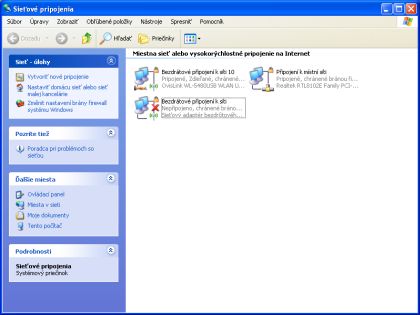
Then, on a computer connected to the Internet, open the Network Connections window (Start - Settings - Network Connections) and right-click the Local Area Connection icon and select Properties from the context menu. In the window that opens, select Internet Protocol (TCP/IP) and nastavte IP adresu napríklad na 10.10.0.1 a masku podsiete na 255.255.255.0.

On the second PC (the one we want to have internet), set IP adresu na 10.10.0.2 (môžete aj inú v danom rozsahu, 10.10.0.2 až 255), masku podsiete na 255.255.255.0, Východziu bránu (Gateway) na 10.10.0.1 a Uprednostňovaný server DNS na 10.10.0.1

Teraz stačí už len na PC pripojenom na Internet nastaviť jeho zdieľanie by right-clicking the icon of the network connected to the Internet in Network Connections, select Properties from the context menu. In the Properties window, select the Advanced tab and enable Internet sharing by ticking the boxes. It should go now. If not, try disabling the firewalls on both PCs.
Configure the logs in the multi category according to the instructions for the given program. Study the manual of the program, for example N1MM by s uvedenými IP adresami mal asi problém. Pre vnútorné siete sú vyhradené tieto rozsahy IP:
10.0.0.0 to 10.255.255.255
172.16.0.0 to 172.31.255.255
192.168.0.0 to 192.168.255.255
And two more important things - the computer with a direct connection to the Internet must of course be turned on in order for the other computer to have it. Whether the second computer is protected by a firewall and an antivirus program depends on the software you have on the main computer.