
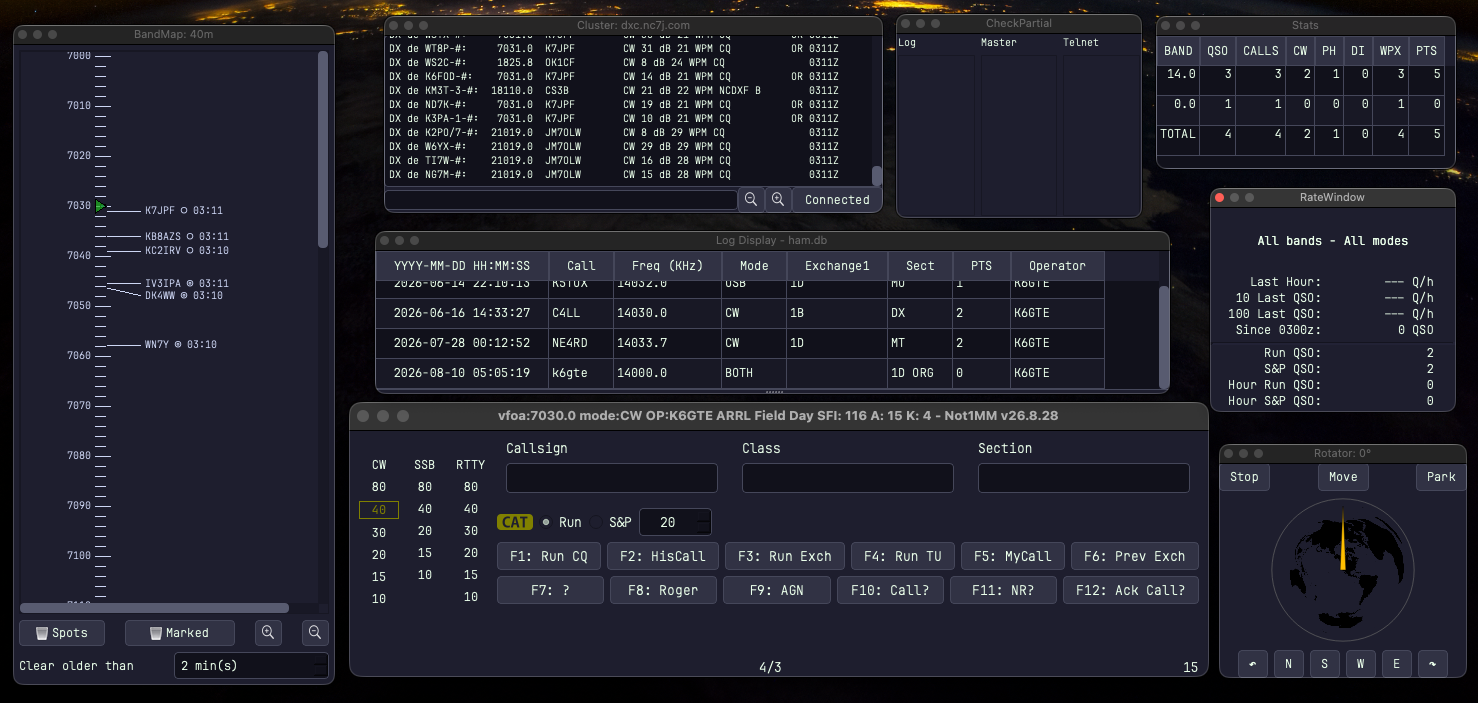
Not1MM is a race log for Linux and macOS developed by Mike Bridak, K6GTE. The program is written in Python 3.11+, the graphical interface is based on the Qt6 library and the data is stored in the SQLite database. It is distributed under the GPLv3 license and supports more than 60 races, according to the GitHub listing. Development is very active, the current version at the time of writing is marked 10/26/28.
You will read in the article
Origin: personal project of a pensioner
K6GTE does not hide that the program was created primarily for his own entertainment. After more than 35 years in telecommunications (GTE, Verizon, Frontier) he retired and was looking for some free time. As casual contestant he didn't find Linux racing software to suit him. He mentions though Penguin, which he considers robust and mature, but it wasn't the program for him.
The interface is openly inspired by the N1MM Logger+ program. However, the author emphasizes that Not1MM is not N1MM and is not intended for cooperation with it. It does send packets in N1MM format, but only for scoreboards built on Node-RED, for example. The primary platform is Linux and macOS, Windows and BSD are not directly supported by the author.
"The worlds #1 unfinished contest logger." According to the author's daughter Corina.
Video: Not1MM in an interview with the author
Episode 507 of the Linux in the Ham Shack podcast brings the motivation and inner workings of the program closer. This is an extensive interview directly with K6GTE. The recording is only audio, so you can listen to it while installing.
Installation using uv
The easiest way is to install with one command in the terminal: curl -LsSf uvx.sh/not1mm/install.sh | sh. The second option is to first install the uv package manager from Astral and run the program with the command uvx not1mm@latest. Permanent installation or update will be provided by uv tool install not1mm@latest.
uv downloads the latest version when it is first run, creates a virtual Python environment, adds the necessary libraries and caches everything. The first start takes about a minute, the others are quick, and the program checks for updates every time it starts.
A virtual environment has a practical advantage. On older distributions with Python 3.10, there is no need to change the system Python, just uvx –python 3.14 not1mm@latest. It is also possible to revert to an older version if the last update contains an error, for example uvx –python 3.11 not1mm==23.5.19. An alternative is a flatpak from GitHub Releases or installation via pipx.
Before installation, the following must be added through the distribution package manager:
- Python 3.11+ and PyQt6,
- libportaudio2,
- depending on the distribution, also libxcb-cursor0, libxslt-devel and libxml2-devel.
SQLite database
At the first start, the program creates the ham.db database. You can find it in the directory specified by the variable XDG_DATA_HOME, otherwise in ~/.local/share/not1mm. The configuration is located in ~/.config/not1mm.
One database contains station settings and any number of race logs. The author allows both approaches: one database for life with hundreds of races or a new database for each race. A new one is created via File > New Database, an existing one is opened via File > Open Database. Since it's a single file, backing up is easy.
Setting the station, CTY and MASTER.SCP
After the first start or after creating a new database, the Station Settings dialog opens. In addition to the call sign and operator, it contains the locator (4 to 6 characters), CQ and ITU zone, geographic coordinates, power, antenna and antenna height, and address data for the Cabrillo file header. They can be changed later via File > Station Settings.

Pred každými pretekmi sa oplatí aktualizovať súbory CTY a MASTER.SCP via FILE > Update CTY and FILE > Update MASTER.SCP. From cty.dat the program determines the country, distance and Azimut k protistanici. Vyhľadávanie značiek podporuje QRZ.com (requires paid subscription) also HamQTH. From QRZ.com, the program can also find a more accurate counter station locator.
CAT and CW keying
The program controls the transceiver via rigctld (default 127.0.0.1:4532) or flrig (127.0.0.1:12345). The README also mentions TCI protocol support. The connection status is shown by the color of the small transceiver icon: green means connected, red means not connected.
There are three paths available for CW:
- cwdaemon on port 6789, in versions for the serial or parallel port or for the K1EL chip,
- pywinkeyer on port 8000, the author's client for WinKeyer (on macOS SwiftKeyer),
- keying via CAT using rigctld if the radio supports it.
In the settings, the step of changing the speed with the PgUp/PgDn keys (1 to 10 WPM), the method of sending the report (5NN, 599 or ENN) and the alignment of the sequence numbers are determined. There are also abbreviated numbers A, N and T instead of 1, 9 and 0. Attention to older versions: Hamlib before version 4.6.3 had problems with CW transmission and speed setting.
DX cluster and band map

In the Cluster tab, the AR Cluster server, port and spot filter are set. In OPEN mode, spots come from spotters from all over the world. For a European station, it is more reasonable to limit them with a filter, for example set/dx/filter spottercont=eu.
The Bandmap window sorts spots and worked stations by frequency. When the CAT is on, it tracks the VFO, which is indicated by the green triangle, and the blue bar shows the width of the receive filter. Clicking on the spot will retune the radio and fill in the tag. Worked stations are gray, the icon behind the mark indicates the mode, and the marks [P] and [S] spot POTA and SOTA.
Older Python, according to the manual, does not have to catch up with the data flow from the cluster during busy races, and the bandwidth map breaks with reality. The solution is to run the program with newer Python via uv.
Not1MM windows and tools
The Check Partial window offers matches from three sources while typing a tag. Z MASTER.SCP displays candidates with at least three matching characters from the beginning of the tag, from its own log and from the last match spots of any length. Click to transfer the marker to the field.
The DXCC and Zone windows show the worked entities and CQ or ITU zones by band. When a mark is entered, they can automatically move to the corresponding line. The Rate window shows the connection rate.
The rotator window is still under development. It connects to rotctld at 127.0.0.1:4533 and displays both the current antenna azimuth and the bearing to the specified station. The Move button turns the antenna to the target, right click for a long way, Stop, Park and World Sides are also available.
Macros and ESM
Macros on the F1 to F12 keys are edited via File > Edit Macros in the system text editor. Each race and each mode (CW, SSB, RTTY) has its own file. Changes are reflected when switching between Run and S&P. Variables such as {MYCALL}, {HISCALL}, {SNT}, {EXCH}, {LOGIT} or {SPOT} are available, the # character inserts a sequence number.
For SSB, macros {VOICE1} to {VOICE10} are for radio voice memories via rigctld or WAV files, for example [cq] for cq.wav. The included NATO phonetic recordings can spell both the brand and the report. However, the author recommends replacing the default recordings with your own voice. A direct CAT/CI-V command can also be sent to the radio with the RI: prefix.
The ESM (Enter Sends Message) function is enabled in Configuration Settings > Options. The Enter key sends the macro based on what is filled in, and the space bar moves between fields. In Run mode it will send CQ, after entering the mark its mark with exchange, in case of empty exchange AGN and finally TU QRZ with connection write. In S&P, it will send its own brand, in the absence of an AGN exchange, and after entering it, its own exchange with a note. The function keys must have the same role in both modes.
Digital fashions in Not1MM
Connections from WSJT-X are intercepted by the program via UDP multicast at the address 224.0.0.1:2237, which works without further configuration. It tracks connections from Fldigi via UDP to 127.0.0.1:9876. It sends the F1 to F12 keys to fldigi via the XMLRPC interface, which switches fldigi to broadcast, sends the text, and connects ^r to return to receive. XMLRPC must be turned on in fldigi, Generic Contest must be selected in CONTESTS > General and Text Capture Order must be set to CALL Exchange.
Multi-Multi with renfield server
The current focus of development is the operation of Multi-Multi. A companion project, renfield, is needed, a lightweight terminal application that ideally runs on a separate computer on the same network, such as a Raspberry Pi. It manages the database, assigns sequence numbers, checks for duplicates, and generates Cabrillo.
On racing computers, a connection to the server is selected in the Group tab, and one station as the main station informs the server of the race it is running. If there is a MULTI-OP operator in the race settings and a transmitter category other than ONE or SWL, Not1MM will request the numbers and duplicate check from renfield. Renfield can also serve as an automatic log backup for the solo operator. At the same time, the author openly admits that he has no practical experience with Multi-Multi, so it is good to try the system before sharp deployment.
Cabrillo, ADIF and conversion of multipliers
The score is continuously updated after each entry. However, when a mistyped connection is corrected, the multiplier can be added or removed. The Recalculate Mults function in the Misc menu is used for this, after which the Cabrillo and ADIF files must be generated again.

The output for the evaluator is created via File > Generate Cabrillo and File > Generate ADIF. The files are saved in the home directory with a name in the form brand_race_date_time with the extension .log or .adi.
Conclusion
Not1MM je pre linuxových contestmanov jednou z mála alternatív k programom viazaným na Windows. The N1MM-like interface makes the transition easy, and functions like ESM, Check Partial, band map or WSJT-X support and fldigi cover common racing operation. The author humorously admits that he is "testing in production", so before an important race it is worth trying the program and having a rollback command at hand. The source code, PDF user manual and changelog are freely available at GitHub project mbridak/not1mm.