
V článku sa dočítate
New version of popular amateur radio logging software brings QSL card printing and an expanded Band Map
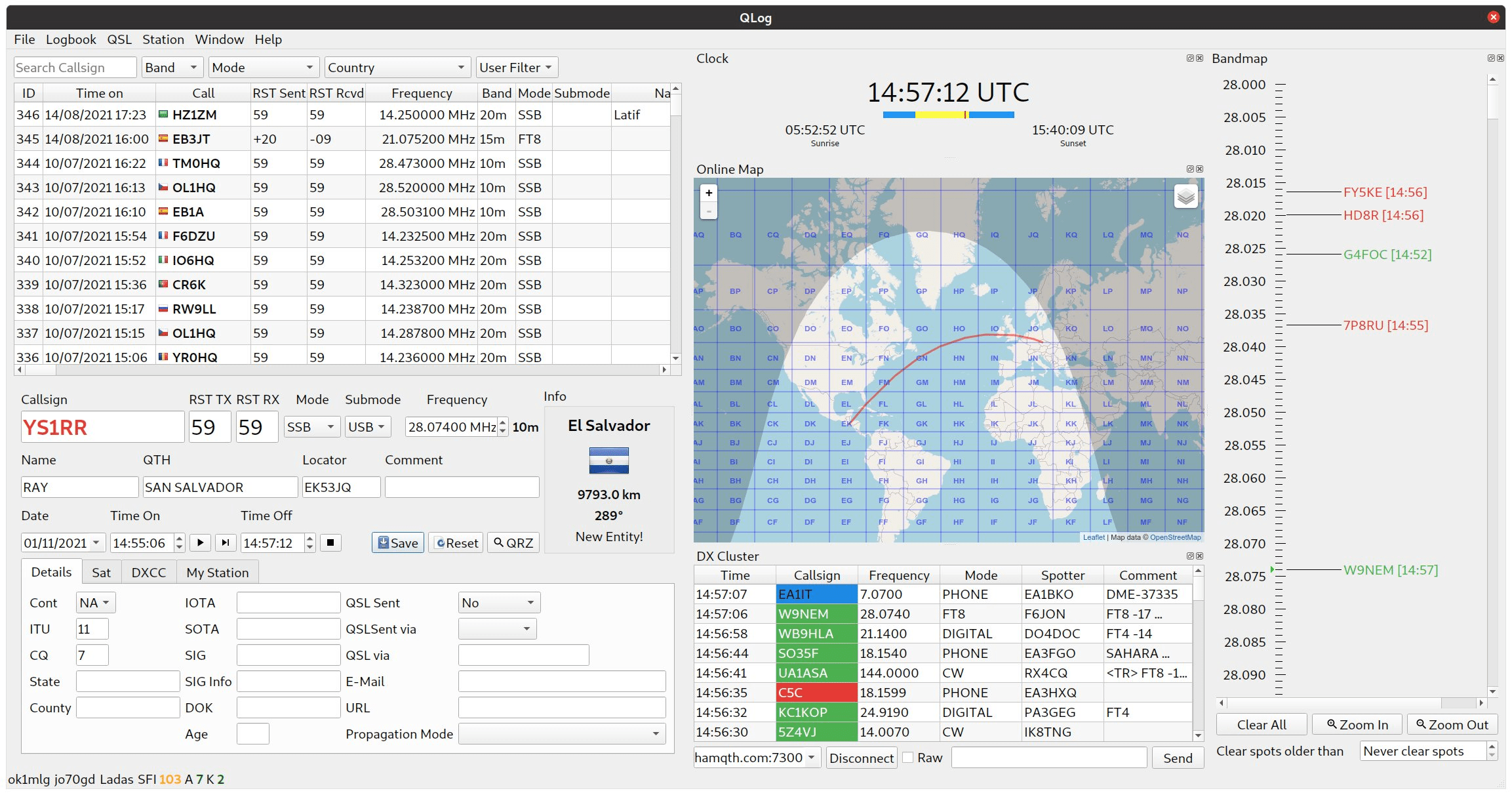
QLog is an open-source amateur radio logging program for Linux and Windows, developed by Ladislav Foldyn, OK1MLG. The project originated as a fork of the original QLog by Thomas Gatzweiler and has been independently developed by OK1MLG since 2021. The source code is available on GitHub under the GPL-3.0 license. The current released version is v0.50.0 (April 2026), with a branch of v0.51.0 actively under development.
What QLog brings to radio amateurs
QLog focuses on everyday DX traffic, not contesting. However, it covers everything that operátor pri bežnej prevádzke potrebuje: riadenie transceivera, DX cluster, Band Map, integráciu s LoTW, eQSL, QRZ.com, Club log, HRDLog.net, Cloudlog and Wavelog, integráciu s WSJT-X a Fldigi, CW keyboard, online and offline map, station profile management and statistics. The main advantage is the absence of ads, user tracking and hidden telemetry - QLog is simply free and open.
Transceivers are controlled via Hamlib (all supported models), Omnirig v1 and v2 (Windows), TCI and FLRig. Rotators are controlled via Hamlib. Passwords and security tokens are stored in native OS storage: LibSecret/GnomeKeyring/Kwallet on Linux, Windows Credential Store on Windows and macOS Keychain on Mac. The database backend is SQLite.
What's new in version v0.51.0
Printing QSL cards
Version v0.51.0 brings the basic functionality of printing QSL cards directly from the application. This is the first implementation of this feature in QLog - the details of the layout and customization options will be further developed in future releases.
Band Map Extensions
Band Map (pásmová mapa) dostala v tejto verzii viacero rozšírení. Pribudlo zobrazenie IBP frekvencií (International Beacon Project) priamo v Band Mape, čo umožňuje okamžite vidieť, kde na pásme sú aktívne majáky. Nová funkcia bandmap Guide (sprievodca pásmom) pridáva vizuálne vodítko s odporúčanými frekvenčnými úsekmi pre jednotlivé prevádzkové typy podľa IARU plánu pásiem – nastaviteľná v Settings. Z IBP markerov and SOS markerov je možné priamo naladiť transceiver dotykom na položku v Band Mape. V Rig Widgete sú nové štítky pre Emergency, IBP and Bandmap Guide. Sprievodca pásmom je možné vybrať aj cez Activity Manager.
Import, awárdy and LoTW
Verzia pridáva import DXCC kreditov z LoTW (na základe PR od @aa5sh and @foldynl). Do award sekcie pribudli WAAC (Worked All American Continents) and WAIP (Worked All Italian Provinces), vrátane tlačidla na otvorenie pravidiel diplomu priamo z aplikácie. Pri importe je možné nastaviť predvolený stav odoslania QSL karty (QSL Sent Status default). Nová funkcia StartUp ADI file Import umožňuje automaticky načítať ADIF súbor pri každom štarte aplikácie – vhodné napríklad pri pravidelnom importe z externého zariadenia.
Settings and customization
V sekcii Settings pribudla možnosť definovania vlastných farieb pre DXCC statusy, čo umožňuje vizuálne odlíšiť confirmed, worked a chýbajúce entity podľa vlastných preferencií. V logbooku je k dispozícii nový virtuálny stĺpec Mode/Submode, ktorý kombinuje mód a submód do jedného stĺpca pre prehľadnejší výpis.
Map and visualization
The online map has received civil, nautical and astronomical twilight - operators working in bands sensitive to the gray line (80 m, 160 m, 6 m) will appreciate the direct display of the current twilight position on the map in real time.
Bug fixes
| Repair | Description |
|---|---|
| FT-950 VFO-B jump | Workaround for the FT-950 unexpectedly jumping to VFO-B |
| ADIF export grid square | Fixed export of too long grid locator |
| Shutdown synchronization | Fixed synchronization of station and device disconnection when exiting the application |
| QRZ callbook lookup | Fixed freeze when searching for some callsigns |
| ADIF multiline fields | Fixed incorrect interpretation of multi-line fields during import |
| Editing a POTA entity | Fixed application crash when editing POTA entity |
| HTML in the membership label | Fixed incorrect HTML rendering in the membership tag |
| WSJTX tx_mode | Fixed tx_mode value in WSJT-X stateful transmission |
The source code v0.51.0 is signed (GitHub Source code signing, issue #1018), which increases the trustworthiness of the distribution for installations from source.
Where to download QLog
For Ubuntu Linux, QLog is available via the PPA repository:
sudo add-apt-repository ppa:foldyna/qlog
sudo apt update
sudo apt install qlog
For Fedora, RPM packages are available on the GitHub Releases page. A Flatpak package with TrustedQSL integrated is available on Flathub (io.github.foldynl.QLog). For Windows, an installer package is available on GitHub Releases (github.com/foldynl/QLog/releases). macOS users are referred to the @aa5sh fork on GitHub.
Video: QLog in practice
Video z kanála „Ham Radio and Linux“ (január 2025) prehľadne predstavuje QLog ako logovací program pre Linux and Windows – od inštalácie po každodennú prevádzku vrátane Band Map, DX clustera and integrácie s LoTW:
Summary
Verzia QLog v0.51.0 posúva projekt o ďalší krok vpred. Printing QSL cards uzatvára jednu z dlho očakávaných funkcií, rozšírený Band Map s IBP frekvenciami a Bandmap Guide je praktickým nástrojom pre operátorov sledujúcich šírenie, a import DXCC kreditov z LoTW zjednodušuje sledovanie postupu ku DXCC awardám. Projekt zostáva bez reklám, sledovania a poplatkov – pre rádioamatéra na Linuxe aj Windows ide o plnohodnotnú alternatívu komerčných logovacích programov.
QLog si určite zaslúži pozornosť. Prešiel som naň z Log4OM, ktorý bol neskutočne pomalý and portable aktivity ktoré ma najviac zaujímajú boli niekedy zložito zadatelné. Qlog je svižný, vie dobre komunikovať s webovými ham službami and spoluautor Ladislav OK1MLG vychádza v ústrety. Môj prechod nebol úplne ľahký, musel som zmeniť niektoré zvyky / zlozvyky z LOG4OM, ale oplatilo sa mi to.
Ja som mal Log4OM, lebo som vtedy nenašiel vhodný log pre spojenia na QO-100. Fungoval, ale tá pomalosť je veľký problém.
QLog som síce nedokázal rozbehať pre spojenia na QO-100, ale na bežné logovanie sa mi pozdával. Rýchly, prehľadný, stabilný. Najmä ten prehľad by som ešte vyzdvihol, lebo niektoré logy sa predháňajú vo farbičkách, množstve okienok, informácií,… and nakoniec je to neprehľadné. QLog by som považoval v súčasnosti za veľmi dobrého kandidáta na hlavný staničný log pre bežného rádioamatéra.
Ahoj, diky za tip. Po delsi dobe me nejaky log zaujal natolik, ze zacinam uvazovat o prechodu z obstarozniho HRD. Fakt pekny, Lada si zaslouzi velkou pochvalu and uznani…