
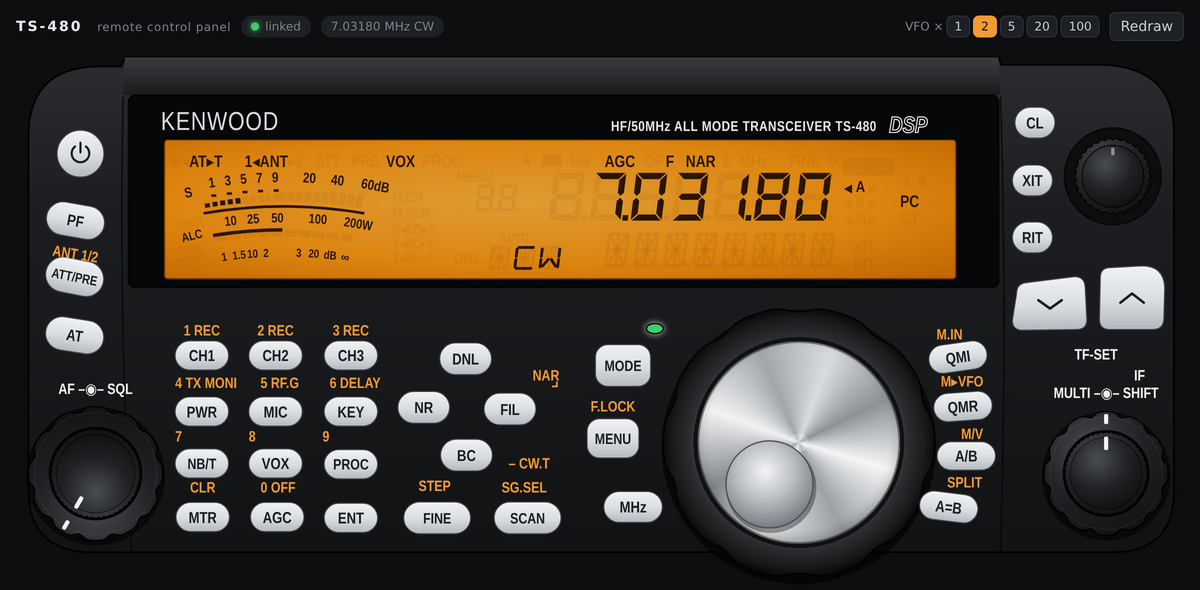
The TS-480 Panel project by radio amateur OK1HRA brings an interesting possibility to replace the original control panel of the Kenwood TS-480 transceiver with a web interface. It is an open-source software solution written in Python that allows you to control the radio via a web browser on a computer, tablet or smartphone.
It is not a complete system of remote radio operation. The TS-480 Panel concentrates on one specific task – reproducing the functions of the original control panel. Audio transmission, VoIP and remote voice traffic are not included. These functions must be distinguished from the capabilities of standalone RemoteQTH solutions.
You will read in the article
How the TS-480 Panel works
The software communicates with the transceiver head unit via the same serial interface used by the original control panel. So it does not use the standard CAT control as the primary communication channel, but directly the data line between the panel and the radio.
On the computer side, a Python server runs using the aiohttp and pyserial libraries. The web browser connects to it via the WebSocket protocol. The server processes the communication with the radio, decodes the data intended for the display and transmits the commands from the web interface back to the transceiver.
The goal is to imitate the original panel as faithfully as possible. The web interface shows data from the radio display and allows you to use buttons including long presses, the VFO tuning control, the MULTI control and the RIT/XIT functions. AF, SQL and IF SHIFT controls are also available.
Three modes of operation
The project supports three ways of use.
Stand-alone mode allows you to completely replace the original panel. The physical control panel must be disconnected and its function is taken over by the USB-UART adapter connected to the computer. The radio is then controlled exclusively via a web browser.
The mode next to the original panel allows you to use the web interface at the same time as the physical panel. A software bridge is used for this purpose, which mediates communication between the radio and the original panel. The web interface displays the same data and its commands are inserted into the communication line. Both panels can thus be used simultaneously.
The simulator allows you to run the web interface without a connected transceiver. It uses a built-in radio model, so it is suitable for getting familiar with the controls and testing the user interface.
Hardware connection

An RJ12 connector and a USB-UART converter with 5 V TTL logic levels are used to interface with the radio. Communication takes place at a rate of 57,600 Bd, with eight data bits, no parity and two stop bits.
Wiring uses GND, RDO and TDO signals. The AF audio output can be fed to an external amplifier or sound card, but the TS-480 Panel itself does not process sound. The +8 V power pin on the RJ12 connector does not connect.
It is important to use the correct type of converter. The interface works with 5 V TTL levels, not with the classic RS-232 serial interface. Connecting a converter with RS-232 voltage levels can damage the radio's electronics.
Installation and control
Python 3.10 or later is required to run the project. Dependencies are pyserial and aiohttp libraries. After downloading the repository and installing the required packages, the server is started with the command python -m ts480.server.
The user interface will then open in the browser. The buttons can be activated by clicking or touching, a long press is interpreted as a hold for more than one second. Controls can be changed by dragging the mouse or using the wheel. The arrow keys can also be used to tune the VFO frequency.
The project also includes tools for diagnosis and analysis of communication, for example monitoring data traffic between the panel and the radio. This can be useful for further development and investigation of the transceiver protocol.
Security and project status
By default, the web server is available locally. If made available throughout the local network, any user who opens the page can control the radio, including broadcasting. Therefore, the author recommends using only a trusted network or a secure SSH tunnel.
The project is published under the GPL-3.0 license. According to the information in the repository, it has been verified on the Kenwood TS-480HX transceiver, including button functions, tuning, display and controls. However, some less used functions remain untested.
The TS-480 Panel is an interesting solution for radio amateurs who want to control the Kenwood TS-480 via a modern web interface or experiment with its communication protocol. Its main advantage is the replacement of the original panel without the need to use the classic CAT control. However, it should be remembered that this is not a separate system of remote operation with audio transmission.
Source code and documentation: github.com/ok1hra/ts-480-web-panel
Frequently asked questions
1. Is the TS-480 Panel system for remote operation via the Internet?
Not in the sense of a complete remote system. It allows you to control the radio panel through a web browser, but does not provide audio transmission or VoIP itself.
2. Does the project communicate with the radio via the CAT interface?
Nope. The main communication takes place directly through the data line between the original panel and the TS-480 main unit.
3. Can I use the web panel and the original panel at the same time?
Yes. For this purpose, the bridge mode is used, which mediates the communication between the radio and the physical panel and at the same time allows entering commands from the web interface.
4. What USB-UART converter do I need?
5 V TTL logic level converter. A classic RS-232 converter with voltage levels of ±12 V must not be connected to the data pins of the radio.
5. On which systems can the TS-480 Panel be run?
Python 3.10 or later and the pyserial and aiohttp libraries are required. Specifically, the project documentation does not specify minimum versions of operating systems.