
Väčšina rádioamatérov exportuje ADIF súbor a nechá ho ležať v priečinku. Srbský operátor Duca YT3MD has created a web tool that gets a lot more out of this file. yt3md.com accepts an ADIF file (.adi or .adif) and generates from it a so-called QStOry – extensive visual analysis of the log with maps, graphs, statistics and comparisons. The output covers dozens of aspects of operation, from propagation conditions to antenna recommendations to the carbon footprint of links. As of October 2026, the tool has generated 303 QStOries.
You will read in the article
Processing in the browser

The ADIF file is not sent anywhere. The entire processing runs locally in the user's browser - not a single byte of the log goes to the server. For operators who work with sensitive data (callers, locators, frequencies), this is a significant difference compared to cloud services. Just open the page, select the file and wait for the result.
Map and distances
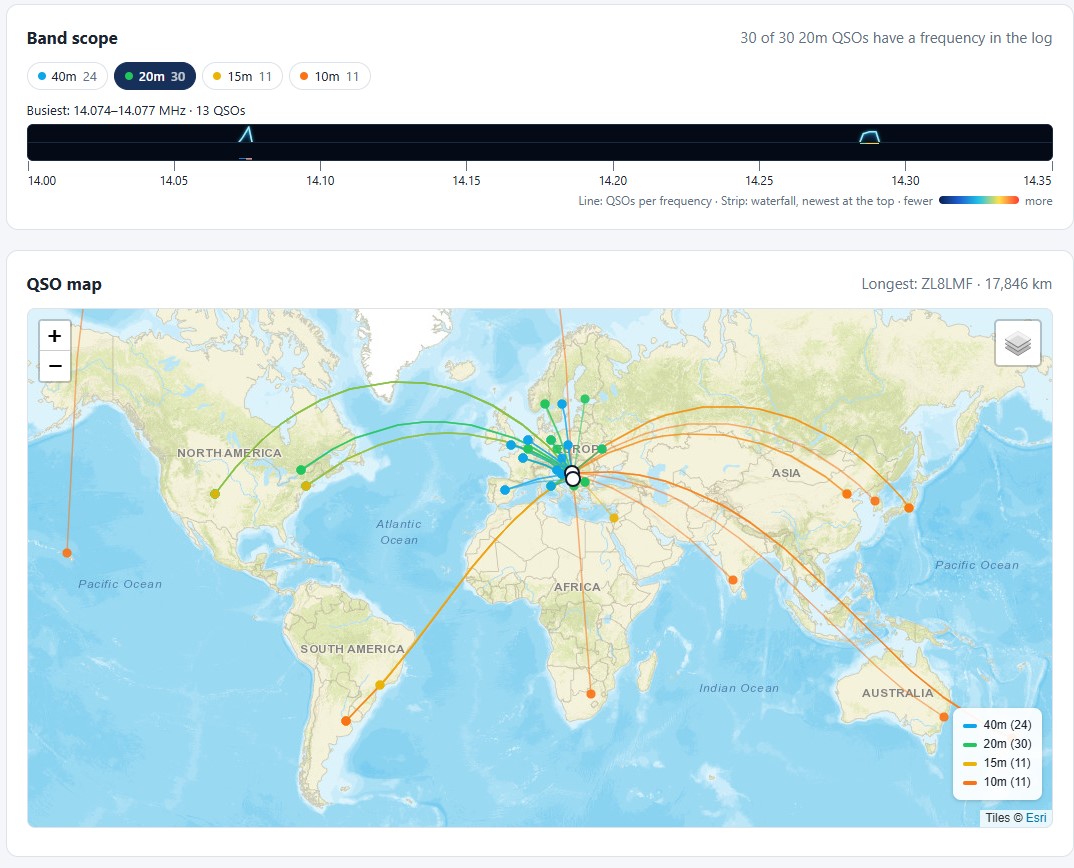
The central part of QStOry is a map with orthodromic connections between the operator's locator and the stations being worked on. For each connection, the tool calculates the distance along the great circle path between the centers of the grid locators and the time of flight of the signal in one direction at the speed of light. In the sample log with 76 connections, this represents a total distance of 345,372 km (8.62 times the circumference of the Earth), with ZL8LMF's longest route reaching 17,846 km. The total time of the signal in the air was 1.152 seconds.
Below the map, the band scope is displayed with the distribution of connections by frequency. In the sample log, the busiest section was 14.074-14.077 MHz with 13 connections, which corresponds to the main FT8 frequencies on 20m. Map tiles use Esri and OpenStreetMap data.
Competitive analysis
The tool recognizes competition traffic and evaluates pace, pauses and strategy. For each hour, it displays the number of connections by bands, the division into running and search & pounce, and identifies optimal and lost moments. In the sample log, the best performance was 24 connections in 60 minutes (mostly on 20m), a total airtime of 5 hours 43 minutes in three sessions, with 69 multipliers (25 zones and 44 countries). The tool also evaluates SO2R traffic - in this case, it did not detect it, since the connections always followed on one band.
Signal reports and dissemination

QStOry analyzes both received and sent reports. For digital modes, it works with SNR in decibels, for phone with RST values. In the sample, the average FT8 reports sent were -6.2 dB and received -8.1 dB. The rose propagation diagram shows the distribution of connections by azimuth and compares it to the expected distribution based on the density of radio amateurs in the world. A table of band openings by continent with time data in UTC is also included.
SOTA, POTA and WWFF
If the ADIF file contains a SOTA, POTA or WWFF activation, the tool will automatically recognize it and display the official name, height and point value of the peak or park. In the sample log, he identified the activation of SOTA YU/CS-011 Jastrebac (1,313 m a.s.l., 6 points) with 26 connections and 2 summit-to-summit connections.
Export and share

The whole QStOry can be exported as a PDF with your own notes and up to six photos. For social networks, the tool generates square graphics optimized for Instagram, X and Facebook. Even during export, the processing remains on the client side - the PDF is generated directly in the browser.
YT2ET, YT2TOR, DD5LP, W6MOQ and CT1ETE collaborated on the development of QStOry. The tool is free and does not require registration. Project address: yt3md.com.