
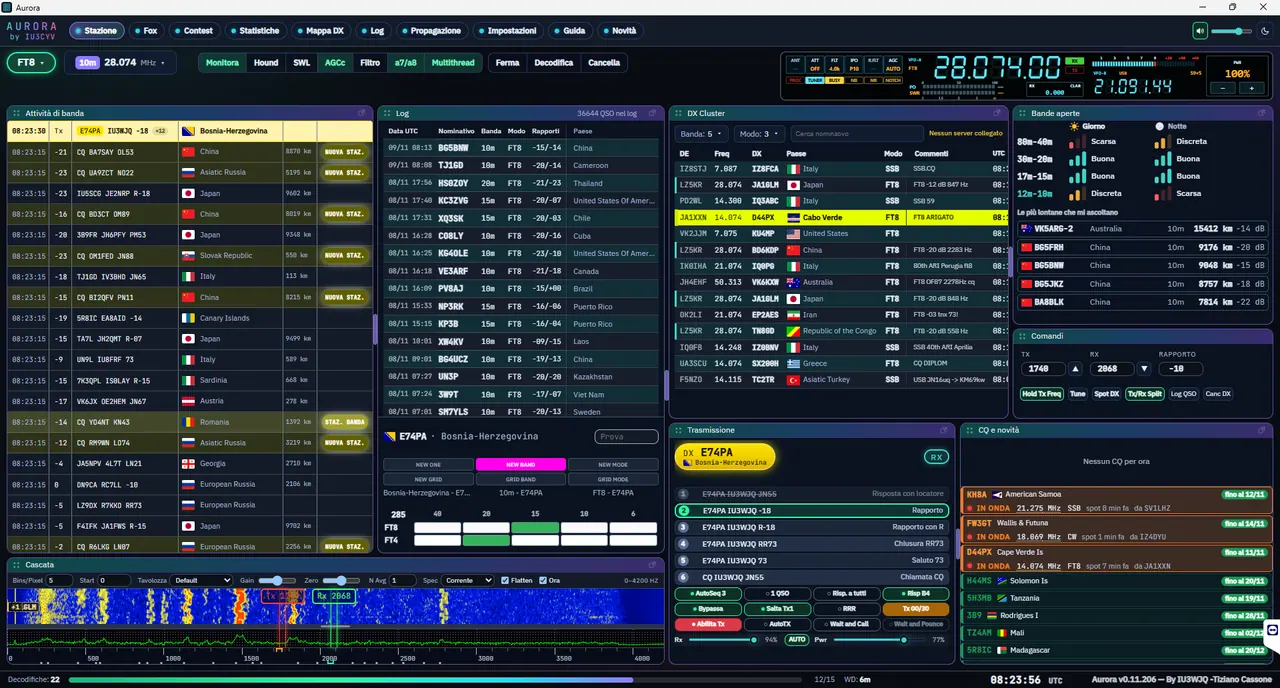
Kto prevádzkuje digitálne módy, pozná to: jeden program na dekódovanie, ďalší na logovanie, tretí na cluster a mapu a k tomu ešte pár pomocných nástrojov. Aurora sa to snaží zjednotiť. Je to bezplatná stanica pre digitálne módy s vlastným vstavaným enginom, ktorá dekóduje, vysiela a vedie spojenia z jedného okna.
Authored by Tiziano Cassone, IU3WJQ. The program is open source under the GPL-3.0 license and does not require an account. According to the user guide in version 0.11.232 dated November 10, 2026, Aurora has its own engine for FT8, FT4, JT65, JT9, JT4, Q65 and MSK144.
You will read in the article
Who is Aurora intended for?
The intention is clear: a modern, readable and automatable digital station. The author assigned it to several groups of operators:
- by a common FT8/FT4 operator – a clear list of messages, colors by type and double-click calling,
- for DX and diploma hunters – DXCC card, list of searched stations and alerts for new countries,
- To DXpeditions - the Fox page to handle the pileup,
- remote controlled stations - control from a phone in the home network,
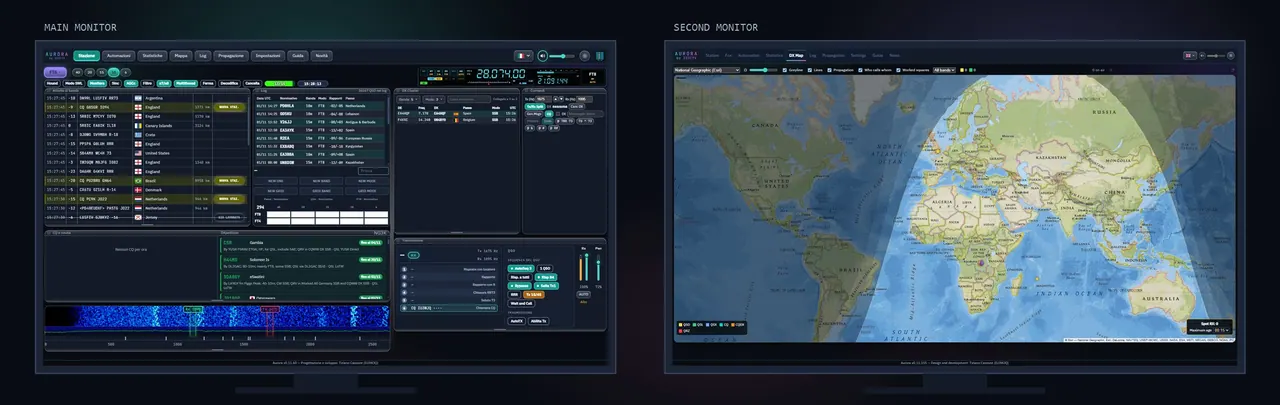
- assemblies with multiple monitors - panels, map and radio display can be expanded to multiple screens.
What's in the installer and must-haves
Right from the start, you will be pleased that you don't need to install anything else. Engine, cty.dat database and Hamlib library are part of the installer. Aurora does not read data from JTDX or WSJT-X.
The requirements are simple: Windows 10/11 64-bit, newer 64-bit Linux or macOS, radio sound card as input (and output when broadcasting) and CAT via Hamlib or OmniRig. The network is only needed for online services, updates and access from the phone. Attention, the version for Linux is created from the same code, but the author has not tested it and does not support it.
After installation, the first launch wizard will ask you for the tag and locator. Then just select the audio input, select Hamlib or OmniRig with the radio model in Settings › Radio and press Monitor. Settings › Support › "Check everything" is used to check the station, radio, sound, clock and phone.
Radio, SDR and logs
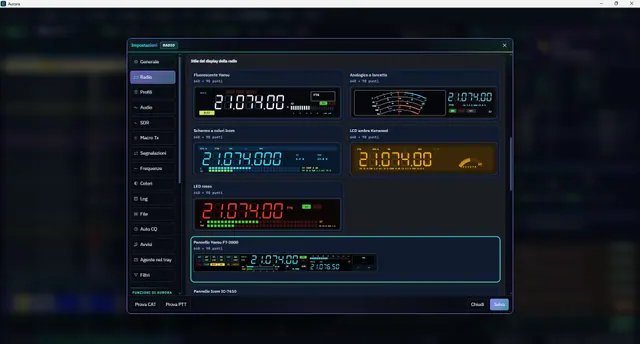
Aurora controls the radio via Hamlib (300+ models) or OmniRig and allows multiple named radio profiles to be saved. For SDR zariadenia pribudla podpora TCI for SunSDR/ExpertSDR and ANAN with Thetis. If you are not using CAT, select "None" in the settings. Aurora is still decoding and broadcasting and you tune the radio manually.
You can post QSOs directly to Wavelog/Cloudlog, ClubLog, QRZ.com and LoTW (via TQSL). UDP integrations, N1MM XML and export to ADIF are also available.
Waterfall, map and phone
Waterfall uses WebGPU (with replacement via WebGL2), displays Rx/Tx bars and spots from the DX cluster, and its width follows your radio's filter. GridTracker-style DX map showing gray line, twilight, Sun and Moon, stations in operation and promotion from PSK Reporter.
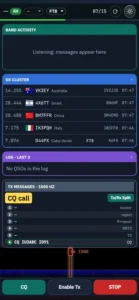
You can detach any panel or map into a separate window and move it to the second monitor. One button brings them back. The station can be controlled via a web interface (PWA) from a phone or tablet in the same network. Pairing is done with an 8-digit code or QR, and each device can be removed from the list at any time.
Fox and Hound, UltraFOX and contest
The standalone Fox site is compatible with WSJT-X 3.3. Hound queue, up to five stations in one broadcast, auto-recorded connections and Fox verification via OTP - all on one screen. As a Hound, Aurora tags DXpeditions with the FOX label and knows how to skip frequencies.
Experimental UltraFOX sends all stations of the period in a single wide signal (750–2260 Hz, approximately 13 s). However, it is in testing and does not yet support digital signature. The Beta page Contest was also created, with 17 ready-made rule sets (eg WW Digi, ARRL Digi, Field Day, VHF) and export to Cabrilla, EDI and ADIF.
Automation with fuses
Automatic broadcasting is disabled by default. Automations start in dry-run mode, have limits, a "dead-man" fuse and an always-visible STOP TX button (the Esc key works the same way). The list of searched stations will help: Aurora marks the call and can answer it herself within the set limits. A new DXCC country or new band will also open a flashing tab with sound.
The background also includes automatic diagnostics, setting backup, signed updates and an interface in six languages (Slovak is not among them).
Conclusion
Aurora is not just another decoder. It's an effort to combine decoding, logging, DX information and control into one clear environment, free and open source. If you want to try something other than the classic pair of JTDX and WSJT-X, just download the installer and press Monitor. The project and source code can be found at GitHub, documentation and download at aurora.iu3wjq.com. You can report problems and ideas directly to the author via GitHub Issues. Good luck and see you on the bands!