
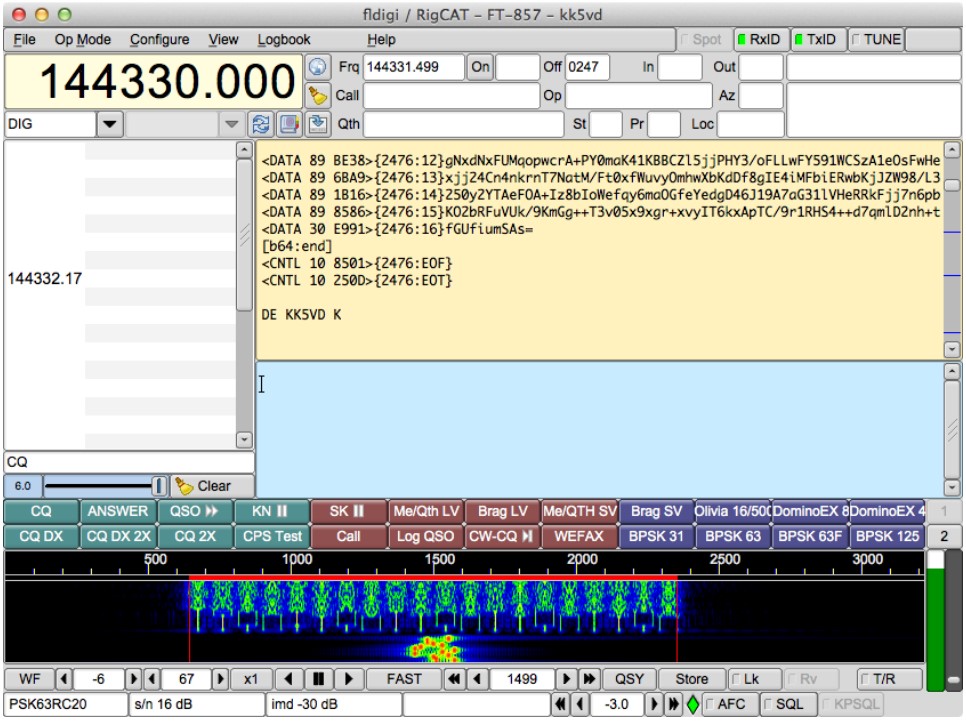
Fldigi (short for Fast Light Digital) is a free and openly available program that turns a standard computer sound card into a simple bidirectional data modem. The software was created by Dave Freese, W1HKJ, along with other contributors including Murray Greenman, ZL1BPU, and Stelios Bounanos, M0GLD; the first release dates back to 2007. For his contribution to amateur and emergency communication, Dave Freese received in 2014 the Dayton Hamvention Technical Excellence Award.
In the article you will read
What is FLDigi?
FLDigi je multi-mode program – dokáže obsluhovať mnoho populárnych digitálnych módov bez potreby prepínania medzi rôznymi aplikáciami, takže operátor only needs to learn to operate one program. The software works in conjunction with a standard HF SSB transceiver, with the computer sound card serving as the main means of input from the radio and output to the radio (audio frequency signals), while radio control (frequency change, PTT) prebieha zvyčajne cez sériový port alebo Hamlib.

The program is built on a lightweight graphical library FLTK and languages C and C++, allowing it to run on a wide range of operating systems: Windows (from Windows 2000), macOS, Linux, FreeBSD, OpenBSD, NetBSD, and Solaris, as well as on a variety of processor architectures including Raspberry Pi. The current stable version is 4.2.05. FLDigi is licensed under GNU GPL version 3.
Vďaka sofistikovanému digitálnemu spracovaniu signálu vnútri počítača dokážu digitálne módy ponúknuť výkon, aký sa hlasovou prevádzkou (a v niektorých prípadoch ani Morseovkou) nedá dosiahnuť – zníženú šírku pásma, lepší pomer signál-šum a nižšie nároky na vysielací výkon.
Which digimodes does it support?
FLDigi supports an exceptionally wide range of modes. Among them are BPSK and QPSK at speeds of 31, 63, 125, 250 (both variants), as well as 63F and 500 (only BPSK); PSKR at speeds of 125, 250, and 500; CW at speeds from 5 to 200 WPM; DominoEX 4, 5, 8, 11, 16, and 22 (also with FEC); FSQ; Hellschreiber in variants Feld Hell, Slow Hell, Hell x5/x9, FSKHell(-105), and Hell 80; IFKP; MFSK 4, 8, 11, 16, 22, 31, 32, and 64 (most with image transmission support); MT63 at widths of 500, 1000, and 2000 Hz; Olivia in various combinations of tones and bandwidths; RTTY in multipletransmission speeds, shifts, and data bit counts; THOR 4, 5, 8, 11, 16, and 22; and Throb/ThrobX 1, 2, and 4.
In addition, FLDigi includes two special, non-transmitting modes – WWV (receiving time signal for sound card calibration) and Freq Analysis (measuring the frequency of the received carrier signal with an accuracy of two decimal places in Hz).
| Category | Examples of modes |
|---|---|
| PSK modes | BPSK/QPSK 31, 63, 125, 250, PSKR |
| MFSK family | MFSK, DominoEX, THOR, Olivia, IFKP |
| Classic modes | RTTY, CW (5–200 WPM), Hellschreiber |
| Wideband modes | MT63 (500/1000/2000 Hz) |
| Calibration/analytical | WWV, Freq Analysis |
The program also supports automatic recognition and tuning of the mode using the RSID (Reed-Solomon Identifier) signal – a short burst of MFSK modulation transmitted before the data signal, which allows the recipient to automatically recognize and set the correct mode among over 270 digital modes. This feature is also supported by several other programs (such as DM780, MultiPSK), ensuring mutual compatibility between different software.
Video: FLDigi – setting up PSK31
Installation and basic settings of FLDigi
Upon first launch, FLDigi performs a series of measurements to determine the speed of the computer's processor. On a very slow processor (below 700 MHz), it is advisable to check if the Slow CPU option is enabled in the Configure → Misc → CPU menu, as the decoding strategy of some modems in this mode consumes fewer processor cycles.

Basic settings are performed through the Configure → Operator menu, where the operator's name, call sign, and locator are entered. If the computer has multiple sound cards, the correct one is selected through Configure → Sound Card, Audio Devices tab. Radio control is set via Configure → Rig control – pri kľúčovaní PTT cez sériový port je potrebné v záložke Hardware PTT zvoliť Use serial port PTT, príslušné zariadenie a riadiacu linku (v prípade pochybností je vhodné zaškrtnúť RTS aj DTR). Pri CAT riadení cez COM port sa v záložke Hamlib check Use Hamlib, select the radio model from the list, and set the serial device, baud rate, and RTS/CTS options; if PTT is also to be controlled via CAT, check PTT via Hamlib command as well. After each of these changes, it is necessary to press the Initialize button. If the radio supports CAT but is not yet directly supported by Hamlib, it can be controlled via FLDigi's own system called RigCAT.

Individual modems can be set up individually through the multi-tab dialog Configure → Modems - for example, it is advisable to set the so-called 'secondary text' for modes DominoEX and THOR (such as a custom call sign and locator), which is automatically transmitted whenever the transmitter runs out of prepared text to send. This section also sets the speed and shift of the RTTY modem, although the default values usually suffice for regular operation. Finally, the configuration needs to be saved via Configure → Save Config.
The sound level settings are done through the operating system's sound card controls - the output volume (Master Volume, Wave Out) is set so that when the TUNE button is pressed, it reaches the desired output power of the transmitter, while the input level (Recording/Line-In) is set so that a dark blue noise is visible in the waterfall - if the level is too high, the diamond indicator in the bottom right corner turns red and decoding performance deteriorates.
Using FLDigi

The main window of the program consists of three panels: the receiving panel (light color), the transmitting panel (light blue), and the waterfall panel (black). Above the waterfall is a strip of macro buttons (F1–F12) and below it a strip of control buttons. The receiving panel displays the decoded text in black, while the operator's transmitted text appears in red, making the panel function as a complete record of the entire QSO. The operator writes the text intended for transmission into the transmitting panel - the panel must first be activated (gained focus) by clicking into it.
In the waterfall panel, it is possible to switch between three views: WF (classic waterfall of signal strength against frequency over time), FFT (spectral display of average signal strength), and SIG (oscilloscope display of raw audio signal). Tuning is done by clicking on the signal directly in the waterfall - yellow tuning markers follow the mouse cursor, and after a left click on the center of the signal, they change to red, which will attempt to automatically track the signal. The program has its own software 'VFO' that operates in transceive mode - the transmitted signal isautomatically tuned precisely to the received frequency, so the response is always in tune with the counterpart.

The RSID function (button in the control bar) enables automatic mode recognition and tuning on reception; as long as the signal is not identified or until the function is turned off, text reception is not possible. An important note is that RIT (Clarifier) must not be used in digital modes – with active RIT, retuning would be necessary after each 'over', and it would also cause the remote station to shift in frequency along with you.
Makrá (Function Keys F1–F12) poskytujú preddefinované prevádzkové funkcie ako odoslanie CQ, odpoveď (ANS), začiatok „over“ (QSO), koniec „over“ (BTU) a ukončenie spojenia (SK). Tieto tlačidlá je možné pravým kliknutím upraviť a využívajú štandardné skratky ako , ktoré sa pri odoslaní automaticky nahradia príslušnými údajmi. K dispozícii sú štyri sady po dvanástich makrách. Program obsahuje aj vstavaný denník (View → logbook), do ktorého sa dá pri vyplnenom poli Call automaticky dohľadať posledné QSO s danou stanicou vrátane mena a QTH.
Most digital modes do not require high transmission power since the reception software is very sensitive; several modes (PSK31, MT63) also require high linearity of the transmitter, so it is recommended to keep the power below 30% of maximum. The output power is adjusted using the TUNE button, which transmits a continuous tone at the current audio frequency.
Summary
FLDigi predstavuje jeden z najkomplexnejších bezplatných softvérových modemov pre rádioamatérske digitálne módy – od klasického PSK31 a RTTY cez robustnejšie MFSK varianty (Olivia, DominoEX, THOR) až po CW dekodér a širokopásmový MT63. Vďaka multiplatformovej podpore (Windows, macOS, Linux, BSD systémy vrátane Raspberry Pi) a možnosti prepojenia s Hamlib alebo RigCAT je vhodný tak pre bežnú KV prevádzku, ako aj pre núdzovú komunikáciu (NBEMS) v spolupráci s organizáciami ako ARES, RACES či MARS. Kompletnú dokumentáciu, aktuálne verzie a doplnkové programy zo série FLDigi Suite (FLRig, FLMSG, FLAMP, FLARQ) nájdete priamo na w1hkj.org, zdrojový kód je dostupný na GitHube v repozitári w1hkj/fldigi.
The last PSK QSO I made was in 2019, now only FT8 is on the band. RTTY might still be working, but other modes are minimally active.