
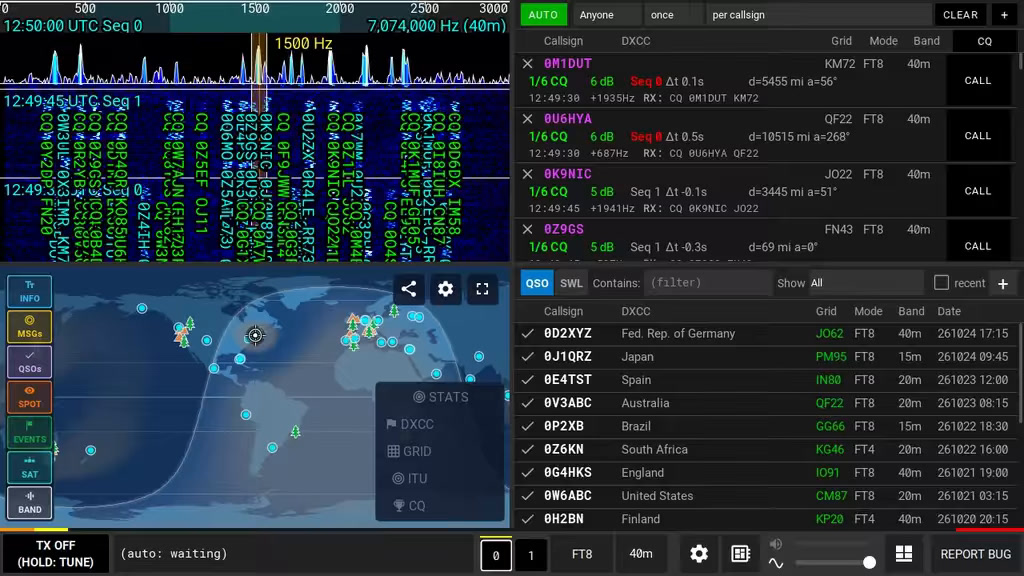
With the FT8 in the field, the biggest problem is everything around the radio: laptop, interface, cables and battery. The qFT8 app tries to shorten this chain to a radio, one USB cable and a phone.
You will read in the article
What is qFT8
qFT8 is a free app with no ads and no account. It runs on Android phones and tablets, iPhone and iPad, Windows, macOS and Linux, including Raspberry Pi. It was developed by Luis Quesada Torres HB9IPH in 2026. He wrote the decoders and encoders from scratch. The license of the source code is determined after it is published, so it is not yet open source.
You can download the application at qft8.com, where you will also find a manual and a link to the Telegram community. The interface is translated into 63 languages, including Slovak.
Radio, cable, pager

Podľa webu funguje 156 modelov rádií priamo cez USB. The application recognizes them and sets them by itself CAT aj audio. Patria medzi ne QRP Labs QMX, QMX+ and QDX, Icom IC-7300, IC-705, IC-7610 a IC-9700, Yaesu FT-891, FT-710 či FT-DX10, Elecraft, Xiegu a mnohé ďalšie. Ak rádio pripájate cez externé rozhranie, napríklad Digirig, vyberiete model v nastaveniach ručne. Ostatné rádiá fungujú cez VOX.
The manual highlights three typical problems. The cable must be designed for data transmission. On some Androids, USB OTG is disabled by default. And the radio must be powered with the correct voltage, for the QMX it is at most 12 V.
Entering the call sign is mandatory, but a fictitious one, for example XX1XXX, is sufficient to try without a radio. When the application is first launched, it requests access to the microphone and recommends the location determined by your locator. It does not send data to any own server, everything is processed locally.
For QMX, the manual recommends the so-called Audio Check. After pressing TX, the radio display should show the A column under the VFO. Two dots mean the sound is too weak or too loud, then try a different volume, for example 70, 80, 60 or 100%. The application never changes the transmission power of the radio and at high SWR it will automatically stop transmission and turn off TX.
The interface in practice
The first video shows the application in practice: waterfall, messages, list of call signs and QSO log.
The bottom bar shows the transmission status, power, SWR, selected message and band. The spectrogram color-codes messages: green is CQ, turquoise is messages between other stations, yellow is your broadcast, and orange is messages addressed to you. Tap the spectrum to change the broadcast offset.
The Stations tab shows the stations you are hearing, with DXCC, locator, CQ and ITU zones, and QSO status. The signs ✗, ✓ and ★ show whether you have not worked, logged or confirmed the station via QRZ or LoTW. The log distinguishes connections by filters such as confirmed, unrecorded or duplicate. According to the manual, the zones where the first connection is concerned are highlighted in green and when confirmed in yellow.
FT8 in six steps and LQ8 in four
The manual explains in detail the standard QSOs in FT8: CQ, reply, report, report with "R", RR73 and 73. A call is logged when a station receives RR73 and sends 73, or vice versa. It is broadcast in 15-second cycles, so accurate timing is key. The application synchronizes it via NTP or GPS, and in the field without internet, the GPS SYNC button is enough.
More interesting is the LQ8 mode, which was created by the author of the application. It maintains FT8 sensitivity at −21dB and completes a confirmed QSO in four transmissions, or 60 seconds. FT8 needs five or six. The messages are CQ, CALL (locator and report in one), REPORT+73 and 73, separate RR73 is omitted.
Štvrté video vysvetľuje výhodu pri pile-upe. According to the manual, the MULTI-REPORT+73 will acknowledge two responding stations at once on one carrier signal, so there is no need to divide the power. The mod is related to the portal lq8.org and in the application there are also experimental siblings LQ4, LQ2 and LQ16. With LQ4 the QSO takes about 30 seconds, with LQ16 about two minutes and the mode is more sensitive.
CAR, targets and map
In AUTO mode, the application itself calls the best station according to the criteria. Targets are, for example, Anyone, Nearby, Far, signal strength, POTA hunter or SOTA hunter, new DXCC, locator, ITU zone or CQ. You can also set the periodicity (once, daily, weekly...) and repetition limits. For contests whose rules prohibit automatic QSOs, AUTO is turned off.
The map is live, according to the manual, showing the stations you hear, spots from PSK Reporter and WSPRnet, SOTA and POTA activity, and propagation on the selected band, including the blind zone around you. The DXCC, GRID, ITU and CQ layers show what you have already worked on. Tapping on a station opens a tab with a CALL button, which also switches the band and mode if necessary. With SOTA and POTA, references are stored in a log.
QMX and FT-891 in practice
The third video shows QRP transceiver QMX. You connect it via USB-C to your phone and switch bands and modes from the app. A band change in the app is transmitted to the radio and vice versa.
The next video is sharp operation on the 20m band in FT4 mode with the Yaesu FT-891. The FT4 operates in 7.5-second cycles and occupies around 90 Hz, but loses about 4 dB of sensitivity over the FT8. According to the video, the application will adjust the time shift itself.
Diary and services
Aplikácia importuje a exportuje ADIF. Connections can be uploaded to QRZ (requires paid subscription with API key), to LoTW (free), Wavelog, Cloudlog či eQSL and confirmations are pulled back. When importing via QRZ or LoTW, automatic recording is also set.
Computer and iPhone
The Windows, macOS and Linux version does the same as the mobile version. It has three window layouts and is controlled only with the mouse. For safety reasons, the keyboard never presses the controls, so you won't accidentally turn on the broadcast. Settings can be moved between phone and computer in one file.
iPhone and iPad need iOS 17 and cannot control the radio via USB. They transmit via VOX or an audio interface, or via the qFT8 bridge, where the radio is held by a computer or Raspberry Pi.
What to watch out for
The application does not broadcast outside the amateur bands of your region, and for selected countries it also follows the national band plan. You need a valid license to broadcast and you are responsible for compliance. Many mods and some features are marked as experimental, so don't take them as a finished solution.
If you're just listening, SWL mode is enough and you don't need a call sign. You connect the RTL-SDR and the app decodes all modes.
Summary
qFT8 is an ambitious application that turns your phone into a digital station. QRP will most appeal to POTA and SOTA operators and activators. It's free, without ads and in Slovak, and whoever wants to try it, just download it at qft8.com. Details can be found in user manual.
Frequently asked questions
Is qFT8 really free?
Yes, the app is free, without ads and without an account. It does not send data to its own server and everything is processed locally.
What devices does it run on?
On Android, iPhone and iPad (iOS 17), Windows, macOS and Linux. iOS devices cannot control the radio via USB and therefore transmit via VOX, audio interface or qFT8 bridge.
What do I need to get started?
Call sign (a fictitious one is enough for the test), cable intended for data transmission and proper power supply of the radio. USB OTG may need to be enabled on Android.
What makes the LQ8 different from the FT8?
The LQ8 has the same sensitivity of −21 dB, but will complete a confirmed QSO in four transmissions instead of five or six. During pile-up, it can confirm two stations at once with one signal.
Can I use the qFT8 for listening only?
Yes, you don't need a call sign in SWL ONLY mode. Decoded stations are written to the SWL log, which can be exported to ADIF or CSV.