
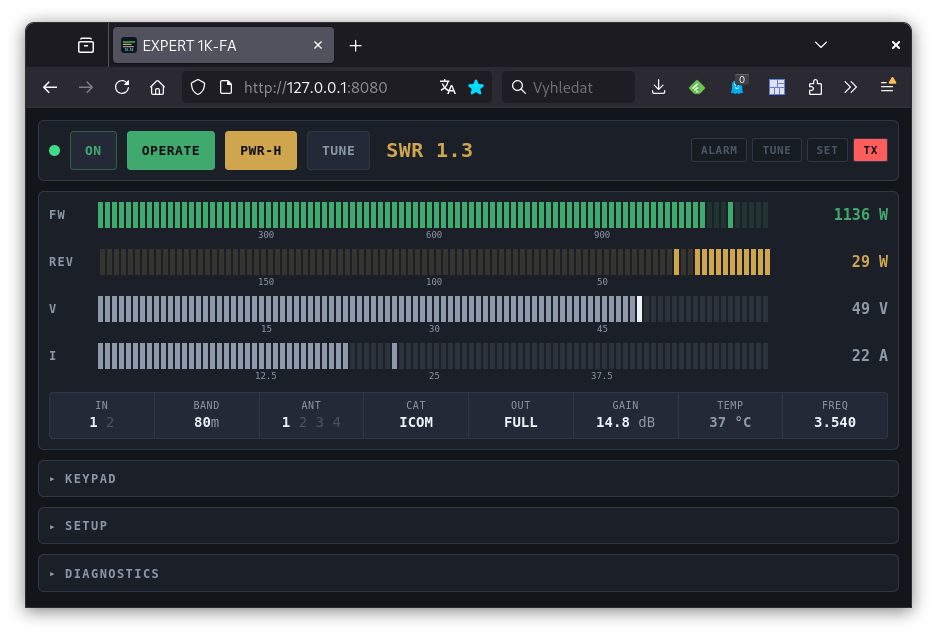
ExpertWebConsole by Dan OK1HRA is a web interface for the linear amplifier SPE EXPERT 1K-FA, designed as an alternative to the original application Expert_Console2.exe. Control is done from a web browser, while the serial port is managed by a separate daemon. expert_console.py. Konzola tak môže byť dostupná aj zo vzdialeného QTH; the client does not need a specialized desktop application.
In the article you will read
Principle of operation of EXPERT 1K-FA Web Console
The architecture is deliberately simple: the browser communicates via HTTP with the service expert_console.py, which manages the amplifier's serial interface. Communication with 1K-FA occurs over a serial line 9600 8N1. The web part does not only function as a display – protocol frames are decoded in the browser, including a 30-byte status record, checksums, and setup menu. The transmission of status data uses SSE.
The advantage of this solution is the separation of serial communication from the user interface. The port is opened exclusively, so the daemon does not compete with another process that might try to use the same interface. The web console also supports a simulator, so basic behavior can be tested even without a connected amplifier. The project distinguishes between two protocol revisions 1.0 and 2.0 and automatically determines the active revision based on the status code.
Control elements
The top row of the console displays status control elements, whose state can be toggled by clicking. Available are ON/OFF, STANDBY/OPERATE, and PWR-L/PWR-H. Additional controls include TUNE, band selection, antennas, and CAT interfaces, L/C control, menu navigation, and DISPLAY button. The OPERATE and PWR-H states are graphically highlighted when the respective state is active. The SWR value is displayed during transmission and shortly after.
Bar graphs and telemetry
An important part of the console are bar graphs showing instantaneous and peak or minimum values. For forward power, reflected power, and current, the maximum is monitored, while for voltage, the minimum is monitored. Therefore, a bar graph does not represent just a simple indicator of the current value. The bar itself shows the instantaneous state and the numerical value next to it shows the peak value; a drop may be marked by a notch in the bar.
The range of the forward power indicator varies depending on the amplifier mode: in FULL it corresponds to 1200 W, in HALF 600 W, and in STANDBY to the range of the trigger signal. SWR is calculated from forward and reflected power. In OPERATE mode, the amplifier does not send SWR directly; the relevant state frame data instead contains gain.
ExpertWebConsole so it is not just a remote button panel. It combines control, continuous telemetry, and protocol diagnostics into a web interface, while serial communication remains focused in a separate process.