
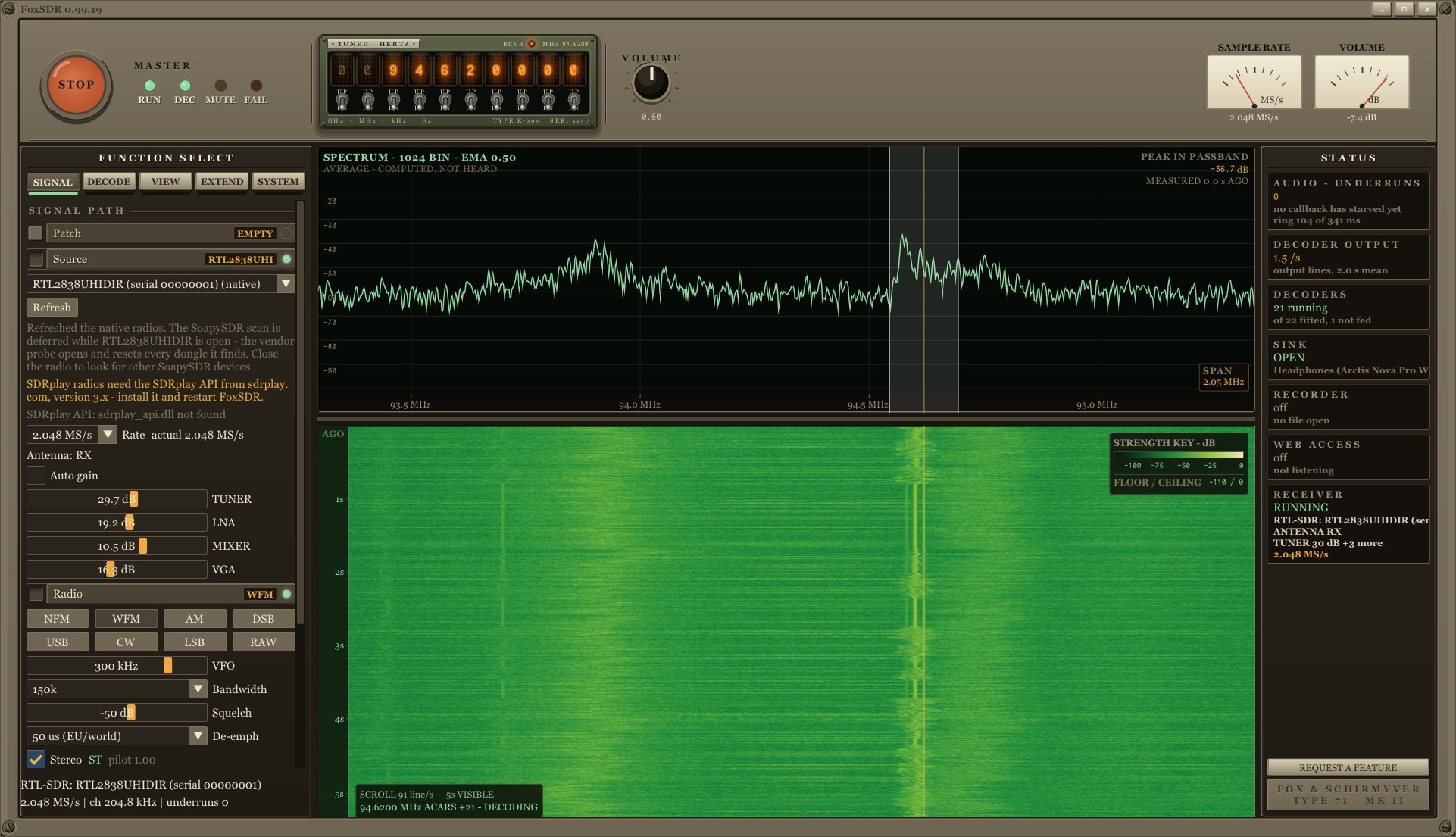
Software for SDR receivers has moved significantly in recent years. Programs such as SDR#, SDR++, SDRangel or Gqrx offer a wide range of reception and signal processing options, but for more demanding use, we often need to combine several applications. One program is used for receiving, another for decoding digital signals, another for displaying planes or ships on the map. It is this fragmentation that the project tries to solve FoxSDR by Steven Fox.
FoxSDR is a comprehensive software package for software-defined radios that combines a receiver, spectrum and waterfall, multiple radios working simultaneously, decoding plugins and a visual environment for building signal chains. In addition, it adds the possibility to control the entire workplace via a web browser in the local network. It is intended for Windows and Linux, while the project also offers builds for Raspberry Pi and an experimental version for Android.
FoxSDR is still under development and is in open beta. It is particularly interesting because it does not try to be just another universal SDR receiver. Its goal is to create a uniform working environment for radio amateurs, listeners, those interested in air and sea operations, as well as experimenters in the field of digital signal processing.
You will read in the article
One workplace for multiple SDR receivers
One of the most interesting features of FoxSDR is its multi-radio architecture. The main window can manage up to eight hardware receivers simultaneously. So we are not dependent on running several separate instances of the program and manually placing windows on the desktop.
Individual receivers can be displayed separately, next to each other or in multiple layouts. Everyone can work on their own frequency, or the tuning can be linked between selected receivers. The volume, muting and the Solo function, which allows you to listen to only the selected channel, are set separately. Decoders can be assigned to a specific physical receiver.
In practice, we can thus imagine a workplace in which one receiver monitors the shortwave band, the other monitors VHF air communication and the third receives ADS-B signals on 1090 MHz. Everyone works independently, but we have everything under control in one environment. It is much more convenient for experimentation than constantly switching between applications.
However, a distinction must be made between the number of receivers in the main window and the visual DSP Patch Canvas. The latter has its own limit of five Radio input nodes. So these are two separate program functions, not the same limitation.
SDR hardware support and installation
FoxSDR má vlastné ovládače pre viacero rozšírených SDR zariadení. Supported include RTL-SDR Blog V3 and V4, HackRF One, Airspy R2 and Mini, Airspy HF+, RX888 mk2 and receivers based on Mirics chips. Also supported are SDRplay RSP through their official API and ADALM-Pluto, which the program connects to via a network interface. Additional devices such as LimeSDR or USRP can be connected via the SoapySDR abstraction layer.
However, support does not mean that every receiver has been equally thoroughly tested. The official documentation lists the RTL-SDR as a device verified on real hardware. Several other drivers have been checked for correctness against reference code or manufacturer documentation, but the devices themselves have not yet been tested in practice by the author. It is therefore advisable to follow this information when choosing hardware.
FoxSDR also tries to simplify installation. With RTL-SDR in Windows, it offers the assignment of the necessary driver directly in the program. No need to manually search for driver files or use Zadig. However, with HackRF, Airspy or Mirics, a one-time WinUSB setup using Zadig may still be necessary. SDRplay requires the manufacturer's own API, and SoapySDR devices need the corresponding software layer.
First practical impressions of using HackRF One and RTL-SDR are captured in the following video. It is a suitable addition to the technical description, as it shows the program in connection with real receiving hardware.
Interface, debugging and visualization of signals
FoxSDR also pays a lot of attention to the user interface. The basis is a classic combination of spectrum and waterfall. The spectrum shows the current signals in the received range, the waterfall their development in time. By clicking on the signal, its frequency can be tuned immediately and the width of the received channel can be adjusted.
An interesting detail is the frequency indicator in the style of Nixie tubes. Other visual variants are also available, such as neon or a simple numeric display. The user can customize the appearance, color display of the spectrum and waterfall, control elements and keyboard shortcuts. The program offers frequency bookmarks, band plans, scanner and recording of demodulated audio and raw I/Q data.
A practical aid for listeners of aviation communication is the database of airport frequencies, available even without an Internet connection. Just enter the airport code, for example EGLL, KLAX or KJFK, and the program will display the available frequencies for Tower, Ground, Approach or Departure. So there is no need to manually search for them in external databases.
The following example also shows the possibilities of decoding air traffic. Airplanes, their identification, altitude, speed and trajectories can be tracked on the map. The color resolution of the height and display of the coverage of the receiver help to quickly orientate in the received data.
Plugins and decoding without virtual audio cables
A big advantage of FoxSDR is its catalog of extensions. Oficiálna stránka aktuálne uvádza 89 pluginov, z ktorých 49 je nových, a samostatnú skupinu 16 sprievodných aplikácií. Je dôležité rozlišovať medzi pluginmi a sprievodnými programami: nie všetky dekodéry sú priamo zabudované v hlavnej aplikácii. Niektoré externé nástroje zostávajú samostatnými aplikáciami, ktoré FoxSDR dokáže spustiť a využiť.
The advantage of integrated decoders is that, with supported functions, there is no need to direct the sound via virtual audio cables to another program. Decoding takes place directly in the FoxSDR environment and outputs can be displayed in separate windows or on a common map.
Medzi zaujímavé oblasti patrí letecká prevádzka. K dispozícii sú ADS-B na 1090 MHz, UAT na 978 MHz, ACARS, VOR, ILS a SELCAL. Pri ADS-B sa na mape zobrazujú polohy lietadiel, volacie znaky, výška a rýchlosť. ACARS umožňuje sledovať dátové správy leteckej prevádzky a VOR či ILS poskytujú informácie súvisiace s leteckou navigáciou.
Ďalšou skupinou je námorný AIS na frekvenciách 161,975 a 162,025 MHz. Decoded ship data can be displayed on the map along with vessel identification, name, speed and other available data.
Radio amateurs and fans of satellite reception will be interested in the NOAA APT and Meteor-M2 LRPT meteorological satellite decoders. The software also includes the display of satellites and the prediction of their flybys. Other options include POCSAG and FLEX, stereo FM with RDS or reception of WEFAX weather faxes. For individual modules, their development status and verification rate must be monitored. Some are marked as experimental and not all have been confirmed by receiving real signals.
Praktickú ukážku príjmu a spracovania WEFAX vo verzii FoxSDR 0.99.81 prináša tretie video. It shows another area where a common receiver-decoder environment can be useful - from signal tuning to the resulting image.
DSP Patch Canvas – custom signal path
A visual DSP Patch Canvas is intended for more advanced users. It is a graphical environment in which the individual blocks of signal processing are interconnected similar to modules in a synthesizer or in the GNU Radio Companion. Instead of writing your own code, signal chains can be created by moving and connecting nodes.
Available elements include raw I/Q data sources, FIR filters, notch filters and decimation, AM, FM, SSB or CW demodulators, as well as measurement and display tools. An oscilloscope, spectrum analyzer, audio vector analyzer or I/Q constellation display are available. The output can be routed to a sound card or saved to disk.
Such a solution allows you to build your own receiving path, experiment with filters and demodulation, or split the signal into several outputs. For a user who only wants to listen to regular broadcasts, this feature may not be essential. However, for the experimenter and technically oriented radio amateur, it represents an interesting possibility to better understand and influence the processing of the received signal.
Control via web browser
FoxSDR does not need to be controlled only directly on the computer to which the receiver is connected. The program includes a web remote panel that makes the entire user interface available in a browser on another device on the local network. The spectrum, waterfall, tuning and sound playback can be used, for example, from a laptop or tablet in another room.
It is especially practical for radio amateurs when they want to place the receiver as close as possible to the antenna and away from sources of interference in the home. A small computer or Raspberry Pi can work with the antenna system and the operator controls the receiver from a comfortable workplace.
The remote panel is disabled by default. It requires a password when accessed on the network, which is hashed using PBKDF2-HMAC-SHA256, and sessions expire after a period of inactivity. Important limitation: the web interface does not use its own TLS encryption. When accessing from outside the home network, you must therefore use a VPN, for example WireGuard or Tailscale, or a secure reverse proxy server. Direct port forwarding to the Internet is not suitable.
Installation, license and comparison with other SDR programs
FoxSDR can be obtained in several ways. Windows users can use the Microsoft Store or a separate installer from the official website. AppImage packages and repositories are available for Linux and Raspberry Pi, but the documentation notes that these builds have not yet been verified on real radio hardware. The Android version is an experimental alpha. Therefore, I recommend checking the current version and release notes before installing.
The project is distributed under the PolyForm Noncommercial 1.0.0 license. It is free for personal hobby use, amateur radio activity, study and education. Commercial use requires a separate license. It is therefore not a classic open-source project with a GPL license, although its use and modifications for non-commercial purposes are permitted under the terms of PolyForm Noncommercial.
Compared to SDR#, SDR++, SDRangel or Gqrx, FoxSDR is distinguished primarily by the combination of multiple simultaneously working receivers, an extensive catalog of plugins, a visual DSP environment and web control. Each of the mentioned programs has its own advantages, and FoxSDR cannot yet be considered a universal replacement for all existing solutions. Its development is active and the beta version may contain unfinished or experimental features.
If you use RTL-SDR, HackRF or another supported receiver and like to try new signal processing options, FoxSDR is definitely worth a try. In particular, the multi-radio architecture and the wide range of decoding tools make it an interesting project worth watching.
Official Site and Download: foxsdr.com
Features overview: What it does
Supported receivers: Radios
Plugin catalog: Plugins
SDR Software Comparison: SDR software compared
Download: Download FoxSDR
Frequently asked questions
Is FoxSDR free?
Yes, for non-commercial purposes such as amateur radio activity, personal experimentation and education. Commercial use requires a separate PolyForm license.
Which SDR receivers does FoxSDR support?
Natively supports RTL-SDR, HackRF, Airspy, Airspy HF+, Mirics, RX888 mk2, SDRplay and ADALM-Pluto. Additional devices can be connected via SoapySDR.
Can FoxSDR work with multiple receivers simultaneously?
Yes. The main window allows you to manage up to eight receivers with independent or linked tuning and separate volume settings.
Do I need additional programs to decode digital signals?
Not always. FoxSDR offers its own plugins for different types of signals. However, some decoders are available as standalone companion apps and their support varies by platform.
Can I control FoxSDR from another room or via the Internet?
On the local network, yes, through a web browser. For remote access via the Internet, a VPN or a secure reverse proxy server must be used, as the built-in web panel does not have its own TLS encryption.