
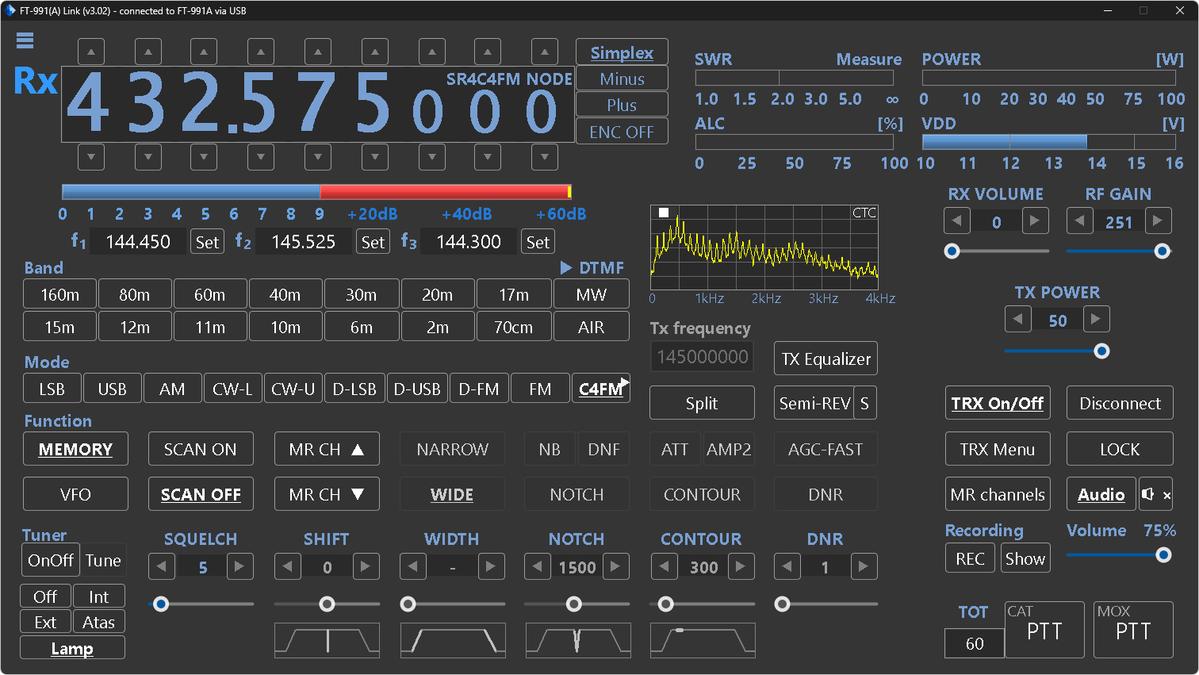
FT991(A) Link je pokročilý počítačový program určený pre rádioamatérov používajúcich transceivery Yaesu FT-991 a FT-991A. Jeho cieľom je poskytnúť plnohodnotné a komfortné ovládanie rádia prostredníctvom CAT rozhrania, eliminate some shortcomings of the original TRX firmware and at the same time add many useful features that are missing in the radio itself.
In the article you will read
Connection to the radio and basic concept of FT991(A) Link
The program allows connection to the radio either via COM port or USB interface. The author recommends using a USB cable, as a single connection ensures:
-
CAT radio control
-
sound card function (RX/TX audio)
For proper function, it is necessary to select the Enhanced port in the radio and set the correct communication speed (Baud Rate):
-
item 029 for RS232C cable
-
item 031 for USB cable
The recommended communication speed is 38400 bps.
Main window of the FT991(A) Link program
The FT991(A) Link main window provides full radio control including:
-
switching bands, modes and VFO
-
working with memory channels
-
complete access to the TRX menu
Veľkou výhodou je možnosť uložiť menu rádia do súboru and later reload it back. During menu editing, it is possible to change the communication speed - the program will automatically adapt to it.
If the USB cable is disconnected, the program will notify about it in the status bar. Upon reconnection, parameter reading will automatically resume.
Audio functions and signal analysis
The program supports receiving audio from the radio to the computer. The user has at his disposal:
-
listening to RX audio on PC
-
display of the audio signal spectrum
-
CTCSS tone measurement
-
signal analysis using cursors directly in the graph
One of the most interesting features is the fast CTCSS tone detection – it takes about 0.1 seconds and works in both the main window and the separate RX Audio window.

Recording received stations
The FT991(A) Link allows automatic recording of received stations:
-
recording starts after opening the squelch
-
is tied to the SQL function
-
records shorter than 1 second are not saved
Files are saved in WAV format, in folders named by date. The file name includes:
-
date and time of the start of the recording
-
frequency
-
channel name (if available)
-
mode
-
signal level
-
CTCSS tone
Records can be quickly viewed using the "Show" button.
Fixes and new features of FT991(A) Link
The program author has resolved several known issues of the FT-991/991A transceivers, such as:
-
unwanted frequency changes when switching modes
-
issues when switching between VFO and memories
At the same time, it added new, very practical features. When scanning memory channels, the program displays the last received frequency or channel name, which the radio itself does not allow.
System notifications
Program dokáže zobrazovať systémové notifikácie with information about the currently received station. This feature is disabled by default and can be enabled in the menu by the item „Show RX notification“.

Memory channels - complete management
The FT991(A) Link offers full-featured memory channel programming:
-
display of all memories at once
-
switching, adding, deleting, and editing
-
funkcie cut, copy, paste, delete (menu or shortcuts)
-
option to save memories to a file and later upload them back to the radio
-
import memories from Win4Yaesu program
Memories marked in orange are excluded from scanning.

TX equalizer and microphone signal processing
Clicking the "TX Equalizer" button opens a window with detailed settings for the broadcast audio chain:
-
equalizer graph (processor on/off)
-
bandwidth setting for SSB
-
turning on/off the processor and equalizer
-
shaping of the microphone characteristic
-
finished filters with the option to save and load from a file
Synchronization and other tools
The program menu has the function available:
-
synchronization of radio date and time with PC
-
saving user callsign
-
recording the current location
Nastavenie enkodéra is activated by the button next to the displayed RX frequency. If CTCSS and DCS are off, the button shows the status „ENC OFF“.
Semi-REV function
Since CAT commands for FT-991(A) do not contain a direct command for the button REV, autor pridal softvérovú funkciu „Semi-REV“. Tá umožňuje počúvanie vstupnej frekvencie prevádzača:
-
works only within the program
-
behaves the same as REV on the radio
-
requires setting offsets for individual bands
Default values:
-
2m: 0.6MHz
-
70cm: 7.6MHz
Settings are available via the button „S“ vedľa Semi-REV.

Appearance and compatibility FT991(A) Link
The program supports:
-
svetlý a tmavý režim (dark mode from Windows 10 and above)
-
interface scaling
The author recommends dark mode, which is pleasant for the eyes and well-readable.
FT991(A) Link is a 32-bit application and has been successfully tested on Windows XP to Windows 11.
Development, support, and availability
Program je neustále vyvíjaný and may contain errors. The author welcomes problem reports and suggestions for improvements - the contact email is provided in the menu „Info/Update“.
The program is always available:
-
as an installer
-
or as a ZIP version without installation
The download is checked by Google antivirus. Links to the latest version, screenshots and changelog are available in the Info/Update section, as well as in the repositories:
Conclusion
FT991(A) Link od Dariusza SP4UBW je mimoriadne vydarený nástroj, ktorý výrazne rozširuje možnosti transceiverov Yaesu FT-991 a FT-991A. It offers comfortable CAT control, detailed memory management, advanced audio features, signal analysis, and a number of practical improvements that every active radio amateur will appreciate - whether in daily operation or when working through repeaters and scanning memory channels.