
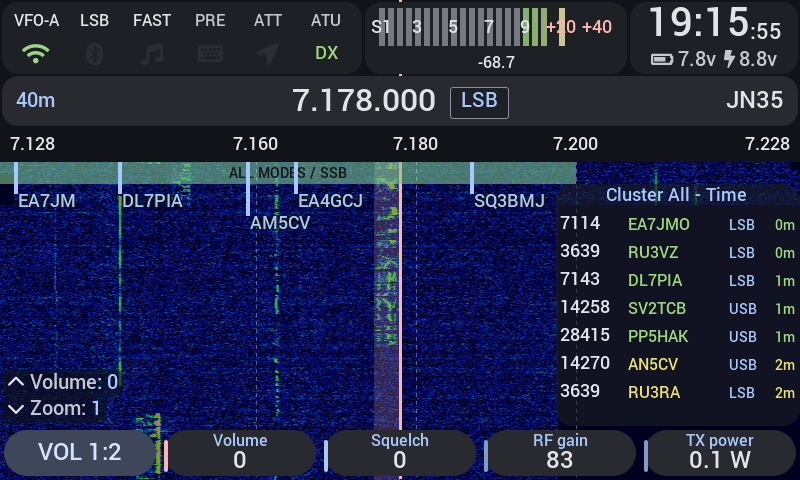
Xiegu X6100 je kompaktný QRP transceiver for bands 160 m to 6 m with power up to 10 W, built-in antenna tuner and touch screen. Factory firmware pokrýva základnú prevádzku v SSB, CW a AM, no jeho vývoj zo strany výrobcu prakticky ustal. Taliansky rádioamatér Giovanni Ricciardi, IU1WXY, vytvoril alternative firmware, which of X6100 makes a completely different radio - with fifteen digital modes without the need for a computer, a CW decoder, a DX cluster, support for field activation programs and a web configurator. The firmware is free, common on the microSD card and does not affect the original software in the radio's internal memory.
You will read in the article
Installation and update
The firmware is installed by writing the image to the microSD card using the balenaEtcher program. The card is inserted into the radio and after power-up the alternative system is booted. The original firmware remains in the internal memory - just remove the card and the radio will return to the factory state. The card must be at least 8 GB and A1 class or faster is recommended.
Since version 0.127, there is a second update method: App Update. The signed .tar.gz package is uploaded to the card via three possible paths – from the X6100 Link application, via the Settings > System > App update menu directly on the radio, or by manually copying it to the /mnt/update/ folder. The update can also be started via the web configurator. If the update fails, the system automatically returns to the previous version (auto-rollback). A package signature prevents the installation of corrupted or modified files.
For full functionality, patched baseband r13 from R2RFE (Georgy Dyuldin) is also recommended, which solves some hardware limitations of the original baseband processor. SWR protection stops transmission after 0.3 s when the set threshold is exceeded (default 2.0, range 1.5-5.0). The PA DRIVE function allows you to limit the maximum power for each band separately (0.1 - 10.0 W), which protects the external amplifier from waking up.
Screen, S-meter and Walkie-Talkie mode

The firmware redesigns the entire radio interface. The main screen displays the spectrum and waterfall with adjustable speed, color scheme and resolution. The S-meter offers two display modes – bar and needle – with the possibility of calibration for each band separately in the range of -40 to +40 dB. The status line informs with icons about the status of WiFi, Bluetooth, connected keyboard, GPS and DX cluster. Battery life estimation is learned from real usage patterns.
Režim Walkie-Talkie prepne zobrazenie do portrétu s pásmovým spektrom a zoznamom 32 kanálov. PTT is controlled by the side button. It is a practical mode for simple operation, for example on VHF repeaters or during field activities where a full waterfall is not required. The channel memory holds up to 100 named frequencies, which are synchronized with both the web configurator and the X6100 Link application.
There are eight built-in themes (IU1WXY, Classic, Outdoor, Outdoor-Negative, VISION, RS, ELectric Love, DarkLED) and the option to create custom themes in JSON format. Colors, fonts (Roboto, DejaVu, Tech, Tech Mono, Liberation Sans), rounding of elements and the color of the LED encoder can be changed.
Digital modes without a computer

The biggest added value of the firmware is the integration of fifteen digital modes directly into the radio. Transmission power in digital modes is limited to 7 W.
FT8 and FT4 include automatic mode (Auto), hold frequency (Hold Freq), call modifier (CQ POTA, CQ DX, etc.), adjustable number of repetitions and time synchronization via WiFi or GPS. Hound mode is supported, but SuperFox is not - the WSJT-X license does not allow it. Decoded stations are displayed on Live Map and Log Map, integration with PSK Reporter works automatically. The "For you" strip highlights stations relevant to the operator. FT2 is an experimental mode of FT4 with twice the speed (41.67 Bd, 2.47 s, 167 Hz width).
JS8 is fully compatible with JS8Call in all four speeds (Normal, Fast, Turbo, Slow). Supports @X6100 group, APRS via JS8 gateways and automatic spotting of POTA/SOTA activations. WSPR runs in two-minute cycles with an adjustable broadcast ratio (0-50%) and automatic uploads to WSPRnet via WiFi.
SSTV receives automatically with the function of noise suppression (Denoise) and broadcasts in Martin, Scottie and Robot modes. WeFax accepts DWD, Northwood, Athens and US stations; WeFax transmission is only possible from the X6100 Link application (IOC 576, 120 LPM). NavTex decodes maritime security communications on MF/HF frequencies including DSC.
PSK31, PSK63 and Olivia allow keyboard-to-keyboard operation with squelch and optional tracking of the TX behind the RX frequency. JTTY is a keyboard mode from WSJT-X 3.2 with %M/%H/%E macros and tokens. RTTY transmission (ITA2 AFSK) only works from the X6100 Link application.
CW decoder, trainer and keyboard key
The CW decoder uses a coherent tone tracker and achieves 98-100% decoding success at 20dB to 0dB SNR (in 2.5kHz bandwidth), 97-100% at -3dB. It estimates the speed with an accuracy of ±0.5 WPM. The Dec SNR parameter (default 8 dB, range 5-30 dB) sets the decoding threshold. Parse mode breaks text into words and recognizes exclamation points.
The CW keyboard (Keyboard Keyer) allows broadcasting from a USB or Bluetooth keyboard in two modes: "On Enter" (sends the entire line after pressing Enter) and "As typed" (transmits continuously). The F1-F5 keys call stored CW messages with the {CALL} token for automatic insertion of the last call. The radio supports four types of USB traps: keyboard, mouse, MIDI and serial (CH340, FTDI, CP210x, PL2303, CDC ACM). The Bluetooth trap TinyMIDI from N6ARA communicates via BLE.
The CW Trainer generates a training tone without broadcasting. In answer mode, the operator keys what he heard and the system evaluates the correctness.
Voice Keyer records voice messages from the microphone (band 250-3000 Hz). Three messages can be stored with automatic repeat at adjustable intervals and MSG monitor. Built-in microphone does not support radio - only handheld.
Field activities, DX Cluster and birdies calibration
The firmware integrates support for five activation programs: SOTA, POTA, WWBOTA, HOTA and WWFF. Each has a full-screen interface with a Start – Log QSO – spot – End workflow. Reference lists (parks, summits) are downloaded to the radio. GPS provides automatic location. POTA self-spotting works via pota.app, including automatic spotting during QSY. SOTAwatch spots are pending authorization. QRZ.com logbook upload is experimental and requires a paid XML subscription (up to three profiles). Park-to-park and summit-to-summit connections are recorded automatically. The Bands screen displays data from the RBN skimmer.
DX Cluster automatically connects to one of eleven public servers (default DXFUN) after connecting to WiFi. Spots are filtered by mode, band and activity (POTA, SOTA, WWBOTA, HOTA, WWFF) including spots from pota.app, wwbota.org, cqhota.app and spots.wwff.co. A column with cluster spots is displayed on the waterfall. The spot snap function tunes the radio to the selected spot with one touch. Alerts allow filtering by caller ID or prefix.
Birdie calibration scans the bands, finds internal interfering signals (birdies), marks them on the spectrum and activates the automatic notch filter. The results are saved to a file on the card. The Broadcast application integrates the EiBi database with shortwave radio station schedules including language filtering - a useful feature for SWL listeners.
Connectivity: web configurator, wfview and Bluetooth
The web configurator runs on port 80 (HTTP) and 443 (HTTPS with a self-signed certificate) as a Python/Bottle server. It is accessible from any browser on the same network. It offers management of frequencies, memories, CW messages, macros, PA drive limits, DX cluster, Field Ops, logs (ADIF/CSV export), card files, gallery (screen recordings, received SSTV and WeFax images with AVI to MP4 conversion), settings, themes and time backups. The Remote page allows debugging, spectrum and waterfall viewing, listening to RX audio (~0.5s delay) and reading digital mode text - but does not allow voice PTT. The firmware update can also be started from the browser.
The wfview server emulates the Icom IC-705 on a local network via the CI-V protocol with RX audio and waterfall. It is disabled by default - it is enabled in Settings > Network > wfview or through the web configurator. The default credentials are x6100/x6100. It uses UDP ports 50001 (control), 50002 (CI-V) and 50003 (audio, LPCM 1ch 16bit). Just add the IC-705 network radio profile in the wfview client. CI-V commands for frequency, mode, VFO, volume, gain, squelch, power, Attenuator, Noise blanker, noise reduction, PTT and more are supported.
Bluetooth supports headphones (A2DP, mono audio, ~0.4s delay), keyboard, TinyMIDI trap, and CAT clients. CAT via Bluetooth uses the RFCOMM serial port - up to three BT clients sharing the CAT port with USB CAT can connect at the same time. Pairing takes 3 minutes (Just Works, no PIN). WiFi and Bluetooth share a single chip, which reduces the performance of both when used at the same time. Ethernet works via USB adapter (ASIX, Realtek RTL8152/8153, CDC Ethernet/NCM) with DHCP or static IP. When the Gateway is set, Internet traffic goes through the cable, WiFi remains for its own subnet. USB tethering from Android is experimental; iPhone is not supported.
X6100 Link application

X6100 Link is a standalone Android application, which connects to the radio via WiFi. It is not part of the repository firmware - it is developed separately. It contains four main parts: Radio (frequency, band, mode, VFO, S-meter, spectrum and waterfall), Log (QSO log with search on QRZ.com, ADIF export, upload to eQSL a QRZ.com), Apps (všetky digitálne módy vrátane TX – FT8, FT4, JS8, WSPR, SSTV, WeFax, NavTex, RTTY, CW) a Themes.
As of version 0.127, it supports voice PTT from the phone in LSB, USB, AM and FM modes with adjustable microphone gain (-30 to +20 dB) and a three-minute timeout. The phone's speaker will be muted during the broadcast. VFO lock (from v0.130) prevents unintentional retuning. The Memories tab (from v0.125) synchronizes memory slots M1 – M9 and named channels with the radio and web configurator.
The USB stick can be connected to the phone via an OTG adapter (mouse, keyboard or MIDI) with support for iambic B, iambic A, straight and bug modes. DX cluster displays alerts as phone notifications. From version 0.127 it is possible to broadcast DX spot directly from the phone. Quick controls in the notification bar offer frequency, mode, band, volume and four configurable buttons.
SSTV in the app can send photos from the phone's camera. WeFax TX is only available from the app. Linking accounts (site account) from version 0.130 enables synchronization of settings.
Firmware is not open-source. Copyright (c) 2026 Giovanni Ricciardi IU1WXY, license allows free use on your own X6100, distribution of unmodified image, but prohibits sale and modification. The image also contains third-party software under its own licenses (Linux, BusyBox, LVGL, ft8_lib library, WSPR helper and others). The firmware supports WSJT-X UDP output (heartbeat, decoded stations, logged QSOs), which allows integration with external tools such as GridTracker or JTAlert. Personal data protection is handled individually – the update check, PSK Reporter and DX cluster can be turned off independently of each other.