
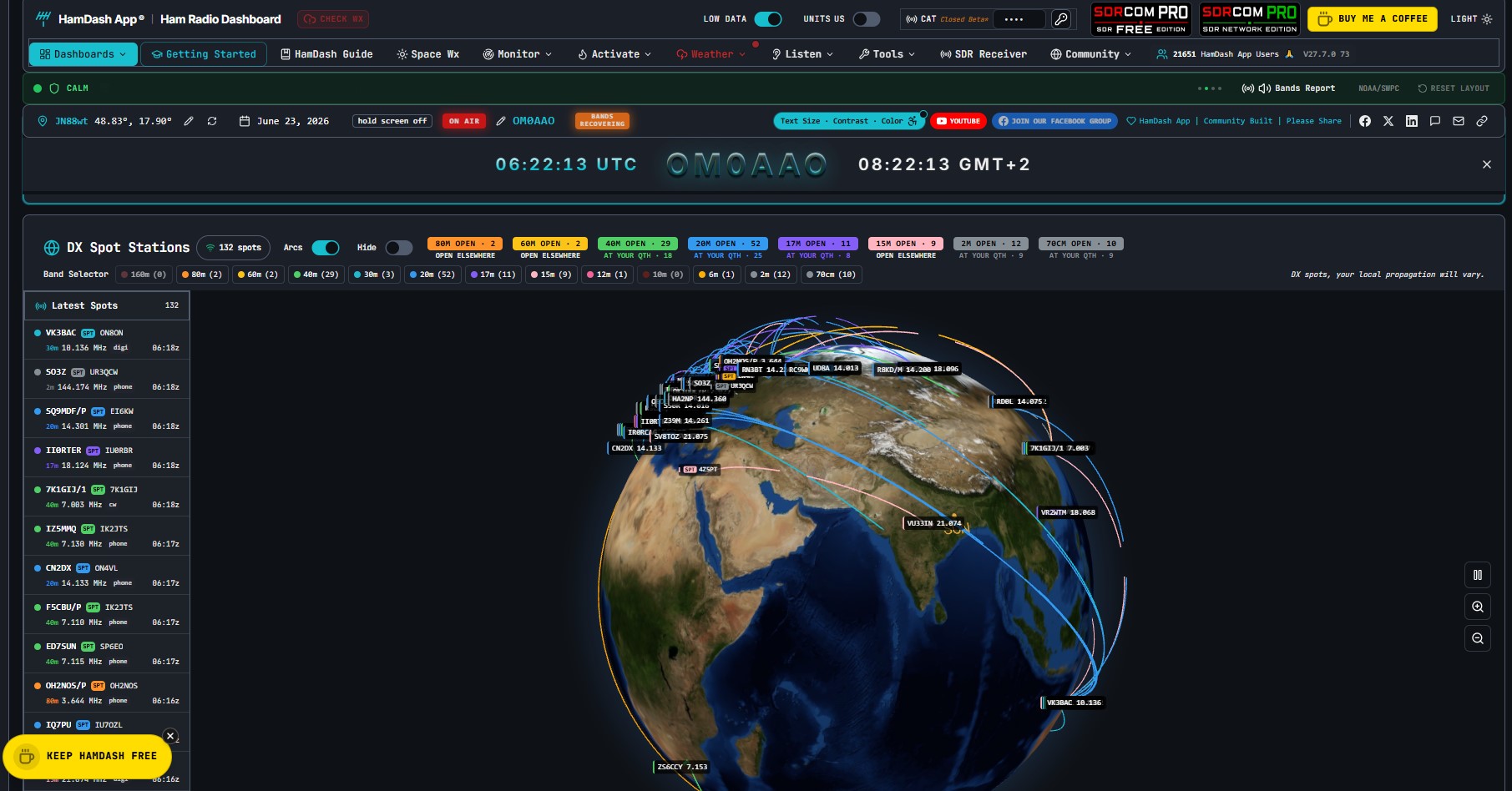
Most radio amateurs are familiar with the situation: during operation, you need to monitor the solar index, check current DX spots, check propagation conditions, and at the same time keep an eye on ongoing activations. POTA. Tieto informácie sú roztrúsené po desiatkach rôznych webových stránok a aplikácií. HamDash attempts to solve this problem in a single way – by aggregating all relevant data into one customizable dashboard running directly in the browser.
In the article you will read
HamDash Philosophy
HamDash vytvoril Peter, G0LIW, v spolupráci s W4PAH. Cieľom projektu je poskytnúť rádioamatérovi a poslucháčovi SWL an always-on monitor that displays everything essential on one screen without the need for registration, subscription or software installation. The dashboard runs entirely in the browser and is available at hamdash.com for free.
The basic philosophy is simple: no accounts, no payment gateways for basic functionality, no restrictions for the average operator. HamDash focuses primarily on real-time - data on propagation, solar weather and DX spots are updated continuously, not with a delay. This makes it suitable as a permanent second monitor in the shack, on a tablet placed next to the transceiver or on a Raspberry Pi.
How to start?
Running HamDash requires no installation. Just open your browser and visit hamdash.com. The dashboard loads instantly and without logging in. For full functionality, Chrome or another Chromium-based browser (Edge, Opera) is recommended, which is especially important for the feature SDR receiver via WebUSB. Firefox works for most panels, but does not support WebUSB.
Upon first load, a preset dashboard layout is displayed. The user can save their own panel configuration locally in the browser - no server synchronization is required. Entering a callsign in the settings will localize some data to a specific QTH, napríklad predpovede šírenia podľa VOACAP.
Video: HamDash in action
The following video provides an overview of HamDash's basic features and is a good first step before configuring the dashboard yourself.
Dashboard overview and panel organization
HamDash organizes content into themed dashboards, each representing a separate screen focused on a specific area of operation. The user can switch between them and configure each one individually. The panels are moveable and their layout is saved in the browser's local storage.

The core of the Solar Weather dashboard is live values of solar flux index (SFI), K-index, X-ray flares and aurora tracking. The data comes from NOAA and other meteorological sources. In addition to propagation indices, HamDash also includes Met Office and MeteoAlarm warning messages, which is practical for portable POTA, SOTA and Field Day operations, where the controllability of the operation also depends on the current weather.
The propagation dashboard works with VOACAP forecasts and displays the HF Signals panel – a matrix overview of SNR values from RBN skimmers (for CW and RTTY), PSKReporter (for FT8, FT4, JS8) and SSB reports. Each cell of the matrix displays the average SNR in dB between the source and target regions on each band over the last 15 minutes. The mode row indicates with green indicators on which band and mode the spots are active. This information is directly usable: if the 14 MHz cell to the east shows strong CW and DIG values, propagation conditions are favorable without the need for speculation.

DX cluster panel zobrazuje živé spoty z DX klastrovej siete s možnosťou filtrovania podľa pásma a módu. SWEAT a SOTA panel prináša aktuálne aktivácie parkov a vrcholov, čo je cenné pre stanice lákané vzácnymi referenciami. Súčasťou je aj greyline mapa zobrazujúca aktuálnu polotmavú zónu, kde podmienky šírenia v nižších HF pásmach (80 m, 40 m) bývajú mimoriadne priaznivé vďaka zániku vrstvy D.
Menu organization
Hlavná navigácia HamDash je rozdelená do niekoľkých sekcií prístupných z bočného alebo horného panela. Sekcia Propagation zahŕňa HF Signals, VOACAP predpovede a greyline mapu. Sekcia DX a Activity združuje DX cluster, SWEAT, SOTA spoty a kalendár contestov. Space Weather obsahuje solárne indexy, aurora tracking a výstrahy. Sekcia Tools poskytuje prístup k nástroju SDR (SDRCOM), QSO logu a trénerovi Morseovej abecedy.
The menu is designed to help the average operator get to the information they need in as few clicks as possible. Each section can be opened as a panel in the current dashboard or as a separate page, which increases layout flexibility on larger monitors.
Free SDR receiver in HamDash – SDRCOM
One of the more technically interesting components of HamDash is the integrated SDR receiver SDRCOM, which works directly in the browser via the WebUSB interface. Supports RTL-SDR V3 and V4 dongles without the need to install drivers or external software - just connect the dongle via USB a otvoriť HamDash v prehliadači Chrome, Edge alebo Opera.
The free version of SDRCOM Lite is included with HamDash and provides the following features:
| Function | SDRCOM Lite (free) | SDRCOM Pro (.99/year) |
|---|---|---|
| Reception modes | AM, FM, SSB, CW | AM, FM, SSB, CW |
| waterfall view | basic | extended |
| FT8 decoder | yes | yes |
| FT4 decoder | no | yes |
| Equalizer | 3-lane | 4-band NR DSP |
| Memory channels | 100 | 1,000 |
| ADS-B tracking | no | 3D aircraft tracking |
| WAV recorder | no | yes, with timer |
| Belt scanner | no | auto lock |
SDRCOM Lite covers the basic needs of the amateur radio and SWL listener, including SSB and CW demodulation, waterfall monitoring and FT8 decoding. For advanced use - auto-scanning, recording with scheduling or ADS-B tracking - a Pro version is available with a one-year, non-renewable license for .99.
WebUSB access requires the operating system to see the RTL-SDR dongle as a device accessible to the browser. On most Windows systems, this works without additional configuration when using the WinUSB or Zadig driver. On Linux, udev rules may need to be set. The project author, G0LIW, provides technical support directly by email.
Frequently Asked Questions (FAQ)
Is HamDash really free?
The core dashboard including all promotion panels, DX cluster, POTA, SOTA, space weather and SDRCOM Lite SDR receiver is free without registration. Only the SDRCOM Pro version is paid.
Does HamDash also work in Firefox?
Most panels work in any modern browser. The SDRCOM (SDR receiver via WebUSB) feature requires a Chromium-based browser - Chrome, Edge, or Opera. Firefox does not support WebUSB.
Do I need to install any software?
Not for the dashboard itself. To use the RTL-SDR dongle via SDRCOM, a step of installing the WinUSB driver using the Zadig tool may be required on Windows if the dongle is installed with a different driver.
What RTL-SDR dongles are supported?
SDRCOM is compatible with RTL-SDR V3 and V4. Other RTL-SDR devices may not be supported.
Is HamDash open-source?
According to available information, the HamDash source code is not publicly available in any repository. Despite being freely available, it is a proprietary project.
Where can I find help with setup?
The author G0LIW provides direct email support. Contact is available at hamdash.com.