
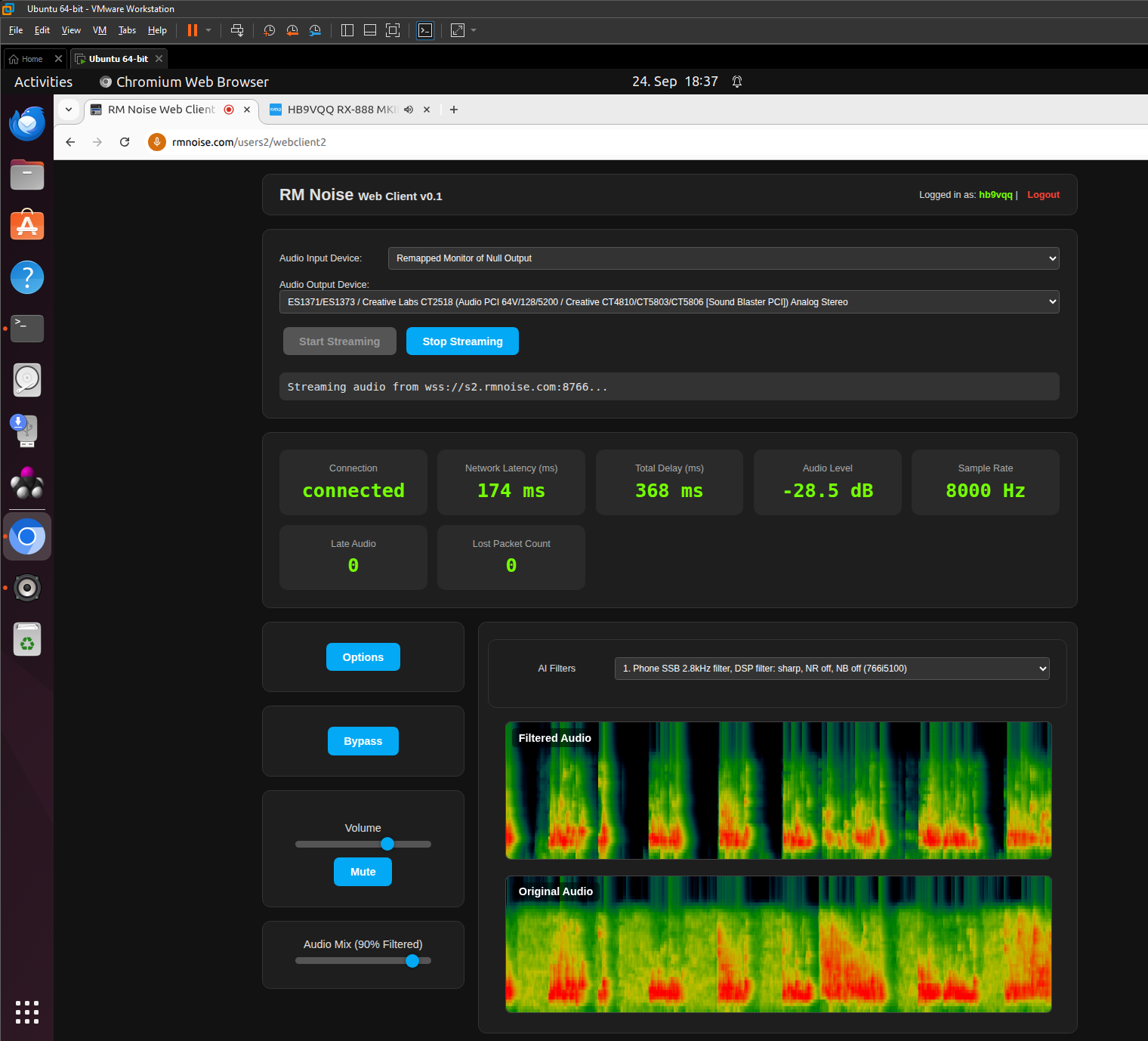
Dňa 14. septembra 2025 oznámil Randy Williams K5RMN spustenie nového webového klienta RM Noise, ktorý je momentálne dostupný vo fáze beta testovania. The goal of this project is to provide users with an easy way to work with RM Noise directly through a web browser - without the need to install special software.
Randy vyzýva všetkých záujemcov, aby sa do testovania zapojili a poskytli spätnú väzbu. Topics, comments or error reports can be sent to e-mail: rmnoise(zav)ournetplace.com. V prípade problémov je vhodné pripojiť aj screenshot, aby bolo možné chybu presne identifikovať.
You will read in the article
How to start the new RM Noise web client
Using the web client is simple and anyone who has an active RM Noise account can do it:
- Open a web browser a prejdite na stránku: https: //rmnoise.com/
- Click on the item „Web Client“.
- Pri prvom použití sa musíte prihlásiť using your RM Noise username and password.
- On the next launch, just go straight to the "Web Client" link.
Poznámka: Account must be older than approx 1 mesiac, inak sa prihlásenie nemusí podariť.
Requirements and compatibility
Randy also provided some important technical details:
- The web client has been successfully tested on Firefox a Chrome/Chromium na Windows 10/11 aj Linuxe.
- Safari it has not yet been tested and its functionality is questionable.
- It is currently available iba jeden server, ktorý beží v Texase (USA).
- Vstupné zariadenie (such as a sound card) must support it mono režim a vzorkovanie 48 kHz.
Useful functions and options
The new RM Noise web client brings several interesting functions that will be appreciated especially by technically oriented users:
- Štatistiky a logy can be watched directly in the browser console
- Otvorte ju klávesom F12 (Chrome and Firefox → bookmark Console).
- Nahrávanie zvuku funguje, no zatiaľ it is not possible to save records to the online site.
- Kliknutím na graf je možné play audio from a specific point in time (funkcia time-shift).
- Automatic compensation of audio delay (jitter):
- If the "late audio" counter is increasing, increase the value „audio buffer“ v nastaveniach.
- A higher buffer reduces the risk of outages, but can cause mierne oneskorenie zvuku oproti živému vysielaniu.
Known issues and limitations
As with any beta project, this one also has a few flaws that are being worked on for now:
- Nezrovnalosť lowpass filtra between the new client and the existing AI model.
- To môže spôsobiť suboptimal noise filtering.
- Randy plánuje preučiť AI filter, when deciding on the final version of the lowpass filter.
- Používateľské rozhranie má niekoľko kozmetických nedostatkov, which will be gradually corrected.
- Momentálne online sharing of recordings is not available, aj keď lokálne nahrávanie funguje.
Summary
Nový webový klient RM Noise is a big step forward for users who want to process and analyze radio noise directly through a web browser. Although the beta version still contains a few minor bugs and limitations, it already offers a number of interesting features such as statistiky v reálnom čase, klikateľný graf na spätné prehrávanie audia či flexibilné nastavenia zvukového bufferu.
If you have an account on RM Noise and want to try something new, all you need is a browser, an internet connection and a little curiosity. Yours feedback môže výrazne prispieť k vývoju a vylepšeniu tohto projektu.
Test for: https: //rmnoise.com/