
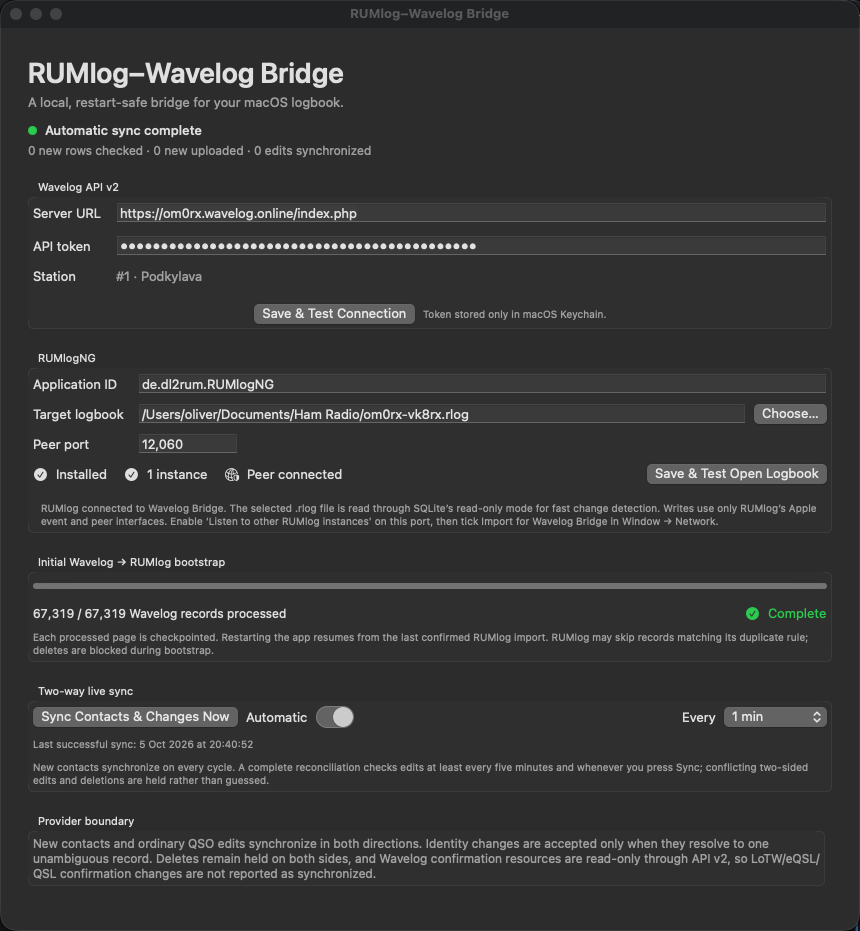
Ak používate RUMlogNG na Macu ako staničný denník a zároveň prevádzkujete webový logovací systém Wavelog, until now you have faced the question of how to keep these two environments in sync. The bridge RUMlog–Wavelog Bridge, ktorý napísal Oliver Bross, OM0RX, solves this problem with a native macOS application – without the need for external scripts, Python, or manual exports. ADIF.
In the article, you will read
How RUMlog–Wavelog Bridge works
The bridge is a native SwiftUI application for macOS 13 and newer. On the RUMlogNG side, it reads an open file .rlog exclusively via SQLite connection with the flag READONLY a PRAGMA query_only=ON – teda nikdy nezapisuje do databázy denníka. Nové QSO imports via the Apple-event ADIF interface of RUMlogNG, remote changes are transmitted via the native RUMlog TCP peer protocol (port 12060). On the Wavelog side, it communicates via REST API v2 s tokenmi uloženými výhradne v macOS Keychain – nie v konfiguračnom súbore ani v logoch.
Synchronization occurs bidirectionally: new QSOs are transferred from RUMlogNG to Wavelog and vice versa, including edits of fields such as frequency, band, mode, RST, locator, name, QTH, power, IOTA, CQ/ITU zone, and satellite. Every five minutes, an automatic full difference check occurs; in the event of a conflict – when both sides have changed the same QSO record – the bridge reports the conflict and leaves it unresolved instead of guessing the correct version.
Configuration on the Wavelog side
In the Wavelog settings, generate an API v2 token with permissions station:read, qso:read a qso:write. The token starts with a prefix wl2_…. In the Bridge, enter the full URL of the Wavelog installation including /index.php, vložte token a stlačte Save & Test Connection. From the returned list, select the correct station profile. The token will be saved in the Keychain and will not be visible in the application interface.
Configuration on the RUMlogNG side
In the Bridge, point to the file .rlog, which you currently have open in RUMlogNG, and confirm the peer port 12060 (ak ste ho v RUMlog nemenili). Stlačte Save & Test Open logbook – the bridge will verify that the last QSO in the file is visible through the running RUMlog. In RUMlogNG, set: Preferences → UDP → Listen to other RUMlog instances na rovnakom porte; Window → Network → zaškrtnite Import pre Wavelog Bridge. Bridge musí hlásiť stav Peer connected.
The first launch requires permission for Automation in macOS (System Settings → Privacy & Security → Automation) – without it, the Apple-event ADIF interface does not work.
Bootstrap and ongoing synchronization
After configuration, run Start Bootstrap once. The bridge pages existing QSOs from Wavelog through ADIF, compares them with the semantic identity of QSOs in RUMlog, and imports only those that are missing. Bootstrap is renewable after interruption – it checkpoints each page. After successful completion, run manual synchronization and then enable automatic mode with the desired interval. Automatic deletion remains deliberately turned off; changes to QSL confirmation statuses are also paused, as the Wavelog API v2 makes them read-only.
Installation and practical limitations
The current version is 0.2.1, available on GitHub (github.com/oliverbross/Rumlog-Wavelog-Bridge). The application is signed with Developer ID certificate OM0RX but is not notarized – on the first launch, it is necessary to open it via Control-click → Open and confirm the exception in macOS Gatekeeper. Requires macOS 13 or newer.
Fields specific to Wavelog (SOTA, POTA, WWFF references, propagation) are preserved during synchronization on the Wavelog side but are not transferred to RUMlogNG – RUMlogNG 6.5.1 does not persist them in its schema. If you actively use these fields, Wavelog remains their only source of truth.
The source code, architecture documentation, and compilation guide are available at github.com/oliverbross/Rumlog-Wavelog-Bridge. License GPL-3.0.