
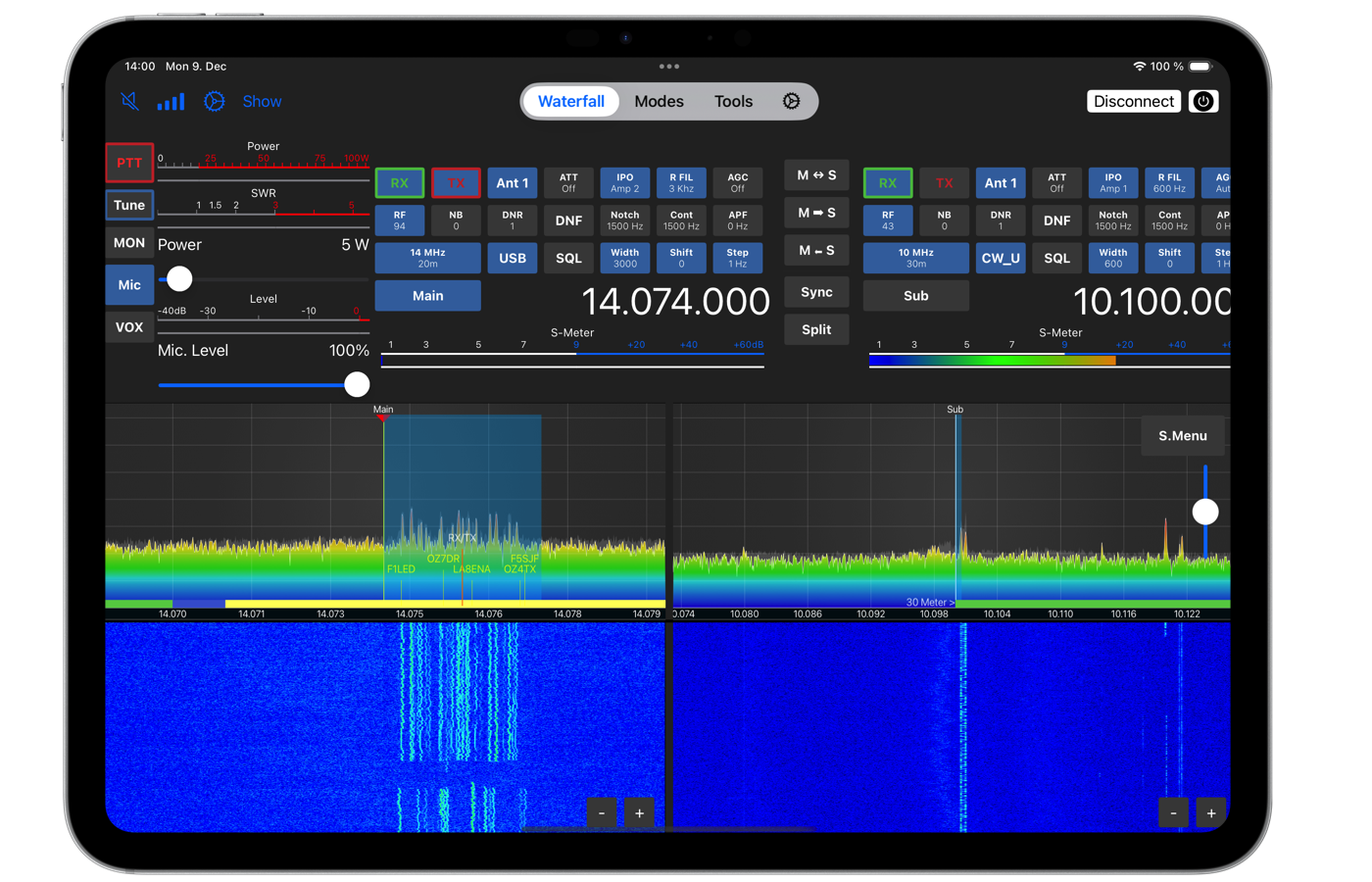
SDR-Control is a series of applications by Marcus (DL8MR) and Jan Roskosch that allow control of Icom transceiver over the network - from Mac, iPad or iPhone. Instead of traditional connection CAT káblom a zvukovou kartou stačí, aby bol transceiver aj zariadenie s aplikáciou pripojené do rovnakej siete (alebo aby bola nastavená vzdialená prevádzka cez internet), a operátor ovláda rádio vrátane vodopádu, filtrov, VFO aj digitálnych módov priamo z obrazovky.
In the article you will read
TIP: what to use SDR-Control for

SDR-Control is particularly useful where physical contact with the radio is impractical or impossible - for example, when the main unit of the transceiver is located in another room, when the operator wants to control the station remotely from anywhere in the world, or when they need a compact control interface on the go without the need to carry a notebook with external software. The application also integrates a built-in CAT server, so even with a network connection, it is possible to use external software concurrently such as WSJT-X alebo Fldigi (on macOS).
Supported devices

SDR-Control for Icom supports transceivers IC-705, IC-7610, IC-7760, IC-9700, IC-R8600, IC-7300 mk2 and older IC-7300 (ten iba cez USB, exclusively on Mac - iPad and iPhone do not have a fully functional USB port for this use). The newer IC-7300 mk2 already has a LAN connector, so it works locally and remotely just like the other supported models.
| Platform | Requirements |
|---|---|
| Mac | macOS 14 (Sonoma) or newer, any Intel or Apple Silicon processor |
| iPhone and iPad | iOS 17 or newer, any model and size |
| Local access | WiFi or LAN (on Mac also USB as an alternative) |
| Remote access over the internet | Only requires port settings in the router (described in the manual) |
The radio must be connected to the local network (via LAN cable for IC-7610, IC-7760, IC-9700, IC-7300mk2 or IC-R8600, or via WiFi for IC-705), with 'Network Control' enabled and a username and password set in the radio menu.
Video: SDR-Control in practice
Basic settings
After launching the application, the list of radios opens via the Connect button, where a new device can be added through Add – the connection type Network or USB is selected and the radio settings data is entered. The Low Bandwidth Connect option minimizes network traffic, which is useful for unstable or slow connections. Auto Connect ensures that the application automatically connects the selected radio without the need to go through the selection screen – however, it requires a fixed IP address for the radio.
After the first connection, it is important to set the ALC level (in the Radio menu, IC-xxxx). When connected to the network, it is worth checking the Network Stats tool – the error rate should be below 0.05%; if it is higher, it indicates network issues (incorrect LAN cable, incorrect Full/Half Duplex setting, WiFi problems). Separate from this are the audio settings, which in this application are independent of the Mac's system settings – for example, it allows the radio sound to be routed through a separate device while system sounds go through the built-in speaker.
Nástroje: Bandplán, DX cluster, CW makrá, PSK Reporter, Logbook, Vyhľadávanie značiek, VFO pamäte

The Band Plan tool displays a complete frequency overview for all HF bands according to the selected region IARU, vrátane odporúčaných módov a maximálnej šírky pásma. K dispozícii je aj samostatný bandplán pre satellite QO-100. The boundaries of bands and modes can be displayed directly on the waterfall.
DX-Cluster pripája aplikáciu k viacerým preddefinovaným globálnym serverom or k lokálnemu CW-Skimmeru, so spotmi zobrazenými priamo na vodopáde – dvojklikom na spot sa rádio okamžite naladí na danú frekvenciu. Nástroj obsahuje aj mapové zobrazenie všetkých aktuálnych spotov.
CW macros are managed through the Radio → Macros menu, with support for variables and flags (e.g., ^BK). It is also possible to create macros for RTTY, PSK, and voice messages (recorded via the Mac microphone).
PSK Reporter works bidirectionally: the application can automatically send received FT8/FT4 reports to PSK Reporter (at five-minute intervals), and simultaneously allows you to track which stations have received your own signal – including a map view.
Nástroj Call Lookup poskytuje základné údaje o volacej značke (krajina, DXCC, CQ zone, ITU zone) directly from the application's internal database, with the option for extended searching via HamQTH or QRZ.com (requires a subscription to the XML Data service for QRZ.com).
Radio memories are managed through the menu Radio → Memories, with the option to export and import between different Icom transceivers. A separate tool, Frequency List, allows you to maintain a global frequency list independent of a specific radio, synchronized via iCloud, with its own tagging system for filtering.
POTA support
Nástroj POTA zobrazuje spoty Parks on the Air rovnako ako nástroj DX-Cluster zobrazuje bežné spoty, vrátane zobrazenia na vodopáde. Kliknutím na spot je možné rádio naladiť priamo na danú frekvenciu (upozornenie: pri móde FT8 zverejnená frekvencia nezodpovedá presnej FT8 frekvencii, preto treba pre lov POTA aktivátorov na FT8 otvoriť samostatne nástroj FT8). Ak je otvorené okno logovania, údaje o parku sa doň automaticky predvyplnia vrátane vlastných (custom) polí ADIF, čo je užitočné aj pre SOTA or satelitnú prevádzku. Všetky aktuálne POTA stanice je možné zobraziť aj na mape.
FT8 and FT4
SDR-Control includes an integrated tool for FT8 and FT4, so a separate connection of the radio to the software using virtual audio cables is not necessary for basic operation. The application also allows for automatic logging of connections. The availability of individual features may vary depending on the supported transceiver and platform.
Logbook
Vstavaný denník ponúka rýchle a jednoduché logovanie priamo z aplikácie. Podporuje export a import vo formáte ADIF, ako aj export do formátu Cabrillo pre podanie denníka z pretekov. Log je možné uchovávať lokálne or cez iCloud, čo zabezpečí synchronizáciu naprieč všetkými zariadeniami vrátane aplikácií FT-Control, SmartSDR a HAM-Toolbox od rovnakého vývojára.
Denník podporuje odosielanie QSO do LoTW, QRZ.com, ClubLog, eQSL.cc a CloudLog, s možnosťou spätného sťahovania potvrdení z LoTW a QRZ.com. Súčasťou je aj funkcia Complete logbook data, ktorá dopĺňa chýbajúce údaje (meno, QTH, krajina) po skončení viacerých QSO, funkcia Mass change na hromadné úpravy záznamov a Find duplicates na nájdenie a zlúčenie duplicitných záznamov. Nové logovacie záznamy je možné cez UDP odosielať aj do iných programov (formát N1MM/Log4OM or WSJT-X).
Connectable external devices such as PTT switches, MIDI controllers, power meters, switches, rotators, and others
The application (especially the macOS version) supports a wide range of external controls. The CW Paddle connected via a USB cable works as a CW-Keyer directly through the application (with Iambic A, Iambic B and Iambic B Strict modes), the same USB connection can also be used for the foot PTT switch during phonic operation. Supported MIDI controllers include Numark DJ2GO2, Behringer CMD Micro, Behringer CMD PL-1 and Hercules DJ Controller Compact, with the ability to assign functions to buttons, rotary controls and LEDs.
The Icom RC-28 controller connects via USB and allows mapping of buttons and the rotary wheel. The wireless controllers CTR2-MIDI and CTR2-Dial (Lynn Hansen, KU7Q) connect via Bluetooth-LE or USB adapter and also support the connection of CW paddle. For antenna control, the application supports Ultra Beam (via the control unit RCU-06 and Raspberry Pi), Metropwr devices (FX755 MK2 power meter, FX7 antenna switch, RT1 rotor controller), Green Heron RT-21 rotor controller, and S.A.T. Controller from CSN Technologies for satellite operation with automatic Doppler correction. Waveshare devices (RS232-to-ETH and Ethernet Relay) allow connecting any device with a serial CAT interface (antenna tuners, amplifiers) or remotely switching the radio itself.
Video: Setting up SDR-Control for Icom
Basics of operation with SDR-Control
Tuning frequency can be done in several ways: by dragging on the waterfall (in Center mode it shifts the center, in Scroll mode it shifts the yellow VFO line), double-clicking on the waterfall to move the active VFO, using the mouse wheel, directly entering the number after clicking on the frequency, or through a separate Tuning Panel window. Tuning is also supported with a physical rotary knob on the radio itself, via the connected MIDI controller, or through assigned keyboard keys.
Nové QSO je možné zalogovať viacerými spôsobmi – tlačidlom (+) priamo v nástroji Logbook, cez menu View → Log new QSO, klávesovou skratkou, or automaticky po dokončení spojenia v móde FT8 (ak je vypnuté automatické logovanie). Okno logovania sa predvyplní na základe aktuálneho nastavenia VFO a zobrazí aj vzdialenosť, smer (short path aj long path) a informáciu, či bola daná stanica už v minulosti pracovaná.
For working with satellites via QO-100 or other satellites, it is advisable to use a transverter offset directly in the radio settings in the application – the displayed and logged frequency then corresponds to the actual effective frequency, not the transceiver frequency.
Summary
SDR-Control prináša operátorom Icom transceiverov kompletné sieťové ovládacie rozhranie, ktoré nahrádza väčšinu externého softvéru aj hardvéru potrebného na digitálne módy, CW, logovanie a prácu s DX klastrom či PSK Reporterom. Vďaka podpore širokej škály externých zariadení – od CW paddle a MIDI kontrolérov cez merače výkonu a anténne prepínače Metropwr až po rotátory Green Heron a satelitné kontroléry S.A.T. – sa dá aplikácia prispôsobiť takmer akejkoľvek konfigurácii stanice. Kombinácia lokálneho aj vzdialeného prístupu bez nutnosti dodatočného servera z neho robí praktické riešenie tak pre domácu stanicu, ako aj pre ovládanie rádia odkiaľkoľvek na svete.