
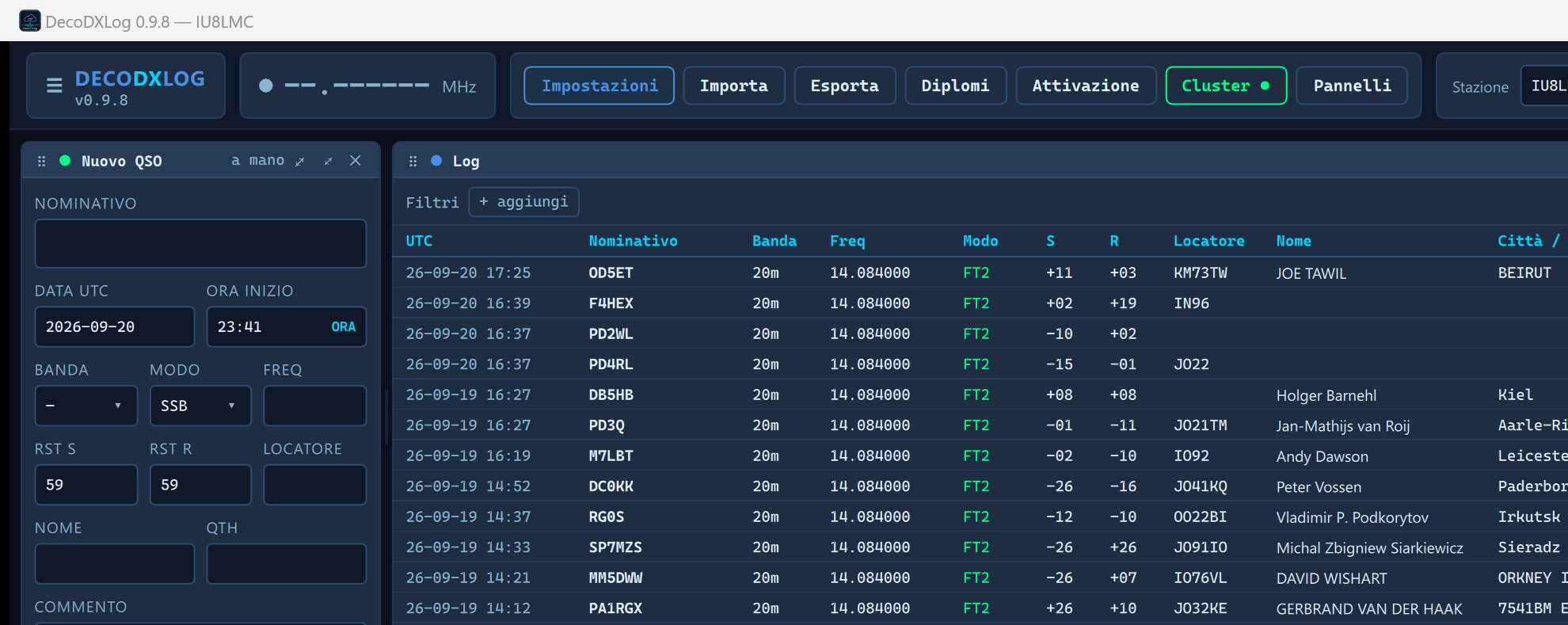
DecoDXLog je staničný log od IU8LMC, napísaný v C++20 s rozhraním Qt6/QML. Patrí do rodiny aplikácií Decodium – spolu s dekodérom Decodium a programom DecoRTTY zdieľa rovnaký vizuálny jazyk, rovnaké klávesové skratky a rovnakú filozofiu práce. Databázou je SQLite v režime WAL, čo znamená offline-first prístup bez externého servera: celý log, všetky profily, histórie revízií a stavy QSL žijú v jednom súbore na disku. Program je dostupný pod licenciou GPL-3.0, zdrojové kódy sú verejné na GitHube (github.com/iu8lmc/DecoDXLog). Aktuálna verzia je 0.5.2.
In the article you will read
Receiving QSO from Decodium, WSJT-X, and JTDX
DecoDXLog receives logged QSO via UDP on port 2237 (default value, configurable, multicast optional) from Decodium, WSJT-X, JTDX and compatible programs. The preferred message is LoggedADIF, ktorá prenáša všetky ADIF polia bez straty; ak nedorazí do 1,5 sekundy, program prejde na záložný formát QSOLogged. Obe varianty sa neduplikujú – do logu sa zapíše vždy jedno QSO. Duplicity sú konfigurovateľné: predvolené okno je ±2 minúty pre digitálne módy a ±10 minút pre ručné záznamy, pričom sa dá nastaviť osobitne pre každý mód.
The status of the UDP client is constantly visible - the program shows who is connected, at what frequency and in what mode they are operating, and whether TX is active. If Decodium stops sending messages, DecoDXLog will alert the operator with a warning message.
FT2 as a first-class mode
FT2 is natively supported mode in DecoDXLog. It is recorded in ADIF as MODE=MFSK, SUBMODE=FT2 and is displayed throughout the interface as the abbreviation FT2 - not as generic MFSK. This integration goes deeper: in the database schema, there is a dedicated FT2 Award panel, ktorý je vždy viditeľný a sleduje počet DXCC entít a lokátorov potvrdených práve v tomto móde, vrátane stavu potvrdení cez LoTW. Simulátor na testovanie bez rádia (decodxlog_udpsend) defaults to transmitting QSO in FT2 mode, which shows where the author's development priorities are.
Callbook, DXCC a automatické dopĺňanie
Program podporuje dve callbook služby: QRZ.com XML API a HamQTH. Login credentials are stored in the system key storage (Windows Credential Manager, macOS Keychain, Secret Service on Linux) - the configuration file only stores the username. Query results are kept in memory for one day, so repeated QSO with the same station do not require network communication.
Pri každom novom QSO callbook doplní iba prázdne polia – meno, QTH, šesťznakový lokátor, adresu, štát, kraj a zóny. Ak primárna callbook služba daný nominatív nepozná alebo neobsahuje polohu stanice, program sa opýta automaticky and druhej a obe odpovede zlúči. QSO zalogované cez UDP si doplnia tieto údaje bezprostredne po uložení, bez zásahu operátora.
Determining DXCC entity is done from the cty.csv database from AD1C (country-files.com), which is directly included in the executable file and can be updated from the program settings. Each imported or received QSO is automatically supplemented with: DXCC entity, country, CQ zone, ITU zone, and continent. If the operator works a new DXCC entity or new band, the program reports it directly while logging with the text NEW DXCC and NEW DXCC ON band.
Diplomas, statistics and map
DecoDXLog 0.5.2 calculates the following diplomas directly from the log:
| Diploma | Description |
|---|---|
| DXCC | DXCC Entity according to the AD1C list |
| DXCC Challenge | Band slots 160–6m (11 bands), goal 1000 |
| FT2 Award | DXCC and locators confirmed in FT2 mode |
| WAC / WAAC | All continents, or African entities |
| WAZ | 40 CQ zones |
| WAS | 50 American states |
| WPX | Nominative prefixes |
| WAJA / AJD | 47 Japanese prefectures / 10 Japanese districts |
| JCC / JCG | Japanese cities and districts (from the CNTY field) |
| IOTA, POTA, SOTA, WWFF | International activation programs |
| Locators | Grid fields, worked and confirmed |
For each diploma program, it displays a table of band slots (● confirmed, ○ worked) including total sums for each band. A list of missing entities, zones, or states is available with one click. Statistics are in a separate window and include QSO by year, month, UTC hour, band, mode, and continent. An interesting feature is the band/hour heatmap, which visually shows when a given band was open from the operator's own log – a useful tool for planning operations. The world map includes coastlines from the Natural Earth database.(public domain, directly in the executable file), the gray line according to the current position of the Sun, worked locators, and color-coded spots from the cluster.
Logbook, filtrovanie a správa QSO
Tabuľka logu zobrazuje voliteľné stĺpce vrátane CQ zóny, ITU zóny, IOTA, štátu, kraja a stĺpcov QSL stavu (L Q C E). Každý QSO záznam má históriu revízií: každá úprava vytvára novú revíziu, staré verzie sú dostupné a obnoviteľné. Vymazanie je mäkké – QSO ostáva v histórii a dá sa vrátiť. ADIF import a export sú bezstratové: polia bez priradenia v schéme sa ukladajú do adif_extra a pri exporte vychádzajú identicky. Logbook podporuje filtrovanie podľa pásma, módu, mesiaca, dátumového rozsahu, entity DXCC, stavu QSL, profilu stanice a štítkov; filtre sa dajú ukladať pod menom a opätovne aplikovať. Ručné and hromadné akcie na vybraných riadkoch zahŕňajú pridanie alebo odobranie štítku a export do ADIF. Klávesnica pokrýva všetky hlavné funkcie: Ctrl+N nové QSO, Ctrl+F hľadanie, Ctrl+I import, Ctrl+E export, Ctrl+K cluster, Ctrl+T aktivácia.
DX Cluster, rotátor a CW keyer
Okno DX Clustra (Ctrl+K) integruje viacero zdrojov naraz: telnetové uzly DX Spider a CC Cluster, Reverse beacon Network pre CW/RTTY aj FT8/FT4, HamAlert (login password in system storage) and POTA activations. Login occurs automatically under the nominative of the profile in the format CALL-2, takže Decodium môže mať vlastnú paralelnú session na tom istom uzle. Každý spot je v reálnom čase porovnaný s logom a označený stavom: NEW DXCC, nové pásmo, nový mód, nový slot, už pracovaný, nepotvrdená entita, alebo používateľ LoTW. Filtre pokrývajú pásmo, mód, stav, kontinent DX stanice aj spottujúcej stanice, zdroj, nominatívy s wildcard, minimálny SNR skimmer and age of the spot; filters can be saved under a name. Alert rules work with voice announcements via OS system voices (Italian and English, phonetic alphabet). Double-clicking on the spot directly sets the frequency and mode in Decodio.
The rotator is integrated via the DecoRotor protocol on WebSocket port 8765 or via standard rotctld on port 4532; the program never connects directly to the serial line. The control panel reproduces the entire 'Controllo' page from DecoRotor including the scale crown, azimuth map with circular distances, six direct memories, and point to degrees or locator. The direction of the antenna is also displayed on the map with cluster spots.
CW keyer and decoder are built directly into the program. The CW panel contains eight macros on keys F1–F8 (variables {CALL}, {MYCALL}, {RST}, {NR}, {EXCH}), a line for immediate text input and a decoder that reads the audio output of the radio, automatically searches for the carrier tone, and continuously adapts to the operator's speed. Communication with the radio takes place via Hamlib/rigctld; program vie rigctld aj sám spustiť, ak pozná model rádia a sériový port.
Contest a QSL funkcie
Contest mode is activated with the keyboard shortcut Ctrl+T (activation of POTA/SOTA/WWFF/IOTA) or Ctrl+Shift+T (contest window with real-time logging). The program displays duplicates in real-time, tracks the QSO rate for the last 10 minutes and the last hour, calculates QSO/h, and shows how many connections are still needed for a valid activation (10 QSO for POTA, 4 for SOTA). Export to Cabrillo format 3.0 includes a header with categories, locator, score, and soapbox; frequencies are in kHz, modes according to Cabrillo conventions (CW/PH/RY/DG/FM). The contest session survives.program restart - it is saved directly in the log.
QSL odosielanie pokrýva LoTW (signature ADIF via installed TQSL, certificate remains in place), QRZ Logbook (API kľúč), eQSL (meno a heslo) a Club Log (e-mail, heslo, nominatív, API kľúč). Každý z týchto servisov sa dá nastaviť na automatické odosielanie po každom QSO alebo spúšťať ručne. Stav QSL pre každú službu je uložený v samostatnej tabuľke a zobrazený v logu stĺpcami L (LoTW), Q (QRZ), C (Club Log), E (eQSL). Sťahovanie potvrdení z LoTW prebieha z lotwreport.adi, len nové záznamy od posledného syncu, manuálne alebo automaticky každých 6, 12 alebo 24 hodín. Párovanie QSO s potvrdeniami zodpovedá metodike LoTW: nominatív, pásmo, skupina módov a čas v tolerancii ±30 minút.
DecoDXLog Cloud and open source code
DecoDXLog Cloud is an optional synchronization layer between multiple computers. Unlike a classic cloud log, it synchronizes not only QSO but also profily stanice a všetky nastavenia – tému, jazyk, filtre, konfiguráciu clustra, zoznam zálohovacích adresárov, adresy susedných programov. Druhý počítač po prvej synchronizácii nájde identickú stanicu, nie len jej podobizeň. Prihlásenie prebieha nomináciou a heslom; program ukladá len token v systémovom úložisku kľúčov. Heslá externých služieb (QRZ, LoTW, Club Log, eQSL, HamQTH, HamAlert) sa synchronizujú zašifrované: šifrovanie je AES-256-GCM with a key derived via PBKDF2 from the Cloud account password; the server knows the password only as an Argon2 hash, the encrypted block itself cannot be opened without this password. The program also works completely offline – Cloud je voliteľný, nie podmienka.
The source code is available at github.com/iu8lmc/DecoDXLog under the GPL-3.0 license. The project includes 22 groups of automated tests for the core program and 73 test cases for the cloud service. Compiling on Windows requires Qt ≥ 6.5 with modules Quick, QuickControls2, Sql, Network, and Test; CMake + Ninja is used for dependency management in the MSYS2 environment. The CI pipeline on GitHub produces an artifact with each commit decodxlog-windows-x64 ready to run without installation.
Source code, documentation, and updates are available at github.com/iu8lmc/DecoDXLog. The project page with an overview of features is at ft2.it/decodxlog/.