
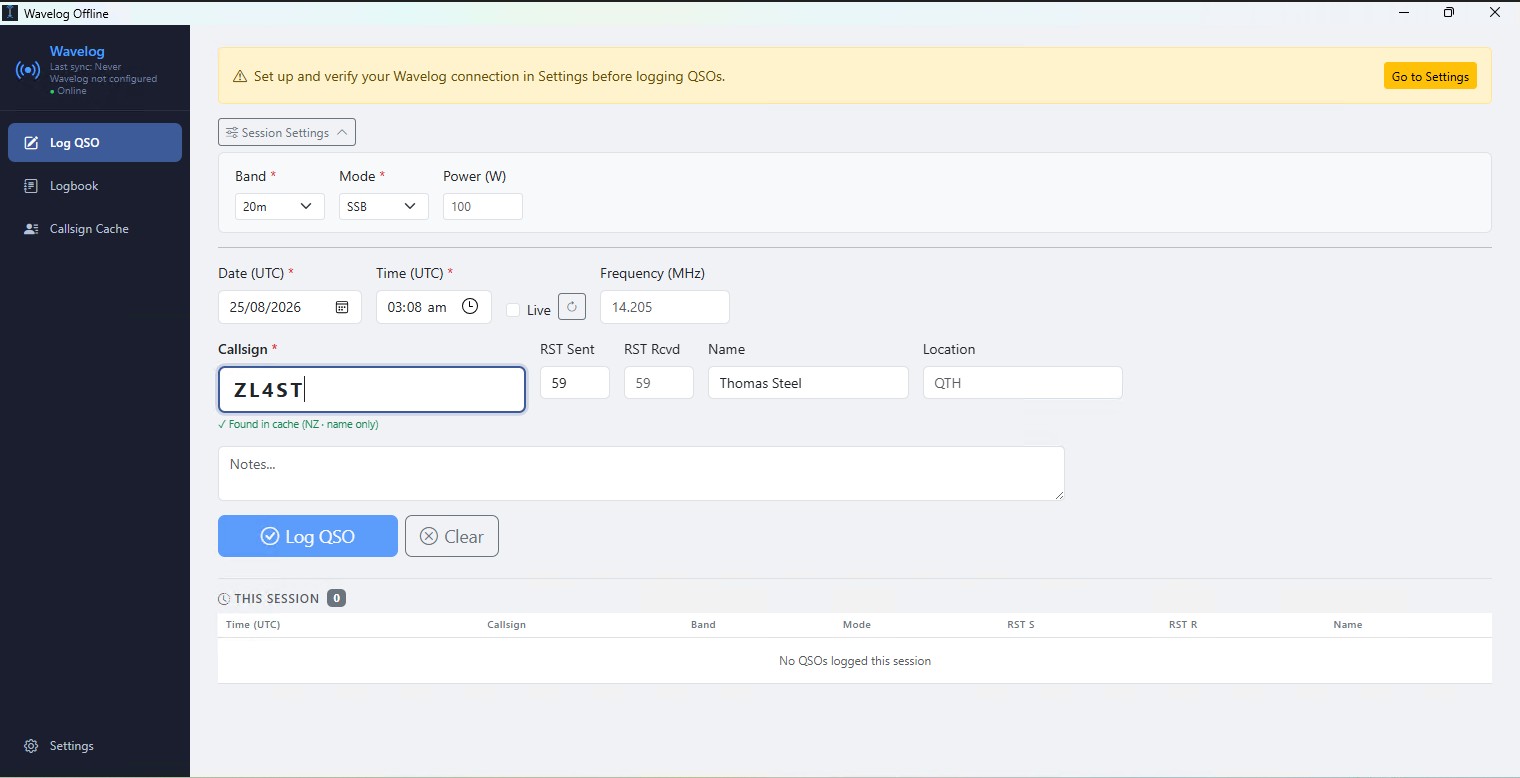
Wavelog-Offline is a lightweight desktop application that complements the popular web log Wavelog o the ability to log connections completely offline and synchronize them with the server as soon as a connection is available. The application is built on the Tauri 2 framework (Rust backend with HTML/JS frontend), which gives it a small size and no external runtime dependencies. It is currently being developed and tested on Windows; macOS and Linux should theoretically work according to the author (Tauri supports both platforms), but they haven't been built or tested yet.
You will read in the article
Reasons for the creation of Wavelog-Offline
Wavelog is a full-fledged web logging system, which, however, requires a connection to the server for its operation. When operating in the field, on roofs without a signal, in basement shacks or simply when the Internet is down, so operátor stráca možnosť okamžite zalogovať spojenie priamo do svojho systému. Wavelog-Offline solves exactly this problem - it allows you to log QSOs locally, regardless of connection status, and postpone syncing until later.
At the same time, the application works as a supplement, not a replacement for Wavelog - the data is always uploaded to the main server in ADIF format, so the log remains unified and centralized, even if part of the connections were logged offline.
Vlastnosti Wavelog-Offline: logovanie QSO, vyhľadávanie značiek, logbook a status
QSO logging is designed to be offline-first: connections are saved locally until they are ready to sync. Uploading pending records to the server takes place with one click in ADIF format. The application can also download remote records from the server and merge them with local records without overwriting pending items. Deduplication works by a combination of call sign, date, time, band and mode, so re-merging is safe.
Rýchle zadávanie dát podporuje klávesu Enter, ktorá posúva kurzor postupne cez polia Volací znak → RST Sent → RST Rcvd → Meno → QTH → Poznámky → Log, čo umožňuje logovať bez nutnosti siahnuť po myši, čo ocenia najmä operátori počas pile-upov. Automatické UTC hodiny vypĺňajú čas spojenia samočinne, s možnosťou vypnúť ich a zadávať čas manuálne. Pásmo, mód a výkon sa prenášajú medzi jednotlivými QSO v rámci jednej session. Predvolené hodnoty RST sú inteligentne nastavené na 59 pre SSB/fóne módy a 599 pre CW/digitálne módy.

Searching for call signs works on three levels. Offline cache allows you to import official national license databases for instant search of any call sign without internet. A personal cache of contacts is automatically built from your QSO history (both local and from the Wavelog server) - already worked stations are highlighted and their name/QTH is pre-filled. If the station is not in any of the local caches and the application is online, a live search will take place via the free API service HamQTH. After the call sign is recognized, the Name and QTH fields are filled in automatically, while manual editing always takes precedence over automatic filling. A color-coded mark next to the field shows the source of the data - personal history, national cache or HamQTH.
Sekcia Logbook & Status ponúka samostatné zobrazenie session (aktuálne sedenie) a plný denník s vyhľadávaním a filtrovaním podľa volacieho znaku, pásma a stavu synchronizácie. Každé QSO má priradený stav: pending (iba lokálne), uploaded (synchronizované na server) alebo online (stiahnuté zo servera). Bočný panel zobrazuje indikátor pripojenia v reálnom čase – nejde len o kontrolu lokálnej siete (LAN), ale o overenie skutočnej dostupnosti internetu.
Only "pending" QSOs can be deleted locally. Connections already uploaded to the server or downloaded from the server cannot be deleted from this application.
Installation and configuration
The easiest way to install is to download the latest .exe installer from the Releases section on GitHub and run it - no additional setup is required. An alternative is to build from source, which requires Node.js version 18 or later, Rust (stable toolchain), Tauri prerequisites for the operating system, and a running instance of Wavelog with API access for synchronization functions. On Windows, this process is simplified by the build.bat script, which automatically checks and installs the missing tools via winget, including MSVC Build Tools and WebView2 Runtime.

Po prvom spustení je potrebné v sekcii Settings vyplniť pripojenie na Wavelog: URL adresu servera (napríklad https://log.example.com), API kľúč (nachádza sa v rozbaľovacom menu profilu pod vaším volacím znakom v hornej lište, sekcia API keys) a číselné ID vášho staničného profilu (Station Profile ID) vo Wavelogu. Tlačidlom Test Connection overíte dostupnosť servera – logovanie QSO je zablokované, kým test spojenia pre aktuálne uložené URL a API kľúč neprebehne úspešne.
Optionally, it is also possible to set up a live call sign search via HamQTH by entering a username and password (free registration at hamqth.com). Other options in the Application section include default RST values for phone and CW, automatic UTC time filling, and automatic synchronization of pending QSOs when a connection is detected.
| Data | Storage |
|---|---|
| QSO (pending / uploaded / online) | browser localStorage within Tauri WebView |
| Application settings (server URL, API key, HamQTH login) | browser's localStorage |
| Call sign cache (national databases) | SQLite - wavelog-offline.db in the application's data directory |
| Personal cache of contacts | SQLite - the same database, contacts table |
A practical example of use
Predstavme si poľnú aktiváciu SOTA alebo POTA na kopci bez mobilného signálu. Operátor spustí Wavelog-Offline, zadá volací znak protistanice – po treťom znaku aplikácia automaticky vyhľadá stanicu: ak bola pracovaná už skôr, zobrazí sa modrá značka „Previously contacted“ s predvyplneným menom a QTH; ak sa nachádza v stiahnutej národnej databáze, zobrazí sa zelená značka so zdrojovou krajinou. Klávesou Enter operator prejde cez polia RST Sent, RST Rcvd, Meno, QTH a Poznámky a spojenie uloží tlačidlom Log QSO (alebo Enterom z posledného poľa).
Po skončení aktivácie a návrate do dosahu mobilnej siete alebo domáceho WiFi operator otvorí záložku Logbook a klikne na Upload Pending – všetky offline zalogované QSO sa nahrajú na Wavelog server vo formáte ADIF v jednom kroku. Ak má zapnutú funkciu Auto-sync, tento krok prebehne automaticky hneď, ako aplikácia zistí funkčné pripojenie na internet, bez nutnosti čokoľvek manuálne potvrdzovať.
Summary
Wavelog-Offline solves a specific and common problem for radio amateurs who use Wavelog as their main log, but often find themselves out of reach of the Internet - during field activations, expeditions or simply when the connection drops. The combination of offline logging, intelligent search of call signs from three sources (personal history, national databases, HamQTH), secure deduplication during synchronization and simple one-step upload to Wavelog makes the application a practical tool for both routine and field operation. The project is open source under the MIT license, currently available for Windows, with the installer and source code on GitHub in the pomtom44/Wavelog-Offline repository.