
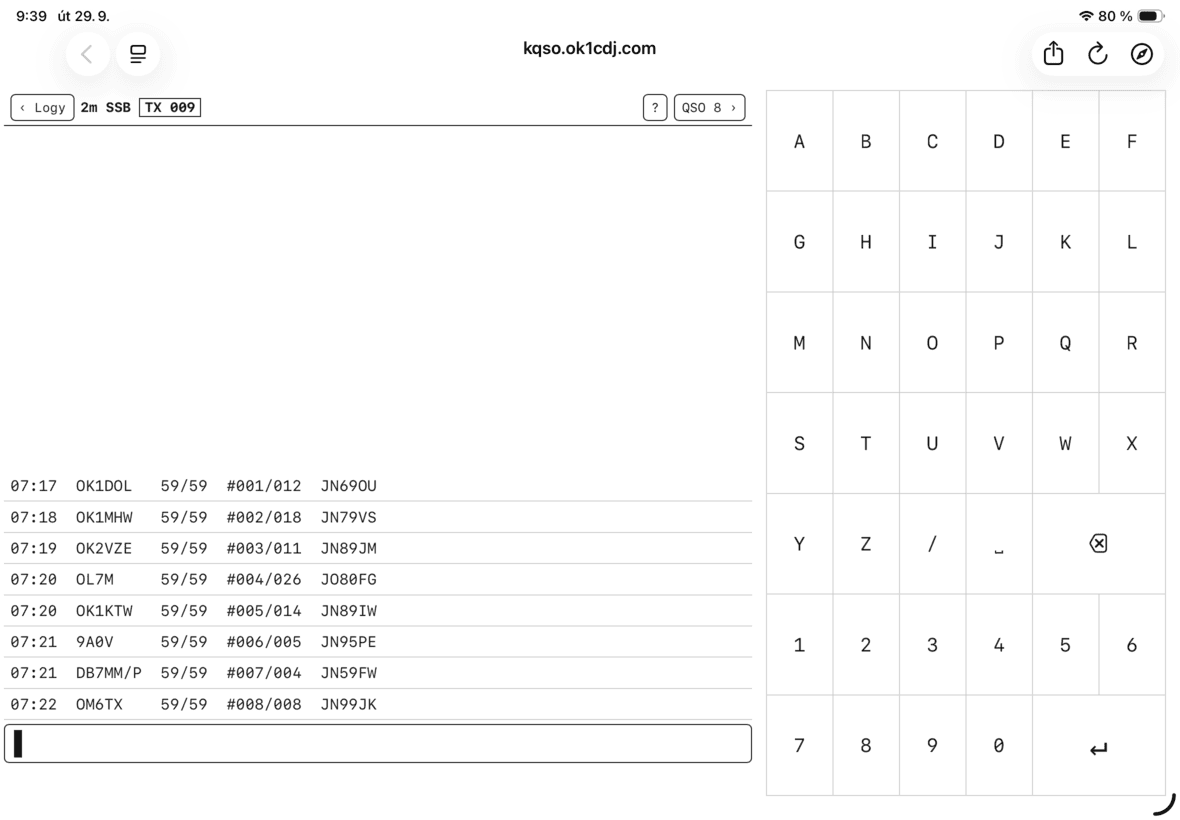
kQSO je rádioamatérsky log od OK1CDJ, ktorého hlavná myšlienka je netradične jednoduchá: namiesto klasického formulára s množstvom polí používa jeden inteligentný vstupný riadok. It recognizes the data that the radio amateur gradually enters – callsign, band and mode, report, serial number, locator, or activation reference. The project exists as a web application with an offline PWA mode and also as an Android APK using the same web application.
In the article you will read
One line instead of a form
When logging normally, you need to switch between individual fields. kQSO reverses this model. Data can be entered gradually into a single line, and the application assigns them to the correct QSO items according to syntax. Below the entered text, it also displays a preview of what will be saved. To save the connection, simply press Enter on an empty line, with the callsign being the only required field.

The practical significance will be especially evident during contests. Instead of moving the cursor between the callsign, report, serial number, and locator, the operator can write the data as they receive it. For example, in the VHF contest profile, you can enter the callsign, serial number, and six-character Maidenhead locator in one line. kQSO will then also display the calculated QRB and point value of the connection.
Profiles for different types of operation

kQSO is not tied to a single type of amateur radio operation. When creating a log, a profile is selected that determines its behavior. There is a general log, an activation profile for SOTA, POTA, WWFF, and TOTA, a VHF contest, and a separate profile for satellite operation.
The VHF contest profile works with serial numbers, six-character locators, and scoring based on the distance between locator centers. When logging satellites, a specific satellite is selected at the time of log creation. The application then sets the appropriate uplink and downlink bands and the SAT_NAME data. This model is practical, for example, when logging multiple passes of RS-44, SO-50, ISS, or QO-100.
Portable operation and work without internet
One of the essential features is offline operation. Each QSO is immediately recorded in the local log, and unfinished QSOs are stored in a crash journal, so after a restart, the user can be prompted to continue. The web version uses persistent storage OPFS, while the Android application saves logs as ADI files in the application storage.
This is important for portable operations where a data connection may not be available. After finishing work, the log can be exported to ADIF; for VHF contests, an export in the EDI REG1TEST format is also available, separately for each band.
Wavelog and working with the callsign database
kQSO can send General, Satellite, and VHF contest logs to its own Wavelog via API v2. Submission is manual and requires setting up the URL and the appropriate token. It is important that submission is not automatic. Wavelog When resending, it skips duplicates, so the same log can be sent again if needed.
A separate feature is the callsign database. kQSO uses pre-prepared databases according to the type of profile and also remembers its own previously worked stations. The database can be exported, imported, or deleted independently of the logs themselves. When entering a callsign, the application can offer known data and supplement the locator during VHF operation.
Interface for keyboard and e-ink
The project is designed for desktop, tablet, Android, and devices with e-ink displays. The application includes its own keyboard layout of 6 × 7, while a hardware keyboard is also supported. The application offers both standard and e-ink display modes and can keep the screen active in logging mode.

For the radio amateur, the limitation on the number of touches is particularly interesting. When working in the field or during a contest, it can be jednoduchší vstup jedným riadkom praktickejší než klasický formulár optimalizovaný pre veľkú obrazovku. kQSO navyše podporuje pásma od 160 m až po mikrovlnné pásma do 76 GHz, pričom mikrovlnné frekvencie možno zadávať v tvare napríklad 24G alebo 47G. Nájdete ho na Gihube also at https://kqso.ok1cdj.com
Will you try kQSO?
Vyzerá to super, osobne ho skúsim využiť pri prepisovaní spojení z papiera.