
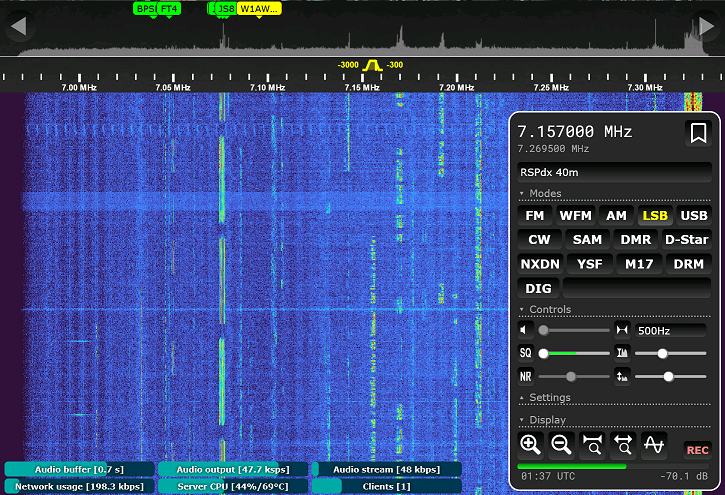
OpenWebRX+ is an expanded and improved version of the original open-source software OpenWebRX, which allows access to SDR receiver over a network or the Internet via a web browser. The project is being developed by Marat Fayzullin as an informal fork of the original OpenWebRX by Jakob Ketterling. While the original provides basic web SDR, OpenWebRX+ adds extensive enhancements: noise reduction, frequency step tuning, frequency scanner, keyboard shortcuts, improved user interface and map, and most importantly, decoders for a wide range of digital communication protocols. A list of publicly available receivers running OpenWebRX and OpenWebRX+ is available on the ReceiverBook website.
In the article you will read
What makes OpenWebRX+ better than the original?
Originálny OpenWebRX je funkčný základ: ponúka waterfall, základné demodulátory a niekoľko dekóderov pre digitálne amatérske módy. OpenWebRX+ nad tým stavia o podstatnú vrstvu. Spektrálny displej (nad waterfallom) zobrazuje aktuálnu úroveň signálu na každej frekvencii v reálnom čase, čo originál nemá. Redukcia šumu pracuje na princípe spektrálnej subtrakcie a je nastaviteľná prahovou hodnotou. Krokové ladenie (tuning step) umožňuje nastaviť granularitu ladenia – napríklad 5 kHz pre krátkovlnné vysielanie or 500 Hz for SSB. The frequency scanner automatically monitors bookmark frequencies and tunes to the one where it detects a signal above the set squelch threshold. The map display is extended with Google Maps and Leaflet/OpenStreetMap with weather layers, marine annotations and position reports from multiple systems. OpenWebRX+ also offers HTTPS support, WiFi configuration directly from the web interface, integrated chat and monitoring of connected clients by the administrator.
Required hardware

OpenWebRX+ supports multiple SDR receivers simultaneously, with the total number limited by the host computer's performance. The most affordable option is the RTL-SDR family. USB prijímačov na čipset Realtek RTL2832U. RTLSDRv3 It operates natively in the range of 24 MHz–1766 MHz, with the possibility of direct sampling (Q branch) also in the range of 500 kHz–14 MHz.
RTLSDRv4 officially also covers the 500 kHz–24 MHz band via a converter and requires an updated driver.
SDRPlay (RSP) receivers cover a continuous range of 1 kHz–2000 MHz with bandwidth up to 10 MSPS and ADC resolution up to 14 bits, require installation of the SDRPlay API from the manufacturer.

The Airspy R2 offers a range of 24–1700 MHz and a bandwidth of 10 MSPS with a 12-bit ADC. The Airspy HF+ Discovery covers 500 Hz–31 MHz and 64–260 MHz with an 18-bit ADC, making it particularly suitable for HF reception. The Hermes Lite 2 is an amateur-designed SDR transceiver with an Ethernet interface, capable of receiving up to four independent pieces of spectrum in the range of 130 kHz–30 MHz, each with a bandwidth of 384 kHz. The HackRF One covers 1 MHz–6 GHz with a 20 MSPS bandwidth and an 8-bit ADC.
| Equipment | Range | Bandwidth | ADC | Interface |
|---|---|---|---|---|
| RTLSDRv3 | 500 kHz–14 MHz, 24–1766 MHz | 2.4 MSPS | 8 bits | USB |
| RTLSDRv4 | 500 kHz–1766 MHz | 2.4 MSPS | 8 bits | USB |
| SDRPlay (RSP) | 1 kHz–2000 MHz | ≤ 10 MSPS | ≤ 14 bits | USB |
| Airspy R2 | 24–1700 MHz | 10 MSPS | 12 bits | USB |
| Airspy HF+ | 500 Hz–31 MHz, 64–260 MHz | 768 kSPS | 18 bits | USB |
| Hermes Lite 2 | 130 kHz–30 MHz | 4 × 384 kSPS | 12 bits | Ethernet |
| HackRF One | 1MHz–6GHz | 20 MSPS | 8 bits | USB |
OpenWebRX+ in practice – overview of functions and decoders
Where to get OpenWebRX+ and how to install it
Binary packages for Ubuntu 22.04, Ubuntu 24.04, Debian Bullseye, Bookworm and Trixie are available from the project repository at luarvique.github.io/ppa. Installation is done in the standard way via APT after adding the repository. For Ubuntu 24.04, adding a single OpenWebRX+ repository is sufficient; for older versions of Ubuntu and Debian Bullseye, the original OpenWebRX repository must also be added. After adding the repositories, the installation is performed with the commands:
sudo apt update && sudo apt install openwebrx
After installation, the web interface is available on port 8073 (http://localhost:8073/). For Raspberry Pi users, pre-prepared SD images with a complete installation including optional packages are available, compatible with RPi 2, 3, 4 and 5 in 32-bit or 64-bit versions. The images are available on the project's GitHub repository. An alternative way is to install via Docker - images with and without SoftMBE (digital voice decoder) are available, for x86-64, ARM64 and ARM32 architectures. Under Windows, installation via WSL2 is possible in combination with USB-IP to release the SDR device from Windows to the WSL2 environment.
Using OpenWebRX+ – overview of functions and controls
The main display consists of a waterfall, a frequency scale, a spectral display (OpenWebRX+) and a control panel. Waterfall shows the band activity with color intensity according to the signal level. Tuning is done by clicking on the waterfall, a bookmark or by directly entering the frequency in the field. Bookmarks come in three types: green (frequency plan, system), yellow (saved by the administrator on the server) and blue (saved in the user's browser). Squelch is set with a slider, right-clicking it activates the frequency scanner. Noise reduction (NR) and step tuning are available in OpenWebRX+ directly from the main control panel. You can display keyboard shortcuts for the most common functions by pressing the ? key. The OpenWebRX Client Android application (com.fms.owrx) is available for mobile devices, which removes the limitations of mobile browsers when working in the background.

Módy zahŕňajú AM, SAM, LSB, USB, CW, NFM a WFM. Dekódery digitálnych módov pokrývajú rádioamatérske módy FT8, FT4, FT4, WSPR, JT65, JT9, FST4, FST4W, Q65, MSK144, JS8, CW (s automatickým dekóderom aj CW Skimmerom pre celých 48 kHz spektra), RTTY (tri varianty: 170/45, 450/50N, 85/50N), SSTV (Robot, Scottie, PD, Wraase SC2 formáty), APRS, as well as packet radio. ADS-B (1090 MHz), HFDL, VDL2 and ACARS are supported from aviation protocols.

From maritime protocols AIS, NAVTEX, SITOR-B/MSI and DSC. For broadcast bands, DAB (digital FM in Europe), HDRadio (NRSC5, digital FM in the USA) and DRM decoders are available. For ISM bands (433–435 MHz and others) a generic ISM decoder for wireless devices (weather stations, sensors, TPMS) is available. Output from decoders of FT8, FT4, WSPR, JT65 and other WSJT modes is reportable to PSKReporter and WSPRnet; APRS spots to APRS-IS; and all decoded data optionally via MQTT broker.
Special features of OpenWebRX+
The administrator can configure background decoding, in which the server automatically decodes signals on frequencies defined by the frequency plan whenever a user is connected. The decoding scheduler allows two modes: Daylight Scheduler switches the SDR device profiles according to the day/night/gray line phase; Static Scheduler allows you to define your own schedule with minute-by-minute accuracy. Both modes are usable for autonomous operation without the presence of users. For radio amateurs, integration with Hamlib – OpenWebRX+ can send commands to change frequency and mode to the connected transceiver, making it a panoramic viewfinder for an existing station. Integration with SatDump allows reception and decoding of satellite weather images (NOAA, METEOR) as a backup function. JavaScript plugins (framework by Stanislav Lechev LZ2SLL) extend the user interface on the client side without interfering with the server code.
Summary

OpenWebRX+ is currently the most advanced freely available web-based SDR server with the widest portfolio of digital protocol decoders. For a radio amateur who wants to make his station accessible remotely, monitor the bands without being present at the radio or operate a public online receiver, the combination of an RTL-SDR or SDRPlay receiver with a Raspberry Pi and OpenWebRX+ is a cost-effective and computationally affordable solution. Installation via the package repository is straightforward on Ubuntu and Debian systems, pre-prepared SD images eliminate the need for manual configuration. Support for external reporting (PSKReporter, WSPRnet, APRS-IS, MQTT) allows integration into global propagation networks. The source code is available on GitHub under the AGPL v3 license.