
Alex VE3NEA is the author of several programs for radio amateurs (DXAtlas, CWSkimmer, etc.). He wrote software for radio amateurs who want excellent modulation Voice Shaper. Je to kompresor dynamiky a ekvalizér v reálnom čase.
Základom je využitie digitálneho spracovania zvuku počítačom. The signal from the microphone is fed to the computer via the sound card and after processing it is fed from the computer to the modulating input of the radio station. Voice Shaper requires a PC with Windows OS, a P4/1GHz processor and better, 256MB of RAM, and a sound card with a WDM driver.
Installing the program is simple and hassle-free. It consists in downloading the installation from the VE3NA site and performing a standard installation. However, setting up Voice Shaper requires patience.
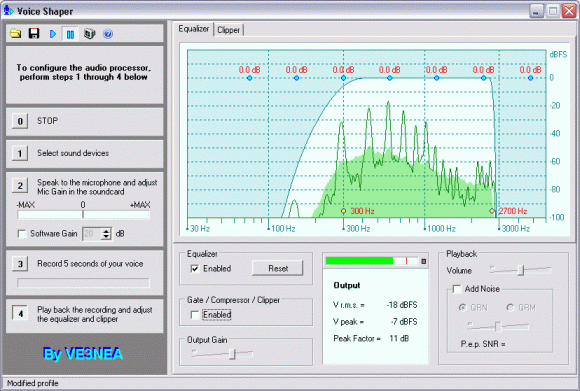
In the left part of the window there are five basic steps - stop, select the audio device, adjust the signal level from the microphone, record and play the recording.
We start by selecting the audio device while speaking into the microphone, we set the signal level so that the Voice Shaper indicator is in the green field. Then we record a speech, for example, a speech. This will ensure that we can better compare the next setting (equalizer and compressor).
In the larger field of the window, the modulation spectrum is displayed. When the equalizer is turned on, we have seven blue rings in the spectrum. By moving them up and down with the mouse, we add and subtract the given frequency band. For example, we can emphasize the bass or treble according to our own wishes.

Rather than graphical and mathematical expression of the modulation level, it is worth relying on your own ears when setting. The Voice Shaper allows you to set even large levels, which will then significantly affect the character of the modulation.
Voice Shaper is a useful program for "modulation fanatics" and owners of devices without a compressor. However, there were two things I missed in Voice Shaper - the ability to key the transceiver from the computer and record several audio files for giving prompts.
You can download Voice Shaper from www.dxatlas.com/Download.asp