
Choosing a logbook for amateur radio operations is a personal matter. Everyone has different priorities: one is looking for quick contest logging, another needs a link to LoTW and ClubLog, the third wants to have the diary accessible from any device, regardless of where they are. It is this last requirement – accessibility from anywhere – that is behind the creation of WaveLog, webovej aplikácie, ktorá od februára 2024 rastie rýchlejšie, než by ktokoľvek predpokladal.
In the article you will read
What is WaveLog, how did it come about and who creates it?
WaveLog is a free, open-source, self-hosted web application for logging amateur radio communications. It is not a program to be installed on a computer in the classic sense – it runs on the web, i.e. on a server, and is accessed through a regular browser. This is what sets it apart from most traditional logs and at the same time gives it the advantage of being accessible from any location with an internet connection: from your home QTH, from a portable station, from a mobile phone on a field day, from a DXpedition device.
Projekt vznikol koncom roka 2023 ako fork dobre známeho Cloudlog, authored by Peter MM9SQL. The four core developers – DF2ET, DJ7NT, HB9HIL and LA8AJA – who had been developing Cloudlog for years decided to continue on their own path. The result was WaveLog, first released on February 1, 2024. Since that date, dozens of releases have been made, adding features for contest logging, satellite operation, QSL card management, advanced statistics and multiple language translations. In 2026, the team received the prestigious Rudolf-Horkheimer-Award from DARC. WaveLog je nekomerčný projekt, vyvíjaný rádioamatérmi pre rádioamatérov, bez reklám a poplatkov.
Technologically, it is based on the classic LAMP stack: Linux, Apache, MySQL (or MariaDB), PHP - specifically the CodeIgniter 3 framework with the Bootstrap interface. For those who do not want to configure the server manually, a Docker installation with a ready-made docker-compose file is also available.
My year of experience with WaveLog – a detailed look OM0AAO
For pure VHF I used the service 20 years ago. VQLog and Atalanta Locator by OK1DUOA new star appeared for the KV contest operation at that time: N1MM. It was excellent software, but it didn't have the features needed for KV DXing or QSL scheduling. So I became addicted to it for many years. Logger32. Either I had it running N1MM and through the so-called bridge, the connections were transferred to Logger32 or I recorded the connection directly in Logger32. Functional, but with the development of internet callbooks, electronic confirmation of connections, and registration in ClubLog, such a system was starting to become quite laborious.
Neprestával som hľadať denník, ktorý by mi funkciami, prepojením na iné systémy, prehľadnosťou and prijateľným ovládaním vyhovoval. Je niekoľko veľmi vydarených contestových denníkov (napríklad Win-Test) and medzi klasickými Qlog. A few were excluded due to a different OS (e.g. RUMLog). I had several connections with Peter MM9SQL through satellites and contests and I knew that he was behind a logbook called CloudLog. However, it is not a classic program, but a web application, which I did not like.
Due to operation via QO-100 satellite I reached for Log4OM. Probably everyone who tried it found out that it can be hellishly slow. Then came the question from Oliver OM0RX: please keep the log! We searched and tested many programs again. It's not a good sign if during import or connection CAT TCVR program zahlási „Fatal error“. Po dlhom skúšaní sme narazili na WaveLog. Opäť v štýle „ideme to pokaziť“ sme začali skúšať a výsledok nás prekvapil.

WaveLog – after so many failed attempts – surprisingly worked. It handled even larger imports, connections to various services, data filtering, and statistics without complications. The clarity and usability seemed good even though we were both looking for DX cluster or some settings. In this regard, it is important to read the manual! And once again: read the manual! It is written briefly, but it is much faster to find the answer to the question.
Another surprise was the fast and accurate support at https://github.com/wavelog/wavelog/discussions. Answers came very quickly to questions – both simple and complex. I was also personally impressed by the number of features for satellite operations. This is not surprising, because WaveLog is based on CloudLog and several developers are actively involved in satellite operations.

The connection to CAT is implemented via WaveLogGate, so it requires a bit of skill in configuration. The version at that time did not yet allow connecting Rotator, but work on that began quickly. The basic language is English, but the undisputed advantage is the translations that are carried out by volunteers. Among the languages are Czech (currently 98% translated) and Slovak (81% translated). I did the Slovak translations over several evenings.
Minus: DX cluster principle
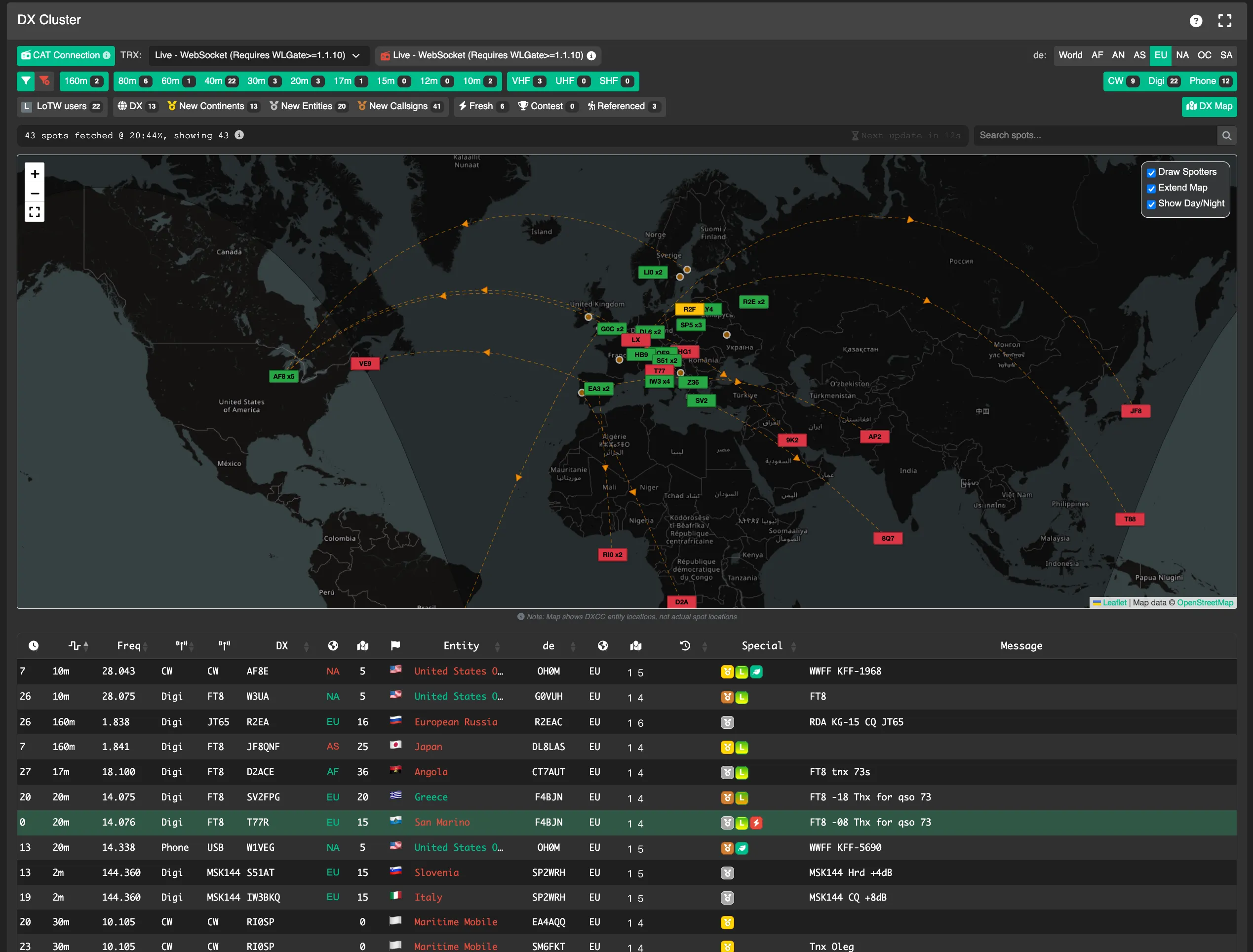
Začnem s tým, čo nefunguje: DX cluster. Nefungoval ideálne v starších verziách podľa predstáv a v novších verziách taktiež nie. Problém spôsobuje, že WaveLog sa nepripája na DX cluster priamo, ale through cache. Tá sa štandardne obnovuje každú minútu. Spolu s mechanizmom zobrazovania tak oneskorenie DX spotu je priveľké.

Plusy: DX cluster, logovanie, prepojenia, filtrovanie, QSL manažment, diplomy
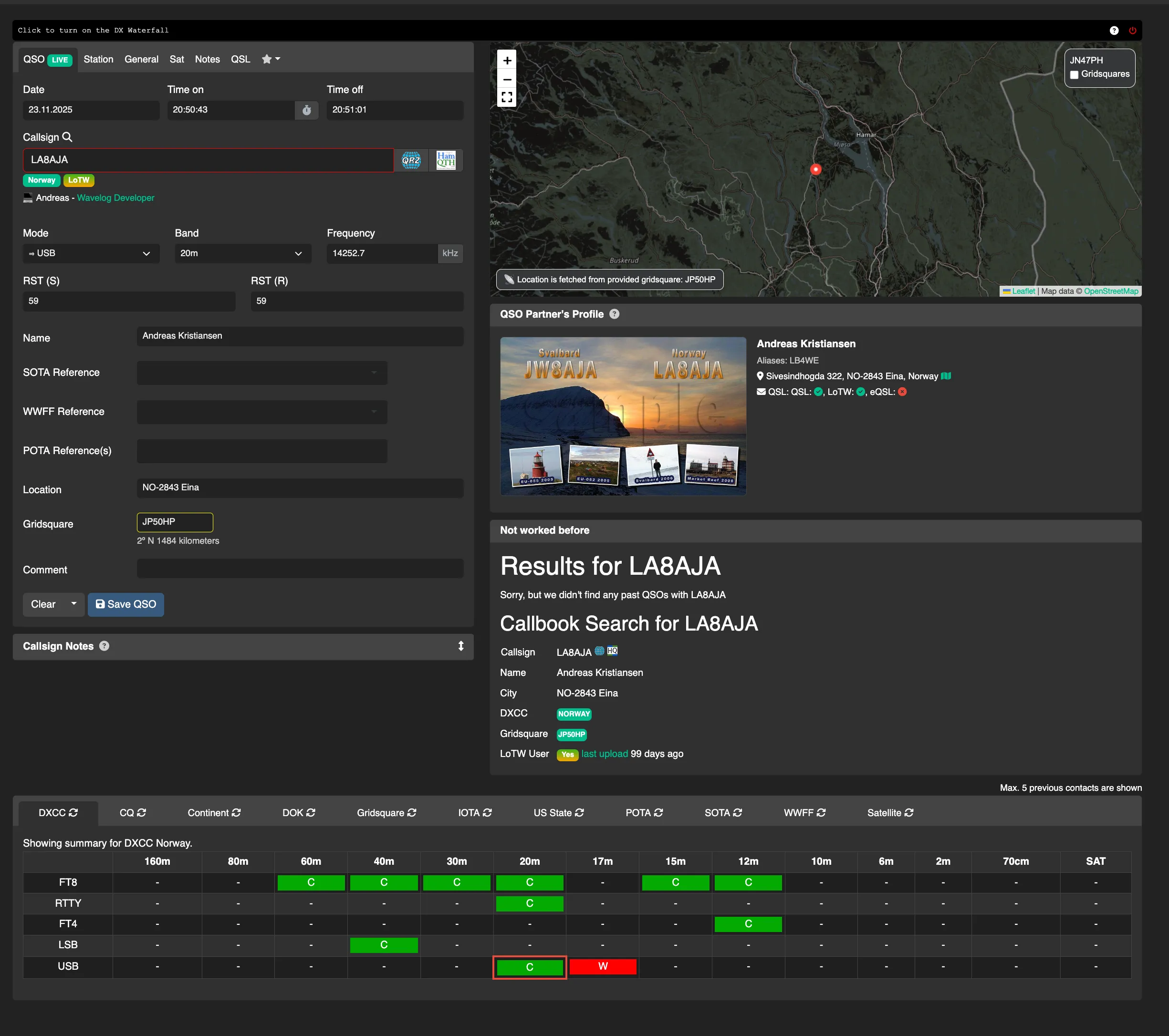
V čom DX cluster naopak funguje? Umožňuje nastaviť viditeľnosť spotov, ktoré chcem vidieť. To je veľké plus, lebo nefiltrované výpisy vedia zahltiť množstvom zbytočných dát. Funguje samozrejme aj preladenie klikom na spot and prenesenie údajov na zalogovanie.
Logging is what WaveLog excels at: from quick logging to very detailed logging. These can be in real time or retrospectively. If you want a surprise: in satellite operation, azimuth and elevation are also stored in the data!

It is possible to retrieve data about previous connections and data from callbook-ov. Ale WaveLog sa nezahanbí ani pri prenose dát smerom von: LoTW, eQSL, ClubLog, AMSAT Status, HRDLog, QRZ, QO-100 DX Club, DARC-DCL. Plus possible exports in common formats.
WaveLog does data transfer in the background. Connection data or POTA, SOTA, WWFF, TLE, etc. data are processed by crons. Very convenient. If you want more, WaveLog also has an API.
The connection can be easily posted on BlueSky or X.

Another strong feature of WaveLog is working with data. Filtering and searching is very fast and provides results in a clear form. This also applies to various diplomas, where the current status of meeting the conditions is instantly on the screen.


Ja pre zobrazenie používam rozdelenú obrazovku prehliadača, kde v pravej časti je DX Cluster, vľavo hlavné okno. Responzivita je výborná.
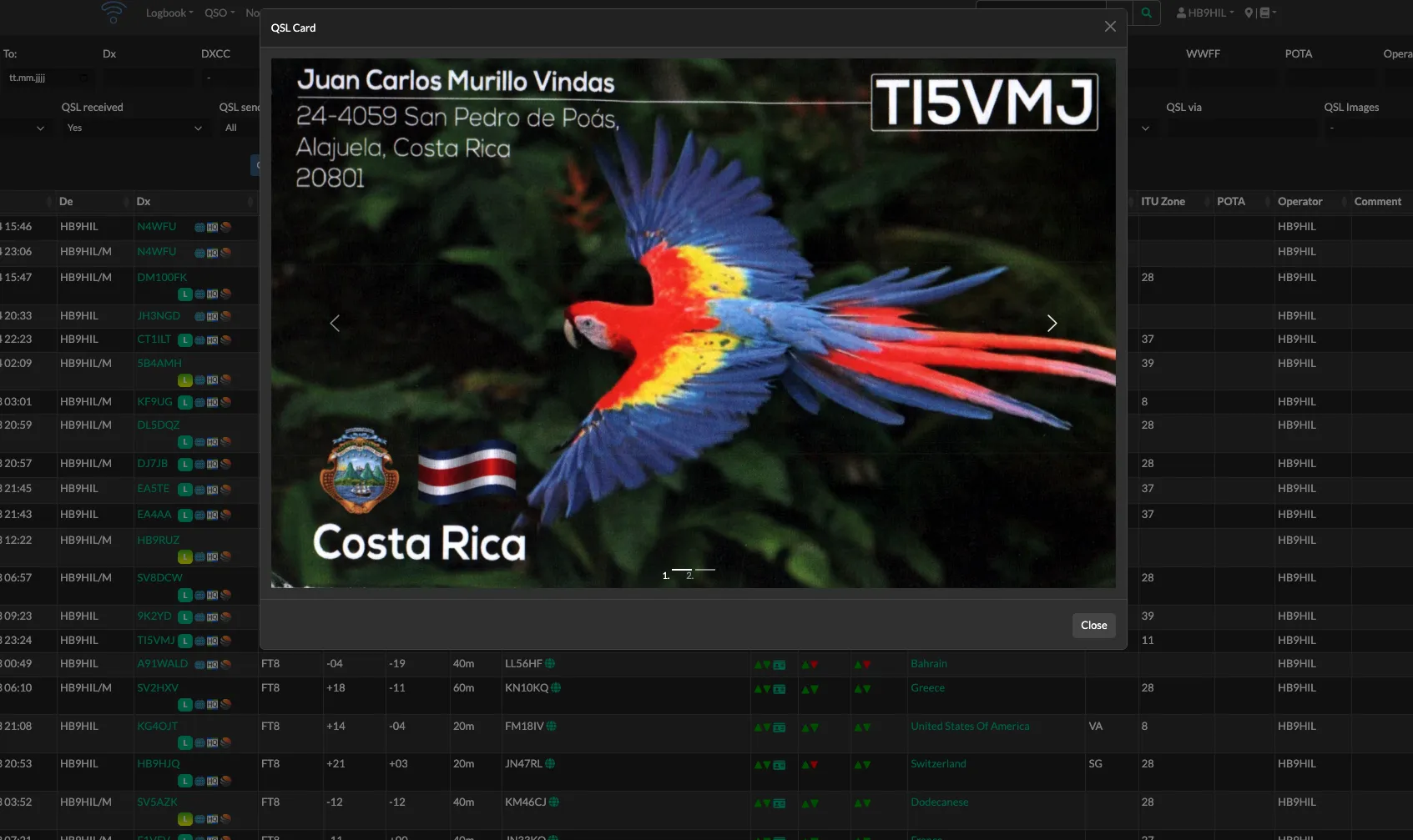
The processing of QSL confirmations is at a good level - again, fast, clear and simple.
I haven't tried logging the races. In my opinion, WaveLog is not a contest logbook, and what it provides me with N1MM+ wouldn't have a chance of matching it. It's a main station logbook.
Some initial distrust of WaveLog has faded. I don't even remember Logger32 anymore.
WaveLog in practice – video introduction
Filip OK1GOD's experience with WaveLog
Filip OK1GOD went through several loggers – RumLogNG, qlog, tried Cloudlog – before coming across WaveLog in a Reddit discussion as a recommended fork of Cloudlog. He tried the demo instance, liked it, and despite his own admission of being lazy about server installation, he finally managed to get it up and running on his own VPS server.
Kľúčová výhoda pre neho bola dostupnosť odkiaľkoľvek bez nutnosti mať so sebou konkrétny počítač – QSO z mobilného prehliadača, logovanie počas POTA aktivácií bez laptopu, prístup zo zariadení kamarátov pri prevádzke na cudzom QTH. Automatické odovzdávanie QSO do externých služieb ocenil rovnako: LoTW, eQSL, ClubLog pracujú na pozadí bez zásahu operátora.
Filip also created his own solution for CAT connectivity: instead of WaveLogGate with FLRig, he built an ESP32-based device that reads the transceiver status (Icom IC-7300 cez UART, Icom IC-705 via Bluetooth) and directly sends frequency and mode to WaveLog API. The device is activated by turning on the power without the need to run any software on the computer. For IC-7300 The source codes for both the IC-705 and the IC-706 are available on his GitHub page. He also created a widget for the QRZ.com profile that shows in real time whether the operátor práve na pásme a na akej frekvencii – widget využíva CAT dáta z WaveLog API. Tieto projekty dokumentuje na melik.cz.
WaveLogGate – bridge between transceiver and WaveLog
WaveLogGate (abbreviated as WLGate) is an official desktop tool that connects amateur radio logging software to a WaveLog instance. It is a standalone application written in Go and Svelte, distributed as a single binary with no external runtime dependencies. It is available for Windows, macOS, and Linux.
WLGate plní dve hlavné funkcie. Po prvé, preberá QSO záznamy z WSJT-X alebo Fldigi via UDP on port 2333 (configurable) and uploads them to WaveLog. Second, číta aktuálnu frekvenciu a mód z transceivera prostredníctvom FLRig (XML-RPC) alebo Hamlet (rigctld via TCP) and sends this data to the WaveLog API - thus ensuring that the frequency is filled in automatically for each new QSO. Since version 2.0, WLGate also supports rotator control via Hamlet rotctld.
Configuration is done in a graphical interface: you enter the URL of the WaveLog instance including the path to index.php, the API key (generated in the WaveLog settings), and select a station. For the radio, you select the connection type – FLRig on port 12345 or Hamlib rigctld on port 4532 – and enter the host address. WLGate supports multiple named configuration profiles, which is useful when working with different devices or WaveLog instances.
For logging from WSJT-X it is important to set the Reporting tab in WSJT-X, activate the Secondary UDP Server and set port 2333 - the primary UDP server sends binary packets that WLGate does not process. For FLDigi, UDP output is activated in the User Interface settings. The current version of WLGate is 2.0.2 (released April 2026).
WaveLog installation – video guide
Basic installation conditions
WaveLog requires a functional web server with a LAMP stack. The minimum requirements are an Apache web server (or Nginx with appropriate configuration), a supported version of PHP with the bcmath, curl, gd, intl, mbstring, mysqli, xml, and zip modules, and a MySQL or MariaDB database server. On the client side, any modern web browser is sufficient.
For those interested without experience with server administration, the easiest way is Docker. The official docker-compose.yml downloads and starts all the necessary containers (MariaDB and WaveLog itself) with the command docker compose up -d . WaveLog is then available on port 8086. Installation on Raspberry Pi is fully supported and functional; Raspberry Pi 3 or 4 can easily handle operation for one or several stations. For advanced deployments, a web installer is also available that guides the user through the configuration of the database and the first account.
Important note from the documentation: WaveLog is not suitable for complete beginners without experience with LAMP environments. Without basic knowledge of web applications, troubleshooting configuration errors can be difficult. If you do not have your own server, you can use a rented web hosting space with PHP and MySQL support, or have it installed by another radio amateur in the club.
Updates are done either via the web interface (for Docker installations by downloading a new image) or by pulling changes from the GitHub repository. The developers release updates frequently - in 2024 and 2025, new versions were released at intervals of several weeks.
WaveLog translations

The base language of WaveLog is English. Localization into other languages is provided by a community of volunteers through the translation platform at translate.wavelog.org, where you can directly contribute translations. The status of translations is visible on the project's main page as a dynamic badge.
Slovak is represented in WaveLog translations - I am also personally involved in the translation work, and I translated most of the interface texts over several evenings.
Czech is 98 percent translated, which is an excellent usable state. Anyone who wants to contribute in Slovak or another language can join translate.wavelog.org without any fees.
WaveLog add-ons and applications
An active ecosystem of complementary tools has emerged around WaveLog, most of which were created by individuals rádioamatéri ako open-source projekty na GitHub.
Wavelog Mobile (Android)
Unofficial Android mobile app available on Google Play. Allows logging QSOs directly from a smartphone with a link to your own WaveLog instance. For those who prefer to use a native app rather than a browser on their mobile, this is a more convenient alternative.
Wavelog_CI_V (DG9VH)
The project by Kim DG9VH solves the CAT connection for Icom transceivers with CI-V bus without the need to run FLRig or Hamlib on the computer. It is a firmware for the ESP32 development board, which connects to the 3.5 mm jack input of the CI-V Icom transceiver (e.g. IC-7300) and reads the operating frequency, mode and RF power level. It sends these values directly via Wi-Fi to the WaveLog API. After switching on, the ESP32 connects to the configured network and immediately starts sending data - no computer, no additional software. The GitHub repository includes a wiring diagram and documentation. The hardware is extremely simple: ESP32 board, 3.5 mm jack, diode and two resistors.
WLBridge4TRX (HB9HJQ)
Similar approach as Wavelog_CI_V, this time for Yaesu and Elecraft transceivers with CAT over RS-232. Author Christian HB9HJQ used an ESP32 with a levelshifter (MAX232 or similar) to convert RS-232 levels to 3.3V ESP32 logic. The project is verified with Yaesu FT-991A and Elecraft KX-2. Configuration is done via the ESP32 web interface after the first launch - you enter your Wi-Fi credentials, WaveLog instance URL, API key and radio name. The GitHub repository contains the complete source code for platformio.
WaveLogGoat (johnsonm)
WaveLogGoat is a lightweight alternative to WaveLogGate written in Go, intended for users who do not need the graphical interface of WLGate and prefer a simple console daemon. The application polls the radio status from FLRig (XML-RPC) or Hamlib rigctld (TCP) and sends it to the WaveLog API. It runs as a simple binary with no dependencies, supports multiple named configuration profiles in a JSON file, and is suitable for deployment on Raspberry Pi as a system service. It supports Linux, Windows, and macOS; it has been tested primarily on Fedora Linux with IC-7300 via FLRig.
Wave-Flex Integrator (tnxqso)
Wave-Flex Integrator solves a specific combination: FlexRadio and WaveLog. Unlike classic CAT solutions based on polling, it connects directly to the FlexRadio TCP API and receives events in real time - frequency and mode changes are available immediately without unnecessary network load. The application simultaneously handles three communication channels with WaveLog: REST API for storing data in the database, WebSocket for immediate display on the screen and HTTP CAT listener for receiving QSY príkazov z WaveLog pri kliknutí na DX spot. Okrem CAT integrácie Wave-Flex Integrator zobrazuje DX spoty priamo na SmartSDR panadaptéri s farebným kódovaním podľa DXCC stavu a členstva v LoTW, poskytuje QSO asistenta s lookupom na QRZ.com, ovládanie rotátora cez MQTT a integráciu s WSJT-X pre automatické logovanie FT8 and other digital modes. The project is in beta and actively being developed; it is available for Windows, Linux, and macOS.
Where to learn more about WaveLog
| Source | Address |
|---|---|
| Official website | https://www.wavelog.org |
| GitHub repository | https://github.com/wavelog/wavelog |
| Documentation | https://docs.wavelog.org |
| Demo instance | https://demo.wavelog.org |
| Translation platform | https://translate.wavelog.org |
| Discussions and support | https://github.com/wavelog/wavelog/discussions |
| WaveLogGate (WLGate) | https://github.com/wavelog/WaveLogGate |
| Wavelog_CI_V (ESP32, Icom CI-V) | https://github.com/dg9vh/Wavelog_CI_V |
| WLBridge4TRX (ESP32, Yaesu/Elecraft) | https://github.com/zone11/WLBridge4TRX |
| WaveLogGoat (lightweight Go daemon) | https://github.com/johnsonm/WaveLogGoat |
| Wave-Flex Integrator (FlexRadio) | https://github.com/tnxqso/wave-flex-integrator |
| Wavelog Mobile (Android) | https://play.google.com/store/apps/details?id=com.wavelog_mobile |
| OK1GOD Experience | https://melik.cz/posts/wavelog-my-logging-choice/ |
| System status | https://status.wavelog.org |
Try WaveLog
Ak hľadáte denník, ktorý bude prístupný z akéhokoľvek zariadenia, automaticky synchronizuje QSO s LoTW and eQSL, umožňuje logovanie z mobilného prehliadača na POTA aktivácii and ponúka prehľadnú štatistiku aj sledovanie diplomov – WaveLog stojí za vašu pozornosť. Pred inštaláciou na vlastný server vyskúšajte demo inštanciu na demo.wavelog.org: celé rozhranie vrátane logovania, DX clustera, štatistík aj nastavení je tam funkčné bez akejkoľvek registrácie.
For those interested in Slovak and Czech: translations of the interface are in an advanced state and are being actively added. If you have tried WaveLog or are dealing with a connection to a specific transceiver, share your experiences in the discussion below the article.
All technical data in the article is based on the official WaveLog documentation (docs.wavelog.org), the GitHub repositories of individual projects, and the personal experiences of the authors cited in the text. WLGate version 2.0.2 released April 2026, WaveLog 3.0.1 current as of the date of publication of the article.
Wavelog prevádzkuje pre svojich členov ako službu Nemecký DARC and Rakúsky OVSV.
Wavelog prevádzkujem, ako backup and online logovanie ak treba. Primarny dennik QLOG mi vyhovuje omnoho viac, aj pre lepšie fungujúci DXcluster and integráciu s portable aktivitami. Wavelog je zase dobrý na tvorbu štatistík, rebríčkov, vizualizáciu QSO and prístup „odvšadial“. Z QLOG funguje export do Wavelog.
Inštalácia Wavelog na RPI (bez docker) pre menej skúseného nie je zrovna triviálna, niektoré kroky v návode nesedeli and musel pomáhať linuxák, ktorému to tiež chvíľu trvalo. Je možné že to bolo spôsobené aj oholenou verziou OS pre RPi, kde mám Wavelog ako sekundárnu službu na pomalom (ale úspornom) RPi zero 2w.