
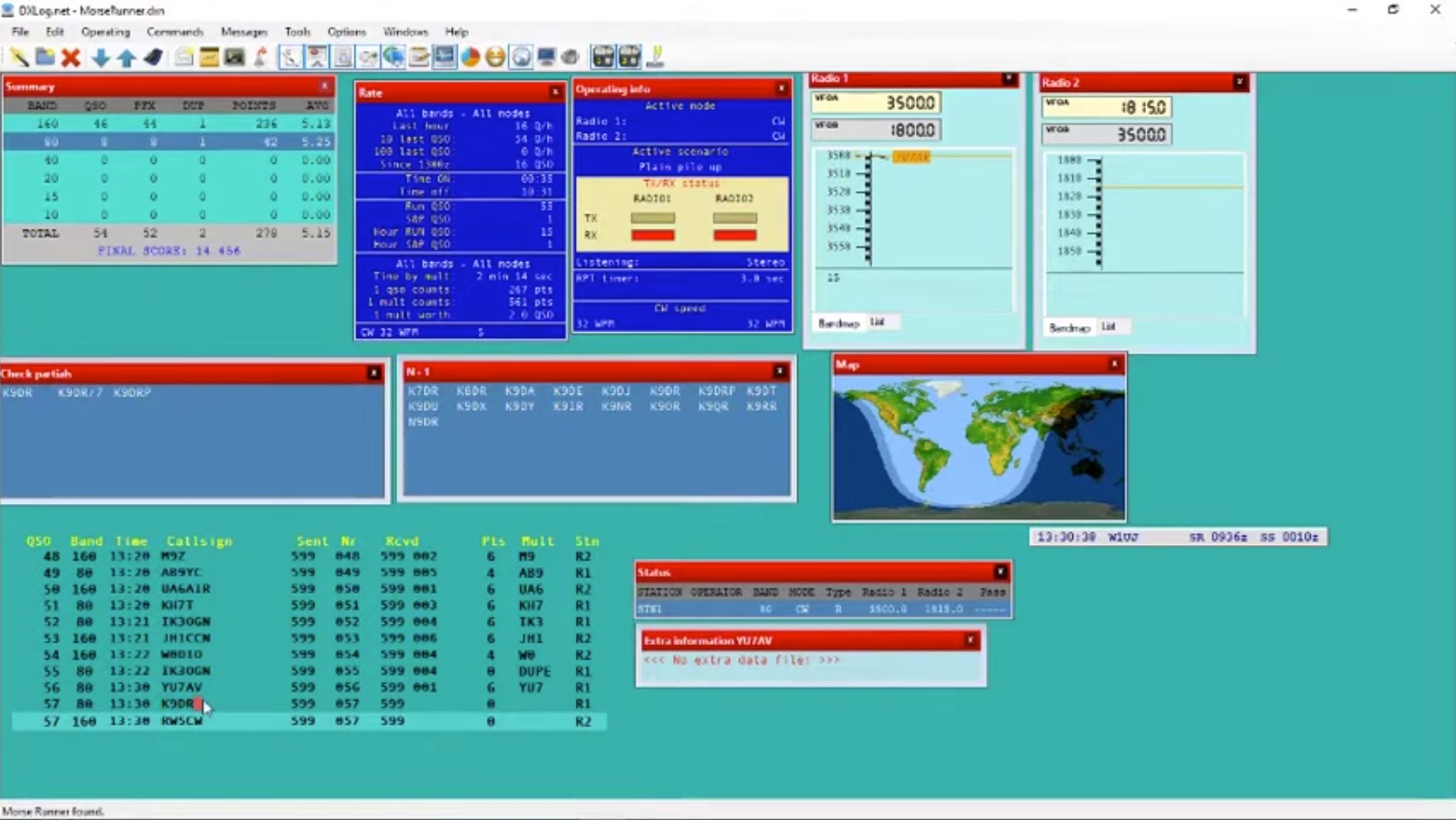
V rádioamatérskom svete, kde sekundy rozhodujú o umiestnení v celosvetových rebríčkoch, je voľba denníka (loggera) kritickým rozhodnutím. Zatiaľ čo mnohí začínajú s jednoduchými programami, skutoční „contestmani“ skôr či neskôr narazia na meno DXLog.net. Tento softvér, vyvinutý pôvodne s dôrazom na rýchlosť, stabilitu a extrémnu prispôsobiteľnosť, sa stal štandardom pre elitné stanice a expedície po celom svete.
V nasledujúcom texte sa podrobne pozrieme na to, čo robí DXLog výnimočným, ako ho konfigurovať a prečo by mal byť vašou prvou voľbou pre ďalšie preteky.
V článku sa dočítate
10 kľúčových tipov pre DXLog.net
| Tip / Klávesová skratka | Funkcia | Prečo to používať? |
| Kategória „Assisted“ | Kontrola zobrazenia spotov v bandmape. | Ak nevidíte spoty, uistite sa, že nemáte nastavenú kategóriu unassisted. |
| Režim ESM | Enter Sends Message | Po aktivácii inteligentne predpovedá ďalší krok. Dramaticky znižuje počet potrebných úderov do klávesnice. |
| SO2V (Single op 2 VFO) | Prevádzka na dvoch VFO s jedným rádiom. | Zvyšuje produktivitu aj s jedným rádiom – na jednom VFO vysielate, na druhom hľadáte násobiče. |
[Shift] + [Ctrl] + [↑] / [↓] |
Skok na najbližší násobič v bandmape. | Nestrácajte čas s bežnými stanicami. Tento skok vás hodí priamo na novú krajinu alebo zónu. |
[Shift] + [↑] / [↓] |
Ovládanie RIT (v režime Run). | Umožňuje jemne doladiť stanicu, ktorá vás volá „mimo frekvenciu“, bez toho, aby ste pustili klávesnicu. |
[Alt] + [K] |
Okno pre priame vysielanie z klávesnice. | Ideálne na rýchlu „konverzáciu“ v telegrafii (CW) alebo digitálnych módoch bez potreby meniť makrá. |
[Ctrl] + [Alt] + [R] |
Reset hardvérových rozhraní (príkaz RESET). |
Zachráni vás pri problémoch s RFI alebo statikou, ktoré „zamrazia“ komunikáciu s rádiom alebo kľúčovačom. |
[Ctrl] + [Alt] + [+] |
Vynútené zapísanie QSO (Force log). | Ak vám nesedí kontrolný kód, ale chcete spojenie uložiť „tak ako je“ bez validácie, toto je cesta. |
Zadanie lokátora + [Space] |
Výpočet vzdialenosti a azimutu. | Stačí do poľa pre značku napísať 6-miestny lokátor a program vám okamžite povie, kam otočiť anténu. |
Držanie [Ctrl] pri štarte |
Reset rozloženia (layoutu) programu. | Ak sa program nespustí správne alebo sa vám „rozsypali“ okná, toto obnoví čisté nastavenie bez straty dát. |
Bonusový tip pre fajnšmekrov
Ak sa zúčastňujete expedície alebo máte obrovský „pile-up“, vyskúšajte [Alt] + [Q] (Intelligent Quick QSL). Program bude na základe tempa (rate) automaticky skracovať potvrdzovaciu správu na konci QSO, aby ste udržali čo najvyššiu rýchlosť.
Filozofia DXLog.net: Rýchlosť na prvom mieste
DXLog.net je výkonný súťažný denník pre Windows, ktorý vychádza z filozofie rádioamatérskeho softvéru zo starej školy (ako bol legendárny CT pre DOS), ale prenáša ju do moderného grafického prostredia. Jeho hlavným cieľom je minimalizovať interakciu s myšou. V horúčave contestu, kedy musíte nadviazať 200 spojení za hodinu, nemáte čas hľadať tlačidlá na obrazovke. Všetko – od prepínania pásiem až po konfiguráciu hardvéru – je dostupné cez klávesové skratky.
Inštalácia a prvé kroky
Inštalácia DXLogu je priamočiara, no vyžaduje prostredie .NET Framework. Po spustení vás privíta čisté rozhranie, ktoré si môžete plne prispôsobiť. Na rozdiel od iných programov, ktoré sú „zakliate“ do jedného pevného okna, DXLog.net funguje na báze plávajúcich okien.

Hlavné súčasti rozhrania:
-
Log Window: Zoznam nadviazaných spojení.
-
Entry Window: Srdce programu, kde zadávate značky a prijaté kódy.
-
Check Window: Okamžitá kontrola, či ste už s danou stanicou pracovali (Dupe check) a aké násobiče vám môže priniesť.
-
Band Map: Vizuálne zobrazenie staníc na pásme zachytených z DX klastra alebo vlastným ladením.
Konfigurácia hardvéru: CAT a WinKeyer
Jednou z najsilnejších stránok DXLogu je jeho schopnosť komunikovať s takmer akýmkoľvek moderným (i historickým) rádiom. V menu Options -> Device Config môžete nastaviť:
-
CAT rozhranie: Podpora pre Icom, Kenwood, Elecraft, Yaesu a FlexRadio. Program umožňuje precízne riadenie frekvencie a módu.
-
CW manipulácia: DXLog.net natívne podporuje WinKeyer, čo zaisťuje perfektné časovanie telegrafie bez ohľadu na vyťaženie procesora počítača. Ak nemáte WinKeyer, môžete použiť klasické LPT alebo COM porty.
-
SO2R (Single Operator 2 Radios): DXLog.net je špičkou v podpore prevádzky na dvoch rádiách súčasne. Obsahuje pokročilé scenáre pre prepínanie slúchadiel, blokovanie súčasného vysielania a automatizáciu prepínania antén.
Práca s denníkom a automatizácia (ESM)
Pre zvýšenie efektivity DXLog.net implementuje režim ESM (Enter Sends Message). V tomto režime program inteligentne predpokladá váš ďalší krok:
-
Ak zadáte značku a stlačíte Enter, program vyšle kód (napr. 599 001).
- Ak po prijatí kódu stlačíte Enter, program zapíše spojenie do denníka a vyšle „TU“ alebo „QRZ“.Tento automatizovaný cyklus dramaticky znižuje únavu operátora počas 48-hodinových maratónov.
Makrá a skripty
DXLog.net umožňuje definovať vlastné makrá pre CW, SSB (cez interný digitálny hlasový kľúčovač – DVK) a digitálne módy. Ak vám preddefinované funkcie nestačia, DXLog.net obsahuje Scripting Engine. Pomocou jazyka C# si môžete napísať vlastné skripty, ktoré reagujú na udalosti v denníku – napríklad automatické prepínanie anténneho rotátora pri zadaní značky z určitého azimutu.
Sieťová prevádzka a Multi-Op
Ak plánujete prevádzku v kategórii Multi-Operator (viac operátorov), DXLog.net ponúka jeden z najstabilnejších sieťových protokolov na trhu.
-
Synchronizácia v reálnom čase: Všetky stanice v sieti vidia každé nové spojenie okamžite.
-
Gab Window: Interný čet pre operátorov, aby sa nerušili hovorením v hamshacku.
-
Status Window: Vedúci operátor má prehľad o tom, na akom pásme sa ktorá stanica nachádza a aký má momentálny „rate“ (počet QSO za hodinu).
-
Inteligentné číslovanie: Program zabezpečuje, aby v režime viacerých vysielačov nedošlo k duplicite poradových čísel, a to aj pri výpadku sieťového spojenia (po opätovnom pripojení sa dáta automaticky zosynchronizujú).
Digitálne módy a integrácia
Hoci je DXLog.net primárne vnímaný ako CW/SSB nástroj, jeho integrácia pre digitálnu prevádzku je robustná. Podporuje:
-
MMTTY / MMVARI: Pre klasické RTTY.
-
Fldigi: Pre širokú škálu digitálnych módov.
-
WSJT-X / JTDX: Cez externé prepojenia môžete efektívne logovať spojenia v módoch FT8 a FT4 priamo do súťažného denníka, čo je kľúčové pre moderné preteky, ktoré tieto módy povoľujú.
Databáza súťaží a pravidlá
DXLog.net obsahuje databázu stoviek súťaží – od globálnych gigantov ako CQ WW DX, až po lokálne preteky (v rátane mnohých českých a slovenských súťaží).
Program automaticky:
-
Počíta body podľa špecifických pravidiel (vzdialenosť, kontinenty, vlastná krajina).
-
Sleduje násobiče (krajiny, zóny, okresy, prefekty).
-
Upozorňuje na chyby v prijatom kóde na základe databáz (Super check Partial).
Pokročilé funkcie pre expertov
Pre tých, ktorí chcú z techniky vyžmýkať maximum, DXLog.net ponúka:
-
Scenario Manager: Umožňuje definovať, čo sa má stať s audiosignálom a vysielaním pri stlačení určitej klávesy v režime SO2R.
-
Live Score: Automatické odosielanie výsledkov na servery ako contest Online Scoreboard, kde môžete v reálnom čase súperiť s kolegami.
-
Omini-Rig integrácia: Pre tých, ktorí preferujú zdieľanie CAT dát medzi viacerými programami súčasne.
-
Podpora pre SDR: Možnosť prepojenia s panoramatickými prijímačmi (panadaptérmi), kde kliknutím na signál na vodopáde automaticky preladíte rádio a prenesiete frekvenciu do denníka.
Práca s logom po pretekoch
Po skončení súťaže je dôležité denník správne exportovať. DXLog.net generuje:
-
Cabrillo: Štandard pre odosielanie súťažných denníkov.
-
ADIF: Pre import do vášho hlavného staničného denníka alebo do služieb ako LoTW a eQSL.
-
Štatistiky: Podrobné grafy a tabuľky, ktoré vám ukážu, v ktorej hodine ste boli najúspešnejší, z ktorých smerov prichádzalo najviac staníc a ktoré pásma boli pre vás kľúčové.
Záver: Prečo si vybrať DXLog.net?
DXLog.net nie je len softvér, je to nástroj, ktorý vás učí byť lepším operátorom. Jeho strohé, ale účelné rozhranie vás núti sústrediť sa na to podstatné – na éter. Vďaka pravidelným aktualizáciám a silnej komunite okolo vývojového tímu (pôvodne vedeného 9A5K, teraz spravovaného komunitou) je DXLog.net vždy pripravený na nové pravidlá a technológie.
Užitočný tip: Ak s DXLogom začínate, nepreháňajte to s nastaveniami. Začnite s jedným rádiom, nakonfigurujte si základné CW/SSB správy a postupne objavujte silu skratiek a automatizácie.