
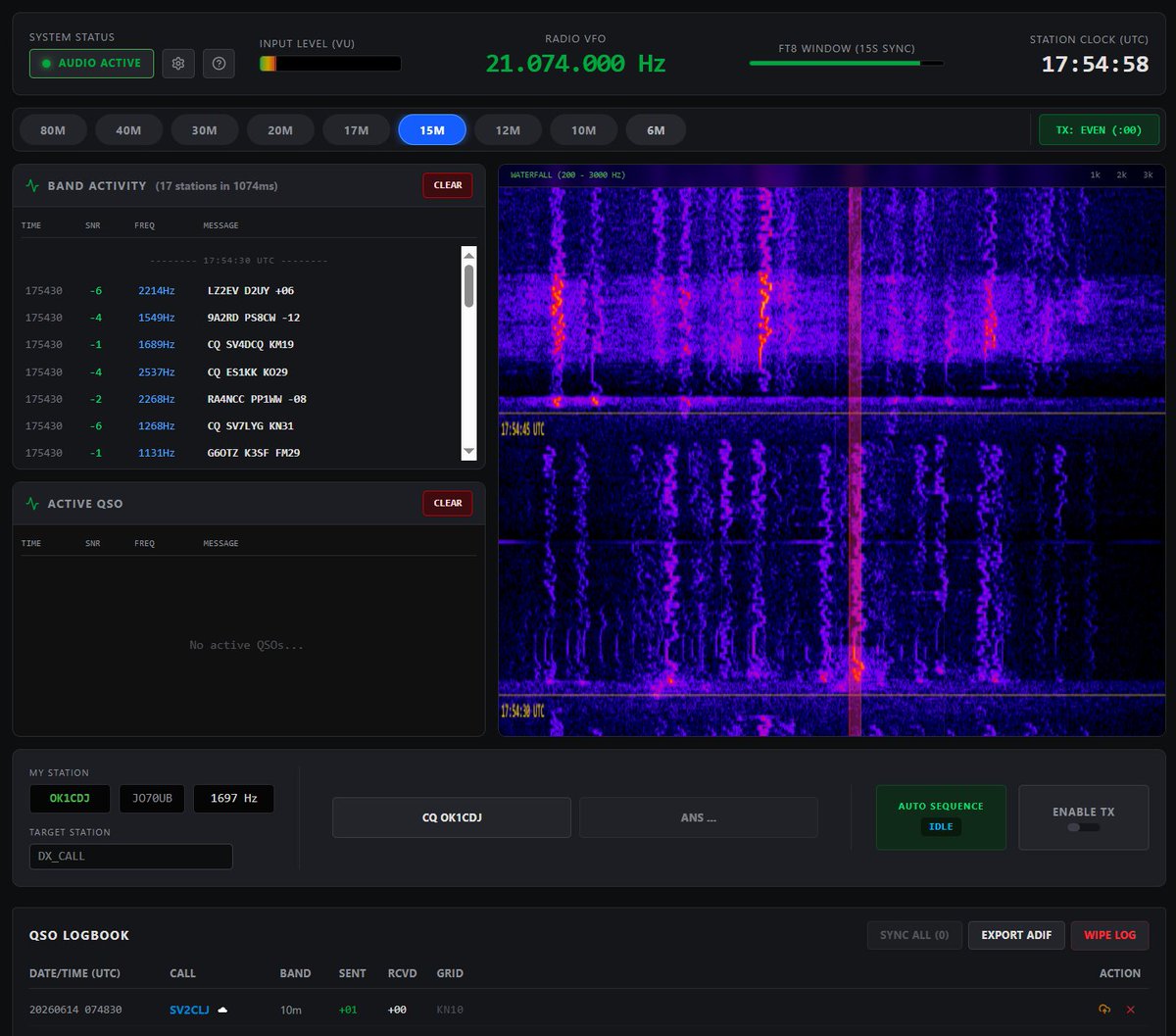
Ondřej OK1CDJ, published the first public beta version of the project on June 14, 2026 FT8 Client Website – a full-fledged FT8 station that runs entirely in the browser without the need to install any software. The application is available at ft8web.ok1cdj.com and is designed primarily for ultra-light portable operation – SOTA, POTA a Field Day aktivácie, kde stačí telefón alebo tablet.
In the article you will read
What the Web FT8 client allows
The application works exclusively via the Web Audio API directly in the browser. After clicking on ACTIVATE AUDIO and granting access to the microphone, the input signal level (Input Level VU) must be set to the green to yellow zone to avoid clipping. The settings include the call sign, grid square and CAT control configuration. Band selection is done via the panel buttons for the 80–6 m bands; with a configured CAT, this change also switches the VFO of the transceiver and reads its frequency.
FT8 je striktne závislé od synchronizovaného UTC time – decoding occurs automatically in 15-second periods, at the :00, :15, :30 and :45 marks. The interface displays waterfall v rozsahu 200–3000 Hz, panel Band Activity s dekódovanými správami, panel Active QSO a logbook s exportom do formátu ADIF. Aplikácia využíva pre dekódovanie a kódovanie FT8 signálu knižnicu ft8ts – čistú TypeScript implementáciu portovanú z Fortran kódu WSJT-X v2.7.0. The entire project is licensed under the GNU General Public License v3.0 (GPL-3.0).
Tested transceivers
Officially tested devices are ICOM IC-7300 and IC-705. The author invites the community to verify functionality with Kenwood and QDX transceivers and requests reporting of results via GitHub.
Key Features of Web FT8 Client
WebSerial CAT for desktop and Android
CAT transceiver control is handled via the WebSerial interface, which is available in modern browsers on desktop systems and Android. This eliminates the need to install drivers or a virtual COM port - the transceiver is connected directly via the USB serial port from the browser.
Automated QSO State Machine
The QSO process is controlled by an automated state algorithm (Automated QSO State Machine). The operator can initiate a connection by calling CQ or replying to a station from the Band Activity panel - the application then waits for the synchronization boundary of the 15-second period and transmits exactly in the given window, without the need for manual timing of individual exchange sequences.
"Fake Split" TX optimization
The “Fake Split” TX optimization feature keeps the transmitted signal clean – it is a transmit frequency optimization that minimizes the risk of intermodulation products and maintains signal quality on the band without the need for physical split operation between VFO A and VFO B.
Development status
Aplikácia sa nachádza vo fáze public beta. Pri pohľade na rozhranie je k dispozícii panel MY STATION s voľbou volacieho znaku, grid locatora and offsetu, panel TARGET STATION, tlačidlo ENABLE TX, logbook QSO s tlačidlami SYNC ALL, WIPE LOG and EXPORT ADIF. Zdrojový kód aj nahlasovanie chýb prebieha cez GitHub repozitár projektu, podpora projektu je možná cez Buy Me and Coffee.
Follow the progress
There is currently no YouTube video demonstrating the specific Web FT8 Client by OK1CDJ. Updates and demos are posted by the author on his X network profile (@ok1cdj) and in the project's GitHub repository. Those interested in trying it out can test the application directly at ft8web.ok1cdj.com and send feedback on functionality with your own transceiver to the author via GitHub issue.
S portable použitím cez WEB by som bol opatrný, asi 20% aktivácii som mal problém so signálom. V mestskom parku OK. V horách je niekedy problém aj Edge and to sú potom dobré na spot aj SMS cez GSM pri mávaní šmatlafónom nad hlavou and pobehovanie 100m po okolí alebo sa skúša cez prevádzače 🙂 . Pre droida je dostupná offline app FT8CN, neskúšal som, na /P chodím robiť spojenia s amatérmi, nie s ich PC 😉
Funguje to celé Offline. Internet je třeba jen pro instalaci…