
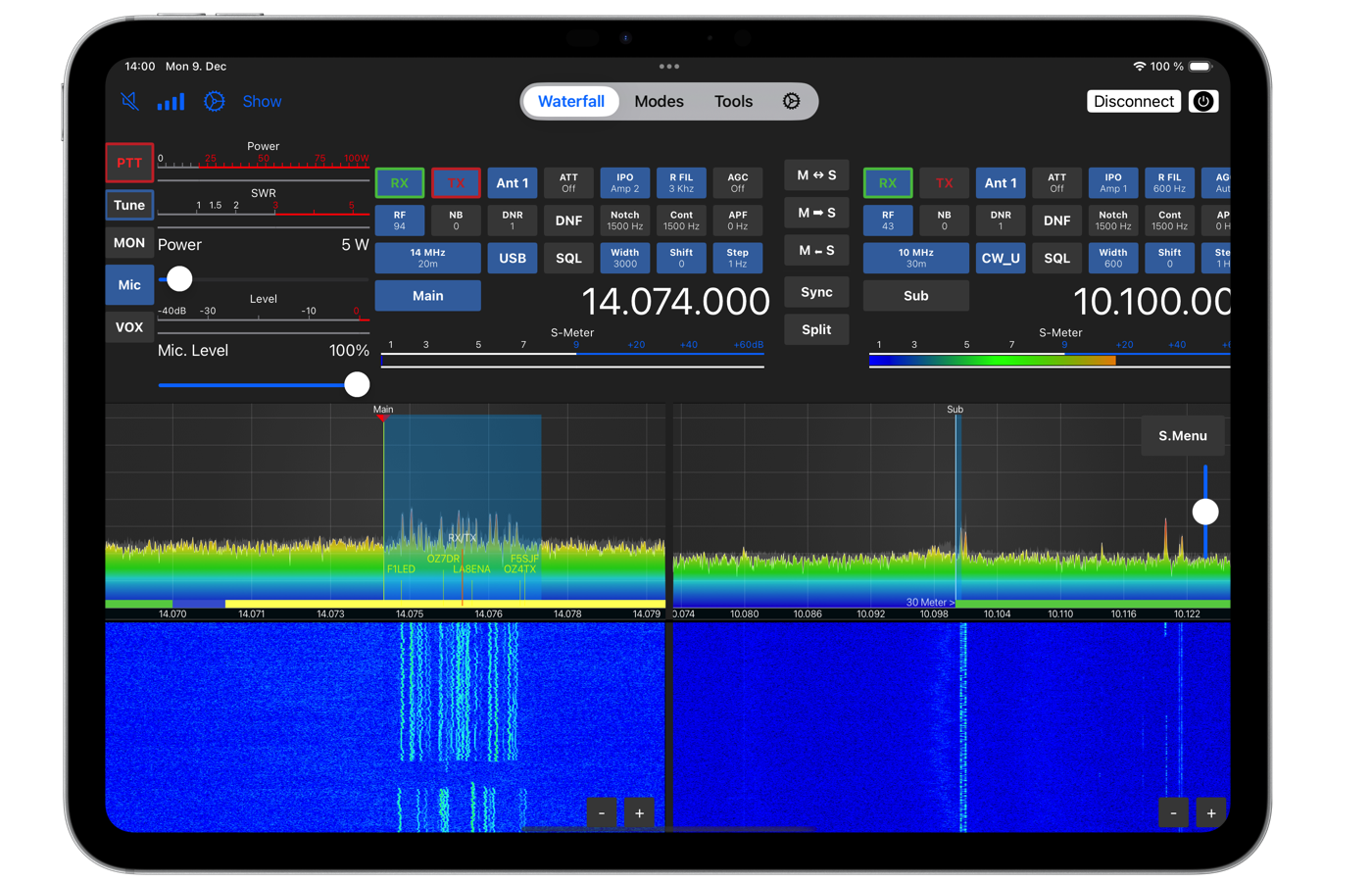
FT-Control for YAESU is an application by developer Marcus Roskosch that allows control of selected Yaesu transceivers over the network – locally at home or remotely from anywhere on the internet. According to the author, it is the first and only application of its kind alongside the Windows software from Yaesu.
In the article you will read
Main features of FT-Control
Key features include an integrated CW Keyer and support for hardware controllers. The application allows operation in all common modes directly from one interface, without the need for additional cables, audio interfaces, or unclear CAT communication settings. Connection to the radio works without the need for a running server, computer, or Mac in the background – just the radio itself and the Yaesu SCU-LAN interface.
Supported devices

FT-Control currently supports three models: FT-710, FTdx-10 and FTdx-101 (versions D or MP). A prerequisite is the Yaesu SCU-LAN interface, which must be connected to the radio and the local network. For multiple radios, a separate SCU-LAN interface is needed for each of them.
| Platform | Requirements |
|---|---|
| Mac | macOS 14 (Sonoma) or newer, any Intel or Apple Silicon processor, any model |
| iPad and iPhone | iOS 17 or newer, any model and size |
| Local access (at home) | Only WiFi or LAN |
| Remote access via the internet | Just the appropriate settings in the router (described in the manual) |
Applications for macOS and iOS are separate and must be purchased separately for each platform; one purchase of the iOS version, however, covers use on both iPad and iPhone simultaneously. After purchase, the application can be used on any number of devices of that type without additional charge, as long as they are logged in under the same Apple ID.
Video: FT-Control in practice
What FT-Control allows

Aplikácia umožňuje prevádzku vo všetkých módoch bez externého hardvéru. V móde SSB je možné použiť vstavaný mikrofón Macu, AirPods, iné Bluetooth slúchadlá or USB headset. Pre CW obsahuje aplikácia integrovaný keyer aj CW dekodér. Módy FT8/FT4 a RTTY, ako aj ďalšie digitálne módy, sú riešené vstavanými dekódovacími nástrojmi priamo v aplikácii, bez nutnosti externého softvéru ani prepojovacích káblov.
Who still wants to use external software (for example Fldigi alebo WSJT-X), can do so - the macOS version includes a built-in Radio CAT server and supports the Common-Radio™ audio interface for fast audio transmission with low latency, allowing full integration with external programs via network CAT control (for example Rigctl/Hamlib, alebo CAT protokoly Icom a Kenwood cez sieť). Táto funkcia však nie je dostupná v iOS verzii aplikácie.
Connection to the radio works the same for local operation at home via WiFi or LAN, as well as for remote operation over the internet, where it is enough to set the appropriate port forwarding in the router – without the need to run a separate server.
The application requires transceivers with specific features, such as waterfall data support and robust communication protocols. The radio must also support the Yaesu SCU-LAN interface. Many older Yaesu transceivers either lack these features or have very limited functionality. (Marcus Roskosch, FT-Control developer)
Why are FT-991 and FTx-1 not supported?

Despite being popular and widely used radios, FT-991 even newer FTx-1 cannot be supported because they do not support the proprietary Yaesu SCU-LAN interface, which is a prerequisite for the application. The author also adds that there is hope that Yaesu will add SCU-LAN support for FT-991 and FTx-1 in the future – similar to what recently happened with the FT-710 model.
Summary
FT-Control for YAESU brings operators three currently supported Yaesu radios (FT-710, FTdx-10, FTdx-101 D/MP) plnohodnotné sieťové ovládanie z Macu, iPadu aj iPhonu, vrátane integrovaného CW keyera, dekódovania digitálnych módov a možnosti súbežne používať externý softvér cez vstavaný CAT server. Kľúčovou podmienkou kompatibility zostáva podpora Yaesu SCU-LAN rozhrania – práve jeho absencia je dôvodom, prečo aplikácia zatiaľ nepodporuje FT-991 ani FTx-1. Manuály pre Mac aj iPad/iPhone verziu, spolu s odkazmi na stiahnutie z App Store, nájdete priamo na stránke ham-radio-apps.com/ft-control-for-Yaesu.