
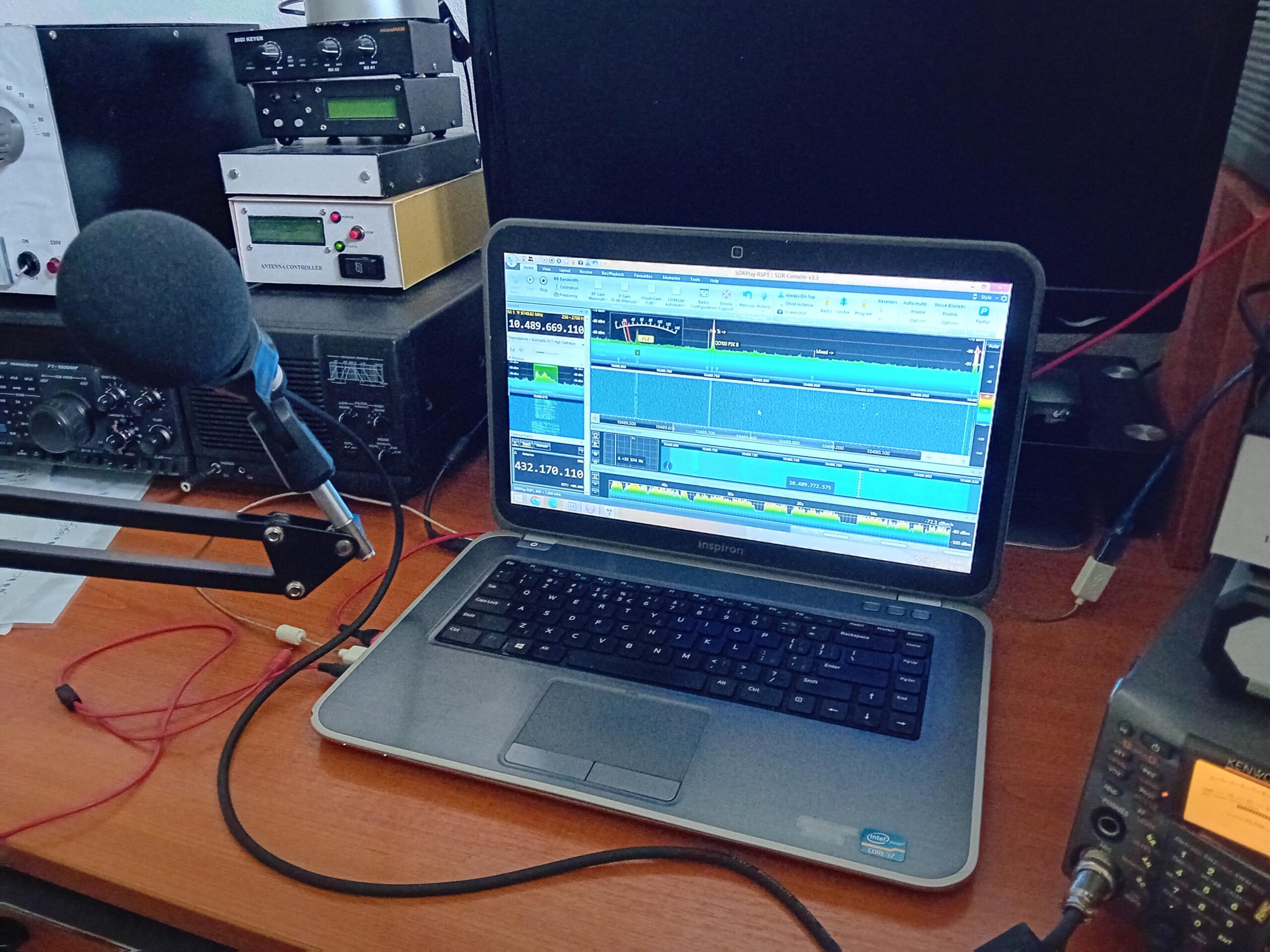
Behringer XM8500 is a dynamic cardioid vocal microphone that has found a place in amateur radio stations. Although it is not specifically designed for radio stations, its properties are particularly interesting for SSB operation. It is important not only the capsule itself but also the connection method, microphone placement, and setting the microphone input of the TCVR.
In the article you will read
Behringer XM8500 – what kind of microphone is it

XM8500 uses a dynamic capsule with a cardioid directional characteristic. The manufacturer specifies an impedance of 150 Ω, sensitivity of −70 dB, and a frequency range of 50 Hz to 15 kHz. The microphone has a gold-plated XLR connector, an integrated mechanical suspension system for the capsule, and a spherical windscreen filter against wind and unwanted explosive sounds. The weight is approximately 240 g.
The manufacturer also indicates a boost in the mid-frequency range, which is intended to support voice projection. The cardioid characteristic limits sound pickup from the sides and the back of the microphone. In amateur radio operation, this is a practical feature especially in noisier environments or when working from a portable station.
Why use XM8500 in an amateur radio station
When comparing an external dynamic microphone with a standard handheld microphone TCVR, two things must be separated: the properties of the capsule itself and the signal processing in the radio station. Changing the microphone does not automatically mean an improvement in the transmitted signal. The result depends on the frequency characteristics of the microphone, the operator's voice, the microphone input of the specific TCVR, and its settings.
Practical experience with XM8500 is also indicated by my testing. I use it in VHF operation and after changing the microphone, I receive praise for the transmitted signal.
Frequency characteristics of XM8500 and SSB
For SSB, it is not crucial for the microphone to transmit the widest acoustic range. The radio chain itself has a significantly narrower bandwidth than the 50 Hz to 15 kHz that the manufacturer specifies for XM8500. Therefore, it is interesting that the microphone's characteristics naturally limit low frequencies and emphasize the area important for speech intelligibility.

OM0A describes the XM8500 as having attenuation of low frequencies and an emphasis on the spectrum above 1 kHz as properties suitable for communication via radio station. A similar relationship is described by KV5R, which distinguishes between a more natural sound for longer conversations and a more narrowly conceived sound optimized for intelligibility in weak signal conditions.
This is an important difference compared to the notion that quality radio sound must contain a large amount of bass. In DX or contest operation, it may be more useful for overall intelligibility to focus energy in the mid and upper speech frequencies rather than expanding the low-frequency component.
XM8500 versus the original TCVR microphone

User experiences are not entirely uniform, which is natural for microphones. Na eHam there are experiences from radio amateurs who compared XM8500 with original handheld microphones. One user, for example, reports significantly better intelligibility and volume of XM8500 compared to a cheap handheld microphone during testing. Another user describes using XM8500 with Kenwood TS-890. Icom 7300 significantly better intelligibility and volume of the XM8500 compared to a cheap handheld microphone. Another user describes using the XM8500 with a Kenwood TS-890.
On the other hand, there are also more critical experiences. One of the newer reviewers on eHam points out the relatively low sensitivity of the XM8500 and that some radios may require greater microphone gain or a preamplifier. This is an important reminder: the microphone cannot be evaluated separately from the specific transceiver.
Connecting the XM8500 to the radio station
The XM8500 has a standard XLR output. However, radios use various connectors and different wiring for microphone inputs. Therefore, a suitable cable or adapter should be used between the microphone and the transceiver. The XLR connector alone does not mean that the microphone can be directly connected to any radio.
When choosing an adapter, it is essential to check the wiring of the microphone signal, ground, any microphone power, and PTT. The XM8500 is a dynamic microphone, so it should not be treated like an electret capsule requiring bias power. In some transceivers, however, a microphone preamplifier may be necessary if the input does not provide sufficient gain. Experiences of amateur radio operators show that the output signal level can be crucial when combined with a specific transceiver.
XM8500 on the arm
The advantage of a separate microphone is the ability to place it exactly where it operátor potrebuje. KV5R uses the XM8500 on a microphone arm and describes the practical advantage of such a solution: the microphone does not take up the hand, and its position remains constant while speaking.
When using a cardioid microphone, it is important to speak into the front of the capsule and maintain the same distance. KV5R states that at his setup, it is approximately 4 inches, or about 10 cm, with a slight rotation of the microphone off the direct axis of the mouth. However, this is a specific setup for one workstation, not a universal value for every operator.
The Behringer XM8500 Shock Mount project is a simple 3D printable anti-vibration holder
Project Behringer XM8500 Shock Mount is a simple 3D printable anti-vibration holder designed for the Behringer XM8500 dynamic microphone. Its purpose is to mechanically isolate the microphone from the stand and limit the transmission of unwanted vibrations, shocks, and mechanical noise to the microphone. This can be useful, for example, when working at a desk, recording spoken word, streaming, or using the microphone for radio communication purposes.
The construction consists of an inner and outer ring connected by flexible elements. The author used black hair ties, but other suitable elastic cords or rubber bands can also be used. The inner ring is tailored directly to the dimensions of the XM8500, and the outer one is modified to work with the original microphone stand adapter.
The model is designed with regard to simple FDM 3D printing. The author printed it from PETG at a layer height of 0.2 mm and 15% infill. The individual parts do not require complex print settings and can be easily assembled after printing.
Video XM8500
Practical experiences with the use of the XM8500 in amateur radio operation can also be observed in the video, which was used as one of the sources for the article.
Setting MIC GAIN, VOX, and compressor
After connecting the XM8500, the first step should not be an immediate increase of the MIC GAIN to the maximum. First, the appropriate distance from the microphone should be set, and then the gain should be gradually increased so that the modulation reaches the desired level without triggering the input and excessive ALC triggering.
In SSB, it is important to monitor the ALC indication according to the instructions of the specific transceiver. A higher ALC reading or greater volume in the receiver does not automatically mean better modulation. Experience with the FT-891 published on eHam highlights the correlation between MIC GAIN, compression, and the risk of undesirable effects with excessive settings.
VOX should be set according to the acoustic conditions of the workplace. If its sensitivity is too high, it may react to fan noise, keyboard, or mechanical sounds. The compressor makes sense to use only after properly setting the basic microphone level.
Equalization of XM8500 for SSB
The XM8500 has its own frequency response, so it is not advisable to use the same EQ setting for each voice. KV5R points out that the equalizer allows you to adapt the microphone not only to its own characteristics, but also to the voice of a specific operator. At the same time, it warns against excessive addition of bass and suppression of the midrange, which can impair intelligibility.
For SSB, it is therefore more important to listen to the resulting signal in the receiver than to try to achieve a "nice" characteristic on headphones connected to your own TCVR. The transmission characteristics of the transmitter will further adjust the resulting sound.
XM8500 with external audio processor

The XM8500 can also be included in a wider audio chain with an external equalizer, compressor and noise gate. KV5R describes a custom build with XM8500 and processor UR6QW, which includes an eight-band equalizer, a compressor and a noise gate. The author emphasizes that the resulting setting must be verified by actual transmission and subsequent reception on another receiver.
However, an external processor is not a requirement for using the XM8500. Its meaning depends on the capabilities of a particular TCVR. If the radio station has a high-quality parametric or graphic equalizer, basic adjustments can be made directly in it. As a practical example, the configuration can be mentioned IC-7300, pri ktorej používateľ uvádza osobitné nastavenie MIC GAIN a ekvalizéra pre XM8500. Takéto hodnoty však nemožno považovať za univerzálne nastavenie pre všetky stanice a hlasy.
How to test XM8500 on your own station
The easiest comparison is to make with the same TCVR, the same performance and the same workplace. First you need to record or broadcast a short demo with the original microphone and then the same text with the XM8500. MIC GAIN, compression and other settings must be kept under control when comparing.
KV5R recommends using a second receiver and recording the broadcast signal when setting up. It can also be used as a simple measuring tool RTL-SDR s vhodným programom. Ešte praktickejšou metódou je vzdialený WebSDR, kde možno sledovať vlastný signál mimo bezprostredného okolia stanice. Takéto porovnanie umožní vyhodnotiť skutočný signál po prechode vysielacím reťazcom, nie iba akustický signál priamo z mikrofónu.
When evaluating, it is important to monitor especially clarity, signal level, voice character, possible distortion, and unwanted noise. A good report should be specific. Simply saying 'you sound good' provides limited information when setting up the audio chain.
XM8500 in amateur radio practice
The XM8500 is particularly interesting for the amateur radio operator who wants to separate the microphone from the handheld control of the transceiver and use it on an arm or stand. Its cardioid pattern, dynamic capsule, XLR connection, and frequency characteristics are suitable for voice operation, but the result always depends on the specific radio input and settings.
For SSB and contest operation, it can be a suitable choice especially when the operator can correctly set the MIC GAIN and uses the available equalizer. Experiences from VHF operation OM0A show that the XM8500 can bring good listening reports in practice..
However, there is no reason to expect that simply replacing the microphone will automatically improve transmission. The entire chain is crucial: the operator's voice, the microphone position, input sensitivity, MIC GAIN settings, equalization, compression, and finally how the resulting signal is received by the receiving station. This is why correct settings and objective comparison are more important with the XM8500 than the choice of microphone itself.